List of Countries - Editing
Introduction
So far, using CountryListPage.razor, we can display a list of countries where the data is saved in a SQLite database, but we don't currently have a way to add, edit or delete countries. We will be tackling these omissions in this article.
YouTube Video
Custom Toolbar
We will add a custom toolbar to the Syncfusion datagrid on the CountryListPage.razor with buttons to allow add, edit and delete. To do this:
- Adding 'Toolbar="Toolbaritems"' to the <SfGrid> header
. 'Toolbaritems' is a variable declared later. Adding <GridEvents OnToolbarClick="ToolbarClickHandler" TValue="Country"> to the grid HTML, where "Country" is the data model type. Adding "private List<ItemModel> Toolbaritems = new List (<ItemModel>); at the top of the @Code section to declare the Toolbaritems variable. For each Toolbaritem adding code similar to "Toolbaritems.Add(new ItemModel() { Text = "Add", TooltipText = "Add a new country", PrefixIcon = "e-add" });" to the OnInitializedSync procedure. Adding a procedure to handle the toolbar click event, (ToolbarClickHandler in the code below). At this stage the Add, Edit and Delete don't do anything.
@page "/countrylist"
@inject ICountryService CountryService;

<PageTitle>Countries List</PageTitle>

<h3>Countries List</h3>

<SfGrid DataSource="@countries"
        Toolbar="Toolbaritems">
    <GridEvents OnToolbarClick="ToolbarClickHandler" TValue="Country"></GridEvents>
    <GridColumns>
        <GridColumn Field="@nameof(Country.CountryId)"
                    HeaderText="Country ID"
                    TextAlign="@TextAlign.Left"
                    Width = "20">
        </GridColumn>
        <GridColumn Field="@nameof(Country.CountryName)"
                    HeaderText="Country Name"
                    TextAlign="@TextAlign.Left"
                    Width = "80">
        </GridColumn>
    </GridColumns>
</SfGrid>

@code {
    private List<ItemModel> Toolbaritems = new List<ItemModel>();  //provides the list to populate the toolbar items
    public List<Country>? countries;

    protected override async Task OnInitializedAsync()
    {
        //Add options for the custom toolbar
        Toolbaritems.Add(new ItemModel() { Text = "Add", TooltipText = "Add a new country", PrefixIcon = "e-add" });
        Toolbaritems.Add(new ItemModel() { Text = "Edit", TooltipText = "Edit selected country", PrefixIcon = "e-edit" });
        Toolbaritems.Add(new ItemModel() { Text = "Delete", TooltipText = "Delete selected country", PrefixIcon = "e-delete" });

        await CountryService.GetCountries();

        countries = new();

        foreach (var country in CountryService.Countries)
            countries.Add(country);
    }

    public async Task ToolbarClickHandler(Syncfusion.Blazor.Navigations.ClickEventArgs args)
    {
        if (args.Item.Text == "Add")
        {
            //Code for adding goes here
        }
        if (args.Item.Text == "Edit")
        {
            //Code for editing
        }
        if (args.Item.Text == "Delete")
        {
            //code for deleting
        }
    }
}
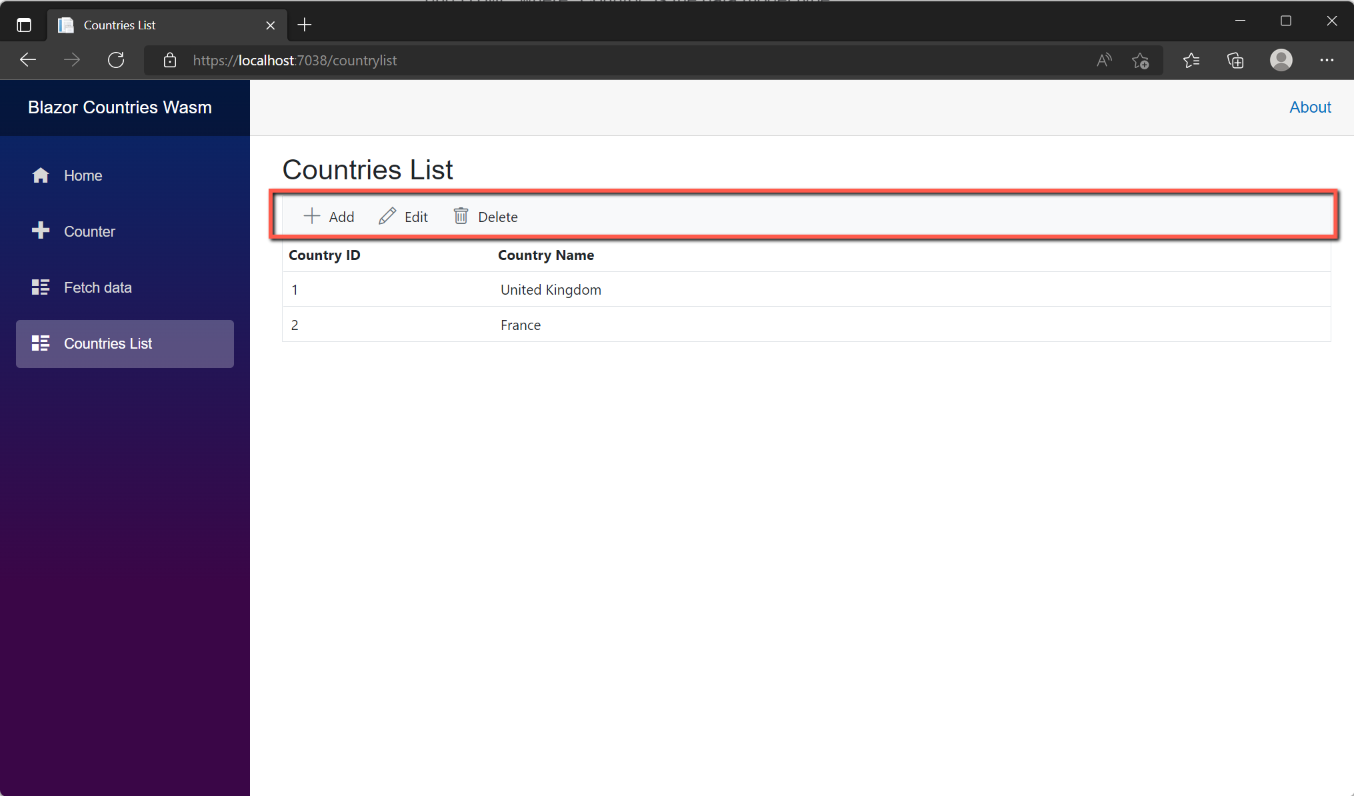
With these changes made, run the application. None of the buttons is functional, but the result should look like this:
Add a Country
We will use a separate page to provide the add and edit functions. To use a separate page the Country List page must be amended with the following changes:
- Inject the NavigationManager to enable navigation to a different page.
- Declare a variable for CountryId, so that it can be assigned a value of 0 to signify that this is a new country.
- In the ToolbarClickHandler procedure add the code to set the CountryId to 0 and navigate to the new CountriesAdd page.
The revised code for CountryListPage.razor is shown below:
@page "/countrylist"
@inject ICountryService CountryService;
@inject NavigationManager NavigationManager;

<PageTitle>Countries List</PageTitle>

<h3>Countries List</h3>

<SfGrid DataSource="@countries"
        Toolbar="Toolbaritems">
    <GridEvents OnToolbarClick="ToolbarClickHandler" TValue="Country"></GridEvents>
    <GridColumns>
        <GridColumn Field="@nameof(Country.CountryId)"
                    HeaderText="Country ID"
                    TextAlign="@TextAlign.Left"
                    Width = "20">
        </GridColumn>
        <GridColumn Field="@nameof(Country.CountryName)"
                    HeaderText="Country Name"
                    TextAlign="@TextAlign.Left"
                    Width = "80">
        </GridColumn>
    </GridColumns>
</SfGrid>

@code {
    private List<ItemModel> Toolbaritems = new List<ItemModel>();  //provides the list to populate the toolbar items
    public List<Country>? countries;
    private int CountryID = 0;

    protected override async Task OnInitializedAsync()
    {
        //Add options for the custom toolbar
        Toolbaritems.Add(new ItemModel() { Text = "Add", TooltipText = "Add a new country", PrefixIcon = "e-add" });
        Toolbaritems.Add(new ItemModel() { Text = "Edit", TooltipText = "Edit selected country", PrefixIcon = "e-edit" });
        Toolbaritems.Add(new ItemModel() { Text = "Delete", TooltipText = "Delete selected country", PrefixIcon = "e-delete" });

        await CountryService.GetCountries();

        countries = new();

        foreach (var country in CountryService.Countries)
            countries.Add(country);
    }

    public async Task ToolbarClickHandler(Syncfusion.Blazor.Navigations.ClickEventArgs args)
    {
        if (args.Item.Text == "Add")
        {
            //Code for adding goes here
            CountryID = 0;
            NavigationManager.NavigateTo($"/countriesaddedit/{CountryID}");
        }
        if (args.Item.Text == "Edit")
        {
            //Code for editing
        }
        if (args.Item.Text == "Delete")
        {
            //code for deleting
        }
    }
}
Open the Pages folder and add a new Blazor component. Call it 'CountriesAddEditPage.razor' and copy and paste the code below.
@page "/countriesaddedit/{CountryId:int}"

@inject ICountryService CountryService
@inject NavigationManager NavigationManager

<PageTitle>Add a Country</PageTitle>

<h1>Add a Country</h1>

<SfDialog IsModal="true" Width="500px" ShowCloseIcon="false" Visible="true">

    <h5>Add a Country</h5>
    <br />
    <EditForm Model="@country" OnValidSubmit="@CountriesSave">
        <div>
            <SfTextBox Enabled="true" Placeholder="Country"
                       FloatLabelType="@FloatLabelType.Always"
                       @bind-Value="country.CountryName"></SfTextBox>
        </div>
        <br /><br />
        <div class="e-footer-content">
            <div class="button-container">
                <button type="submit" class="e-btn e-normal e-primary">Save</button>
                <button type="button" class="e-btn e-normal" @onclick="@Cancel">Cancel</button>
            </div>
        </div>
    </EditForm>
</SfDialog>

@code {
    // Create a new, empty Country   object
    public Country? country = new Country();

    [Parameter]
    public int CountryId { get; set; }

    // Executes OnValidSubmit of EditForm above.
    protected async Task CountriesSave()
    {
        await CountryService.CountryInsert(country);
        NavigationManager.NavigateTo("/countrylist");
    }

    //Executes if user clicks the Cancel button.
    void Cancel()
    {
        NavigationManager.NavigateTo("/countrylist");
    }

}
In the above code we have introduced a new method to the CountryService to insert a new record (CountryInsert). We now need to add this service to:
- CountryService
- Amend ICountryService to add the new method
- Amend CountryController to add the new method
CountryService.cs
Edit CountryService by inserting the following after the 'GetCountryById' method. We are passing an object called 'country', of type 'Country' to the method and then using 'http.PostAsJsonAsync' to insert the record.
        public async Task CountryInsert(Country country)
        {
            var result = await _http.PostAsJsonAsync("api/country/", country);
        }
ICountryService.cs
Edit ICountryService.cs and insert the following:
Task CountryInsert(Country country);CountryController.cs
Edit CountryController.cs and insert the following:
        [HttpPost]
        public async Task<ActionResult> CountryInsert(Country country)
        {
            var parameters = new DynamicParameters();
            parameters.Add("CountryName", country.CountryName, DbType.String);

            sqlCommand = "Insert into Country (CountryName) values(@CountryName)";
            using IDbConnection conn = new SQLiteConnection(_config.GetConnectionString(connectionId));
            {
                await conn.ExecuteAsync(sqlCommand, parameters);
            }
            return Ok();
        }
This deserves a little explanation.
- The first point to note is that it is decorated with [HttpPost].
- We are using 'Task<ActionResult>', but unlike the 'GetCountries' method we are not returning any data. (The GetCountries returned a list of countries), however we are passing in an object of type Country which we are calling 'country'.
- Next we are adding a var called 'parameters' and setting it to a new set of 'DynamicParameters'. Parameters are used to protect the SQL statement from SQL Injection (see References)
- In this case we only need one parameter, the 'CountryName' and this set on the following line.
- The 'sqlCommand' is set to our SQL insert statement, replacing our actual country name with the parameter.
- We then open a connection to the database (getting the connection string from appsettings.json)
- and execute the SQL command, passing to it the 'sqlCommand' text and parameters.
- Lastly we return 'Ok' to indicate that the insert has been successful.
With these changes in place, save all changes and run the application to test it.
Edit a Country
We will use the existing 'CountryAddEditPage' to edit a country, but we need to make a number of changes, firstly to the CountriesList page so the chosen country to be edited can be identified.
CountriesList.razor
The user will click on a row to indicate that they want to edit a particular country.
- We must therefore provide a mechanism that will recognise the selection and identify the CountryId of the row selected.
- We will then need to add code to the 'Edit' button on the toolbar to open the CountriesAddEditPage, passing to it the CountryId of the record selected.
- We will also need to let the user know if they have failed to select a row before clicking the 'Edit' button, but will return to this later.
Syncfusion provides a method of getting details of a row selected from the datagrid.
- Add the following at the end of the <GridEvents> opening tag
RowSelected="RowSelectHandler"- And add the following method at the end of the code section:
    public void RowSelectHandler(RowSelectEventArgs<Country> args)
    {
        //{args.Data} returns the current selected record.
        CountryID = args.Data.CountryId;
    }
To open the CountriesAddEdit page to edit a record, insert the following code in the 'Edit' section of the ToolBarHandler.
            if (CountryID > 0)
            {
                NavigationManager.NavigateTo($"/countriesaddedit/{CountryID}");
            }
            else
            {
                // Warn user that no record has been selected
            }
In the above we are testing that CountryID is greater than 0. i.e. the user has selected a row, and then passing the CountryId to the CountryAddEdit page. If the CountryID is 0 then no record has been selected and we have the placeholder for warning the user.
CountryAddEditPage.razor
When editing a country, in the CountryAddEdit page we need to recognise that the CountryId being passed to it is not 0 and we therefore need to populate the page with the name of the corresponding country. We also have the <PageTitle> and <h1> text set to 'Add a Country'; this needs modifying to either 'Add a Country' or 'Edit a Country' depending on whether the CountryId is 0 or some other value.
We'll deal with the headings first.
- Declare a new string variable as shown below at the top of the code section:
public string pagetitle = "Add a Country";- We will set the value of 'pagetitle' when the page opens, i.e. on initialization. Add this new method under the declarations:
    //Executes on page open, sets headings and gets data in the case of edit
    protected override async Task OnInitializedAsync()
    {
        if (CountryId == 0)
        {
            pagetitle = "Add a Country";
        }
        else
        {
            pagetitle = "Edit a Country";
        }
}- Now, replace the 'Add a Country' text with '@pagetitle in both the <PageTitle> and <h1> tags.
We need to do two more things with this page, we need to populate the CountryName with the name of the country being edited, and we need to amend the 'Save' method to handle the update of the country name.
To populate the country name add the following after 'pagetitle = 'Edit a Country':
country = await CountryService.GetCountryById(CountryId);This sets the country object to the country retrieved by the 'GetCountryById' service where the CountryId being passed to the method is the CountryId of the row selected from the data grid. We will return to the GetCountryById in CountryService shortly, which, when completed will provide the name of the country to be edited.
The other thing we need to do is update the CountriesSave method to update the database with the revised name of the country. To do this replace the existing CountriesSave method with the following:
// Executes OnValidSubmit of EditForm above.
    protected async Task CountriesSave()
    {
        if (CountryId ==0)
        {
            await CountryService.CountryInsert(country);
            NavigationManager.NavigateTo("/countrylist");
        }
        else
        {
            await CountryService.CountryUpdate(CountryId, country);
            NavigationManager.NavigateTo("/countrylist");
        }
    }
Here we are testing to see if the CountryId is 0. If it is we use the CountryInsert service, if not we use the (yet to be defined) CountryUpdate service. If the later we pass the CountryId (to identify the country to be updated) and the country object (basically the country name). In both cases we navigate back to the CountryListPage - which will be initialised and therefore show any new or edited records.
As with the add a country, we now need to tackle CountryService, ICountryService and CountryController.
CountryService.cs
In CountryService we need two methods, GetCountryById (which we already have the placeholder for) and CountryUpdate. Update CountryService by replacing the GetCountryById placeholder with:
        public async Task<Country> GetCountryById(int id)
        {
            var result = await _http.GetFromJsonAsync<Country>($"api/country/{id}");
            return result;
        }
And inserting the new CountryUpdate method:
        public async Task CountryUpdate(int Countryid, Country country)
        {
            var result = await _http.PutAsJsonAsync($"api/country/{Countryid}", country);
        }
The GetCountryById passes in the id of the country and awaits the 'GetFromJsonAsync' where the CountryId is being passed in and a Country object is returned.
The CountryUpdate passes in the id of the country to be updated and the revised country object, and awaits the 'PutAsJsonAsync' method. (Notice the 'Put'). Nothing is returned.
ICountryService.cs
To accommodate the two new/revised CountryService services we need to add/amend ICountryService as follows:
Task<Country> GetCountryById(int Countryid);
Task CountryUpdate(int Countryid, Country country);
Notice that CountryUpdate uses two parameters, the CountryId declared as an integer and a country object called 'country'.
CountryController.cs
There are two methods that need to be modified or added to the CountryController.
For getting a country by id, replace the existing code with:
        [HttpGet("{CountryId}")]
        //[Route("{CountryId}")]
        //Or you can combine the two lines as: [HttpGet("{CountryId}")]
        public async Task<ActionResult<Country>> GetCountryById(int CountryId)
        {
            var parameters = new DynamicParameters();
            parameters.Add("@CountryId", CountryId, DbType.Int32);

            sqlCommand = $"Select * From Country " +
                "Where CountryId =  @CountryId";

            using IDbConnection conn = new SQLiteConnection(_config.GetConnectionString(connectionId));
            {
                var country = await conn.QueryFirstAsync<Country>(sqlCommand, parameters);
                return Ok(country);
            }
        }
This follows a similar pattern to the GetCountries and CountryInsert. Note
- The method is decorated with HttpGet with the CountryId being passed.
- It is an <ActionResult> returning a Country object (the GetCountries returned a list of countries while the CountryInsert didn't return anything)
- A var called 'parameters' of type DynamicParameters is being declared
- The 'CountryId' is added as a parameters
- The sqlCommand is a straightforward select statement but limiting the results to the country where the Ids match
- A var called country is declared and set to the 'QueryFirstAsync' object returned by the sqlCommand
- Lastly, the 'country' is returned to the service.
We also need a method to update an existing record. Add the following method:
        [HttpPut("{CountryId}")]
        public async Task<ActionResult> CountryUpdate(Country country)
        {
            var parameters = new DynamicParameters();
            parameters.Add("CountryId", country.CountryId, DbType.Int32);
            parameters.Add("CountryName", country.CountryName, DbType.String);

            sqlCommand =
                "Update Country " +
                "set CountryName = @CountryName " +
                "Where CountryId = @CountryId";
            using IDbConnection conn = new SQLiteConnection(_config.GetConnectionString(connectionId));
            {
                await conn.ExecuteAsync(sqlCommand, parameters);
            }
            return Ok();
        }
The above now follows a familiar pattern. Note that the Http decoration is HttpPut, that a country object is being passed to the method and that nothing is returned other than an 'Ok()'.
Save all files and run the application to test.
Delete a Country
We could simply add code to delete a record in the ToolbarClickHandler procedure, but it would be better practice to warn the user that a record is about to be deleted and ask for confirmation. We can do this by adding a dialog and then reacting to the user's response.
Syncfusion has some 'predefined dialogs' and we can make use of those. It is likely that an application will have multiple places where a warning or confirmation dialog is needed and so it makes sense to use of Synfusion's predefined dialogs.
Syncfusion Predefined Dialog
To install the Syncfusion Predefined Dialog
- Add the following to Client > _Imports (if not already there.)
@using Syncfusion.Blazor.Popups- In Client > Program.cs add the following at the top of the file:
using Syncfusion.Blazor.Popups;
and this in the end of the 'builder' section:
builder.Services.AddScoped<SfDialogService>()- In Client > Shared > MainLayout.razor add the following under the '@body' line.
<Syncfusion.Blazor.Popups.SfDialogProvider />With the Syncfusion Predefined Dialogs installed we can make the necessary changes to use them to warn the user about not selecting a row, or asking for confirmation before deleting a record.
CountryListPage.razor
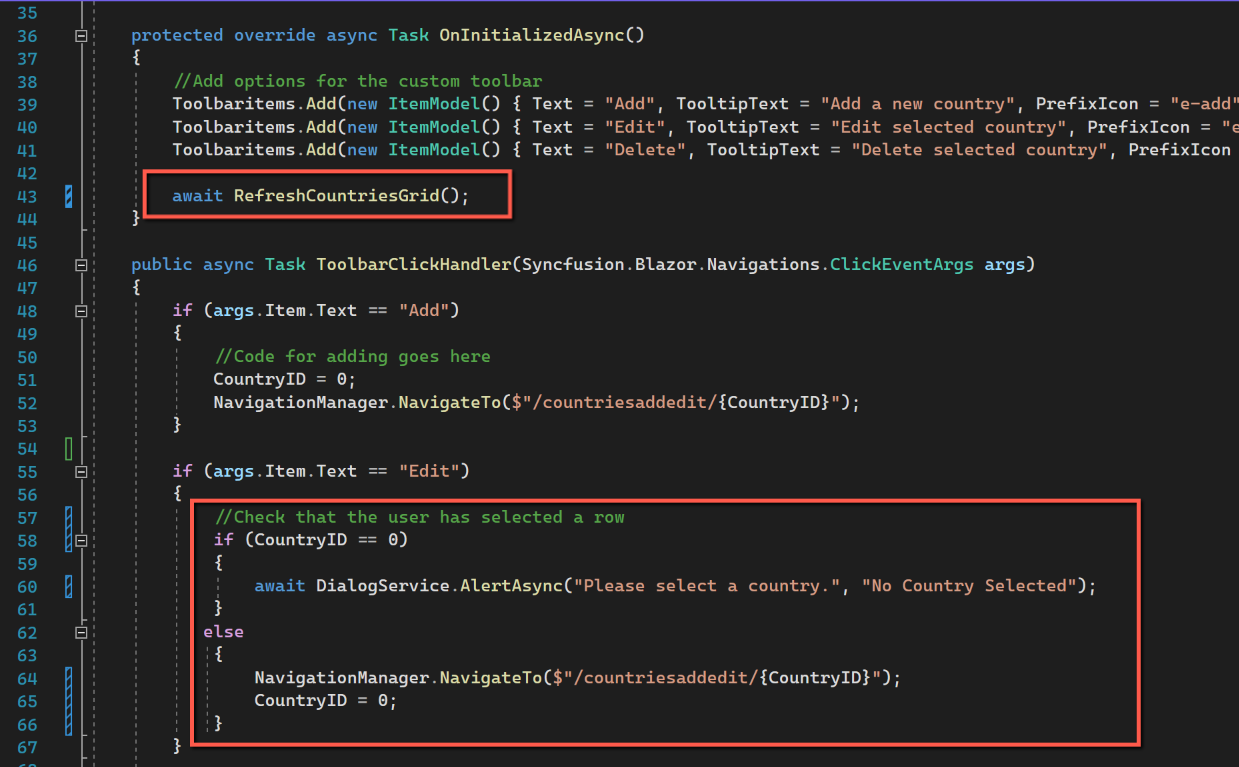
Having the Syncfusion predefined dialog available gives us the opportunity of warning the user if a row hasn't been selected before either editing or deleting a country. The changes to CountryListPage are shown in the following screenshots.
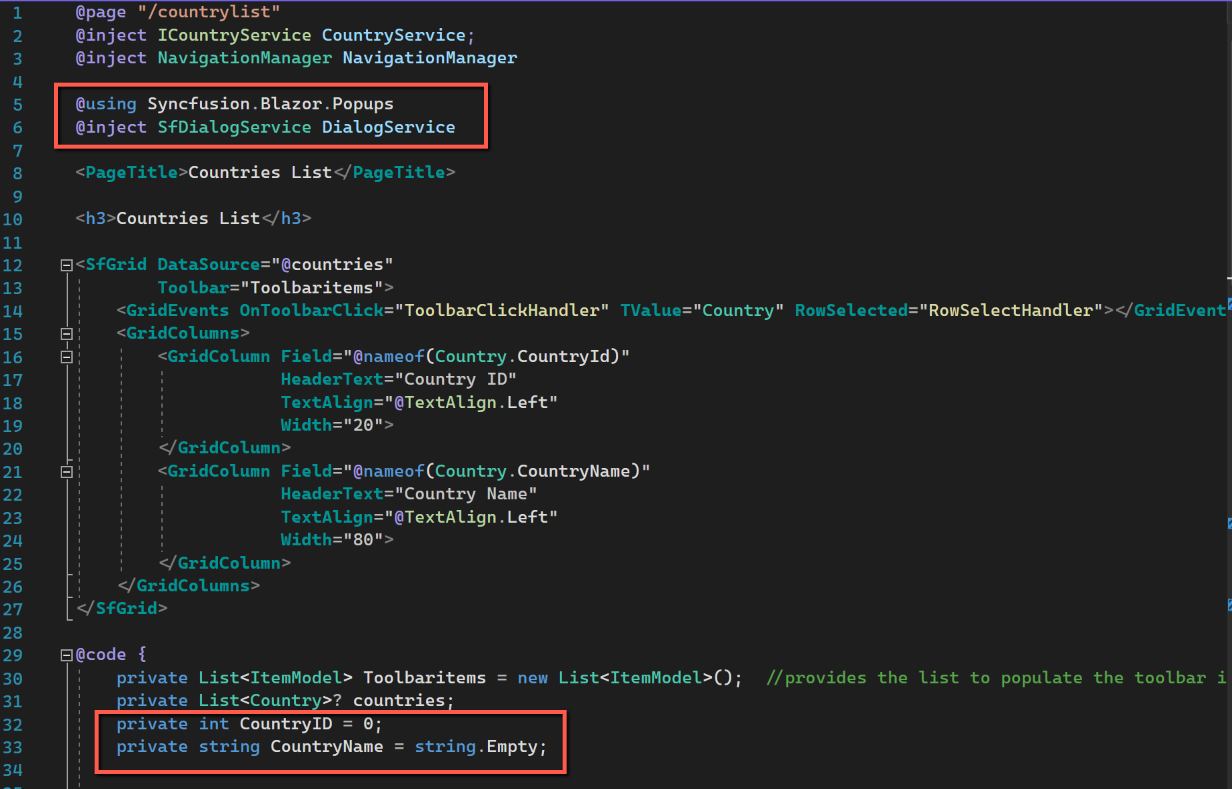

At the top of the file I have specifically added the using statement for Syncfusion Popups, although this isn't strictly necessary as I have it in the _Imports file (I have included it here as a general case illustration.) However, the injection of the DialogService is a requirement.
@using Syncfusion.Blazor.Popups
@inject SfDialogService DialogService
I have declared a new variable, CountryName and set it to an empty string. I will be using this to present the user with the name of the selected country before deleting it.
private string CountryName = string.Empty;I have added a new method called 'RefreshCountriesGrid' as I found myself using the same code to refresh the grid on both initialisation and after deleting a record. (Interestingly this wasn't required after adding or deleting a record.) I have replaced the code to get the countries in the 'OnInitializedAsync' with a call to the new method.
public async Task RefreshCountriesGrid()
    {
        await CountryService.GetCountries();
        countries = new();
        foreach (var country in CountryService.Countries)
            countries.Add(country);
    }
On the 'Edit' section of the 'ToolbarClickHandler' I am now checking to make sure a row has been selected (by checking if the CountryID == 0) and if none has been selected I now call the Syncfusion predefined dialog warning the user that no country has been selected. If a country has been selected we navigate to the add/edit page and reset CountryID to 0.
if (args.Item.Text == "Edit")
        {
            //Check that the user has selected a row
            if (CountryID == 0)
            {
                await DialogService.AlertAsync("Please select a country.", "No Country Selected");
            }
            else
            {
                NavigationManager.NavigateTo($"/countriesaddedit/{CountryID}");
                CountryID = 0;
            }
        }
For the 'Delete' section, again the first thing is to check that a country has been selected, if not, the warning saying 'No country has been selected' is displayed. If a country has been selected a string variable called 'dialogMessage' is declared and set to some text asking for confirmation that the user wants to delete the selected country. (The country name is set on the 'RowSelectHandler'.) The use of 'dialogMessage' was simply to allow code to be seen on one line.
if (args.Item.Text == "Delete")
        {
            //Check that the user has selected a row
            if (CountryID == 0)
            {
                await DialogService.AlertAsync("Please select a country.", "No Country Selected");
            }
            else
            {
                //code for deleting
                string dialogMessage = $"Are you sure you want to delete {CountryName}?";
                bool isConfirm = await DialogService.ConfirmAsync(dialogMessage, "Delete Country");
                if (isConfirm)
                {
                    await CountryService.CountryDelete(CountryID);
                    await RefreshCountriesGrid();
                    CountryID = 0;
                }
            }
        }
The RowSelectHandler needs to be modified so that the name of the country is captured as well as the CountryId. The code is changed to this:
public void RowSelectHandler(RowSelectEventArgs<Country> args)
    {
        //{args.Data} returns the current selected record.
        CountryID = args.Data.CountryId;
        CountryName = args.Data.CountryName;
    }
CountryService.cs
Insert the method for deleting a record in CountryService as shown below:
public async Task CountryDelete(int Countryid)
{
    var result = await _http.DeleteAsync($"api/country/{Countryid}");
}
This is fairly straightforward; we pass the Id of the country to be deleted to the method and then use _httpDeleteAsync to delete the record
ICountryService.ce
Insert the following line into ICountryService:
Task CountryDelete(int Countryid);CountryController.cs
The code to be added to ContryController to delete a record is shown below:
[HttpDelete("{CountryId}")]
public async Task<ActionResult> CountryDelete(int CountryId)
{
    var parameters = new DynamicParameters();
    parameters.Add("CountryId", CountryId, DbType.Int32);

    sqlCommand =
        "Delete From Country " +
        "Where CountryId = @CountryId";
    using IDbConnection conn = new SQLiteConnection(_config.GetConnectionString(connectionId));
    {
        await conn.ExecuteAsync(sqlCommand, parameters);
    }
    return Ok();
}
Note that we are using 'HttpDelete' and that we are passing in the CountryId of the country to be deleted.
As previously, we are adding parameters and the one parameter in this case is just the CountryId.
As usual we contruct the SQL command and then open the connection to the database and execute the command.
Code
The code changes for this post can be found here:
https://blazorcode.uk/countriesandcitieswasm/crud-operations-code/