Data Validation
Introduction
The user can only enter data for city names and city population, but so far we have no check that the user doesn't enter invalid data, such as names longer that the field length defined in the database, or populations outside a specified range (less than 1,000 or more than 25 million, for example). In addition there is the possibility that the user could add duplicate cities (for the same country).
YouTube Video
Data Validation
We can add 'business rules' as part of the logic of the 'CitiesSave' method, (and we will be doing this for checking for duplicates), but we can also achieve a lot of what is required by using the inbuilt data validation offered by 'Data Annotations'. This is pretty simple and has just two basic steps:
- Editing the data model
- Adding 'using System.ComponentModel.DataAnnotations;'
- Placing data 'rules' in the Data Model class
- Adding validation messages in the Data Model class
- Editing the data entry form
- Adding <DataAnnotationsValidator /> to the <EditForm> block
- Adding a <ValidationMessage>
to the <EditForm> block
Data Model
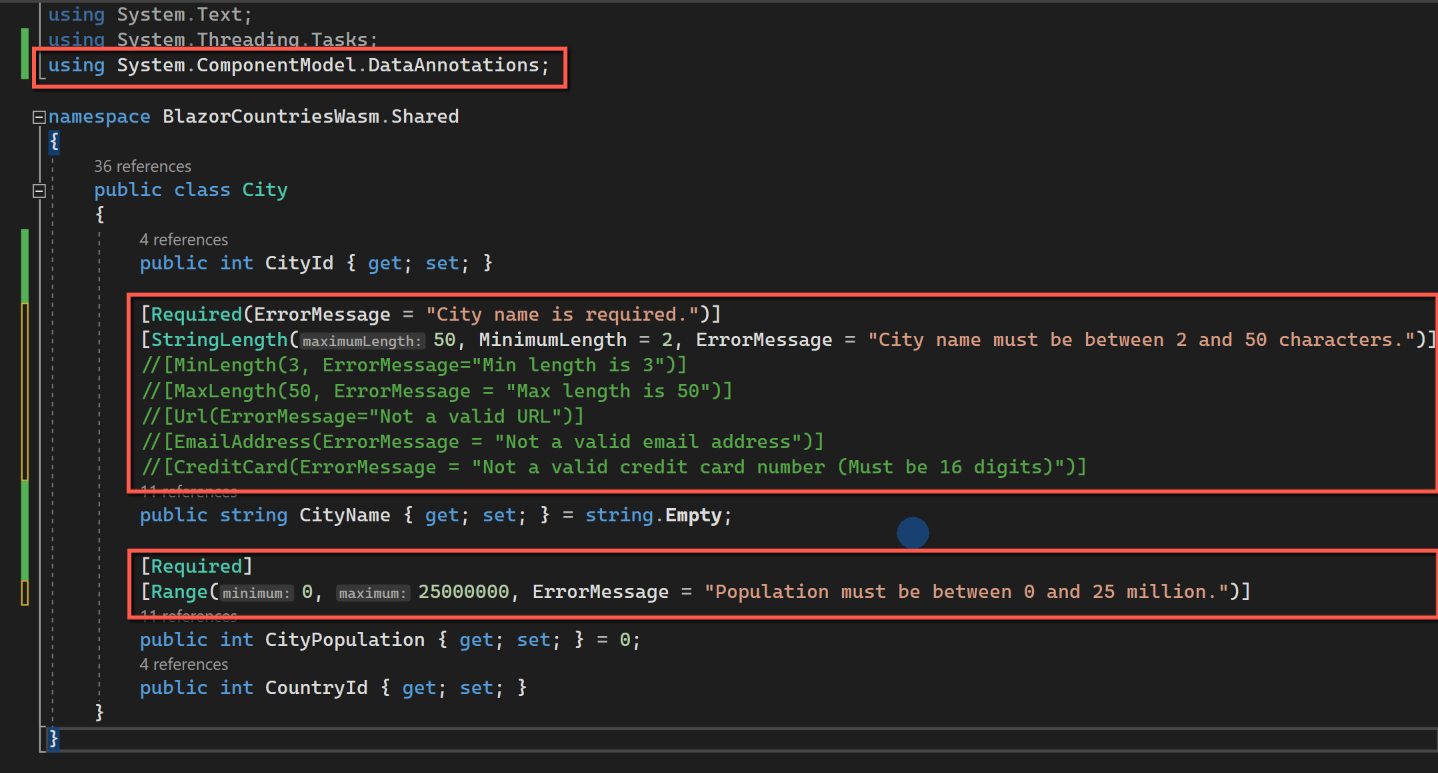
Open Shared > City.cs
Add the following to the top of the code:
using System.ComponentModel.DataAnnotations;We don't want the CityName to be left blank, but we should limit the number of characters to, say, 50. We also want a meaningful error message to be displayed if the user forgets to enter a name or enters a name longer than 50 characters. To do this we will add the code shown below above the CityName definition:
[Required(ErrorMessage = "A City name is required.")]
        [StringLength(50, MinimumLength =3, ErrorMessage = "Name must be more than 3 and no less than 50 characters.")]
In the case of the 'Population' column, it makes sense to place a reasonableness test to this, checking that it is, say, less than 25 million. To add this restriction add the following to CityPopulation (we will also make it required to avoid the user leaving it blank, as opposed to 0).
[Required]
[Range(0,25000000,ErrorMessage ="Population must be less than 25 million")]
Other examples of annotations for string columns are:
//[MinLength(3, ErrorMessage="Min length is 3")]
//[MaxLength(50, ErrorMessage = "Max length is 50")]
//[Url(ErrorMessage="Not a valid URL")]
//[EmailAddress(ErrorMessage = "Not a valid email address")]
//[CreditCard(ErrorMessage = "Not a valid credit card number (Must be 16 digits)")]
Save the file.
Index Page
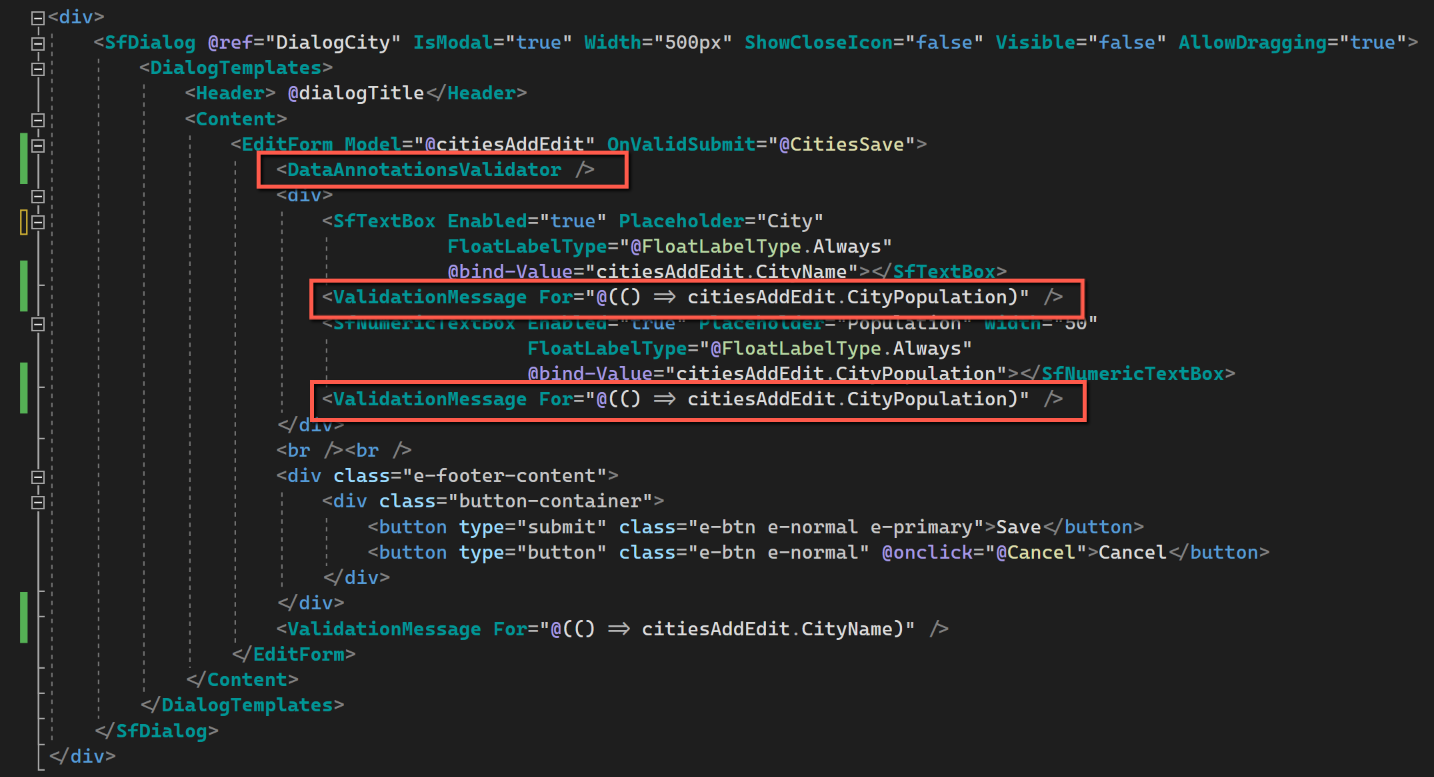
Within the <EditForm> section of the dialog we need to insert <DataAnnotationsValidator />.
<DataAnnotationsValidator />To enable the use of the error messages specified in the City class we must also add code to display the message. This is the code for the individual fields. The positioning of the ValidationMessage is important; in this case I have placed the code immediately below the relevant text box. It can sometimes be more appropriate to place the validation messages at the top, or bottom, of the form.
<ValidationMessage For="@(() => citiesAddEdit.CityName)" /><ValidationMessage For="@(() => citiesAddEdit.CityPopulation)" />The revised code for the dialog is shown below, with the changes highlighted.
Duplicate Cities
Cities with the same name ought to be allowed to be entered; for example 'Birmingham' exists in the UK and USA, but should be prevented for the same country i.e. we should prevent more than one Birmingham in the UK. (This is a very bad example as there are multiple cities/towns called Birmingham in the USA - but we'll overlook that for now!)
Adding Cities
To prevent duplicate cities being created we will count the number of cities already in the database with the same name before we permit an insert or update. (Here we are talking about cities for a particular country, so we will also take the country into account.) If there is already a city in the database with that name we will prevent the insertion or update and then display a warning message to the user. This is the same technique we used for preventing duplicate countries. We will need to make changes to:
- CityController
- CityService
- ICityService
- Index
CityController
We'll start with the CityController. We need a method that will count the cities for a particular country and we do this by passing in the CountryId and the CityName. I have designated the route as "api/city/{CountryId}/{CityName}" as I don't think this will cause a conflict with any other similar method (see below for duplicates when editing...) and given the method the name of "CountCitiesForInsert". The SQL command counts the city names where the CityName and CountryId match the passed parameters. The other thing to note is that it uses the Dapper "QuerySingleAsync" method (as opposed to "QueryFirstAsync" or "QueryFirstOrDefaulyAsync". "QuerySingleAsync" can be used where the method will only ever return a single value. (I came across this in a blog post by Camilo Reyes called "A Practical Guide to Dapper" and is well worth having a look through.) The complete code for this controller method is shown here:
[HttpGet]
[Route("api/city/{CountryId}/{CityName}")]
public async Task<ActionResult> CountCitiesForInsert(int CountryId, string CityName)
{
    var parameters = new DynamicParameters();
    parameters.Add("@CountryId", CountryId, DbType.Int32);
    parameters.Add("@CityName", CityName, DbType.String);

    sqlCommand = $"Select Count(*) From City " +
        "Where Upper(CityName) =  Upper(@CityName)" +
        " and CountryId = @CountryId";

    using IDbConnection conn = new SQLiteConnection(_config.GetConnectionString(connectionId));
    {
        int duplicates = await conn.QuerySingleAsync<int>(sqlCommand, parameters);
        return Ok(duplicates);
    }
}
CityService & ICityService
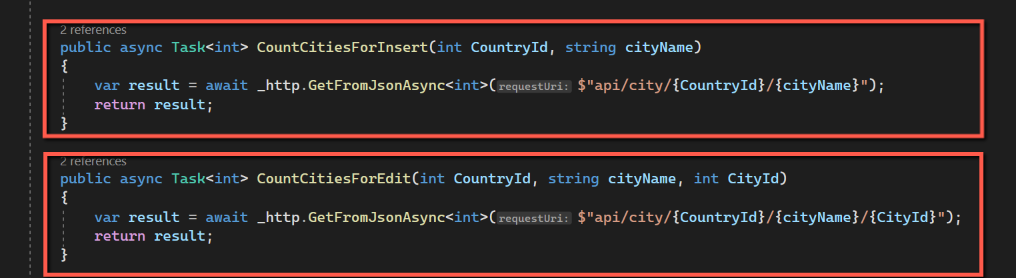
CityService need to reflect the structure and nomenclature of CityController. The code is as follows:
public async Task<int> CountCitiesForInsert(int CountryId, string cityName)
{
    var result = await _http.GetFromJsonAsync<int>($"api/city/{CountryId}/{cityName}");
    return result;
}
Similarly ICityService needs modifying:
Task<int> CountCitiesForInsert(int CountryId, string cityName);Index
On the Index page we need to add the check for the possibility of adding duplicates at the point of saving a city. We do this by calling the code we have just added to count the number of existing cities for a particular country, and if none are found we proceed with the insert. On the other hand if the count returns more than 0 (hopefully only ever 1 if more than 0!), we don't proceed with the insert and warn the user. The code is shown below:
if (citiesAddEdit.CityId == 0)
{
    // Insert if CityId is zero.
    citiesAddEdit.CountryId = SelectedCountryId;

    //Check for duplicates
    if (await CityService.CountCitiesForInsert(SelectedCountryId, citiesAddEdit.CityName) == 0)
    {
        //If count comes back as 0 there are no cities for the selected country with the new name, so insert.
        await CityService.CityInsert(citiesAddEdit);
        await DialogCity.HideAsync();
    }
    else
    {
        //Otherwise, display a warning message
        await DialogService.AlertAsync("Sorry, you can't add this city for this country, it already exists", "City/Country Already Exists");
    }

}
Editing a City
A slight variation on the technique used when adding a record is required when editing as the number will already be 1, so we must exclude the city being edited from the count. Again we will need to modify:
- CityController
- CityService
- ICityService
- Index
CityController
The code for counting cities when editing is very similar to the code when adding; the main difference being the exclusion of the record currently being edited. The code is:
[HttpGet]
[Route("api/city/{CountryId}/{CityName}/{CityId}")]
public async Task<ActionResult> CountCitiesForEdit(int CountryId, string CityName, int CityId)
{
    var parameters = new DynamicParameters();
    parameters.Add("@CountryId", CountryId, DbType.Int32);
    parameters.Add("@CityName", CityName, DbType.String);
    parameters.Add("@CityId", CityId, DbType.Int32);

    sqlCommand = $"Select Count(*) From City " +
        "Where Upper(CityName) =  Upper(@CityName)" +
        " and CountryId = @CountryId" +
        " and CityId <> @CityId";

    using IDbConnection conn = new SQLiteConnection(_config.GetConnectionString(connectionId));
    {
        int duplicates = await conn.QuerySingleAsync<int>(sqlCommand, parameters);
        return Ok(duplicates);
    }
}
The CityId of the current record is added to the route, the parameters and the SQL code.
CityService & ICityService
Similar changes are required for CityService and ICityService
public async Task<int> CountCitiesForEdit(int CountryId, string cityName, int CityId)
{
    var result = await _http.GetFromJsonAsync<int>($"api/city/{CountryId}/{cityName}/{CityId}");
    return result;
}
Task<int> CountCitiesForEdit(int CountryId, string cityName, int CityId);Index
The modifications to Index follow the pattern established for adding a new city.
else
{
    //Editing an existing city

    //Check for duplicates
    if (await CityService.CountCitiesForEdit(SelectedCountryId, citiesAddEdit.CityName, citiesAddEdit.CityId) == 0)
    {
        //If count comes back as 0 there are no cities for the selected country with the new name, so edit.
        await CityService.CityUpdate(CityId, citiesAddEdit);
        await DialogCity.HideAsync();
    }
    else
    {
        //Otherwise, display a warning message
        await DialogService.AlertAsync("Sorry, a city with this name already exists for this country. It cannot be added again", "City/Country Already Exists");
    }
}


Save all files, run and test.
Enter-Key Behaviour
I have noticed, when entering data into Countries or Cities, that pressing the [Enter] key has the undesirable effect of submitting the form twice, and in the process avoiding data validation and the duplicates test.
This seems to be the 'default behaviour' of some (not sure how many - it could be all) Syncfusion components. I eventually found an answer to the problem that worked for me in stack overflow. It involves inserting a 'dummy' submit button. The code for Cities is shown below, but needs to be applied to Countries as well.
<button type="submit" disabled style="display: none" aria-hidden="true"></button>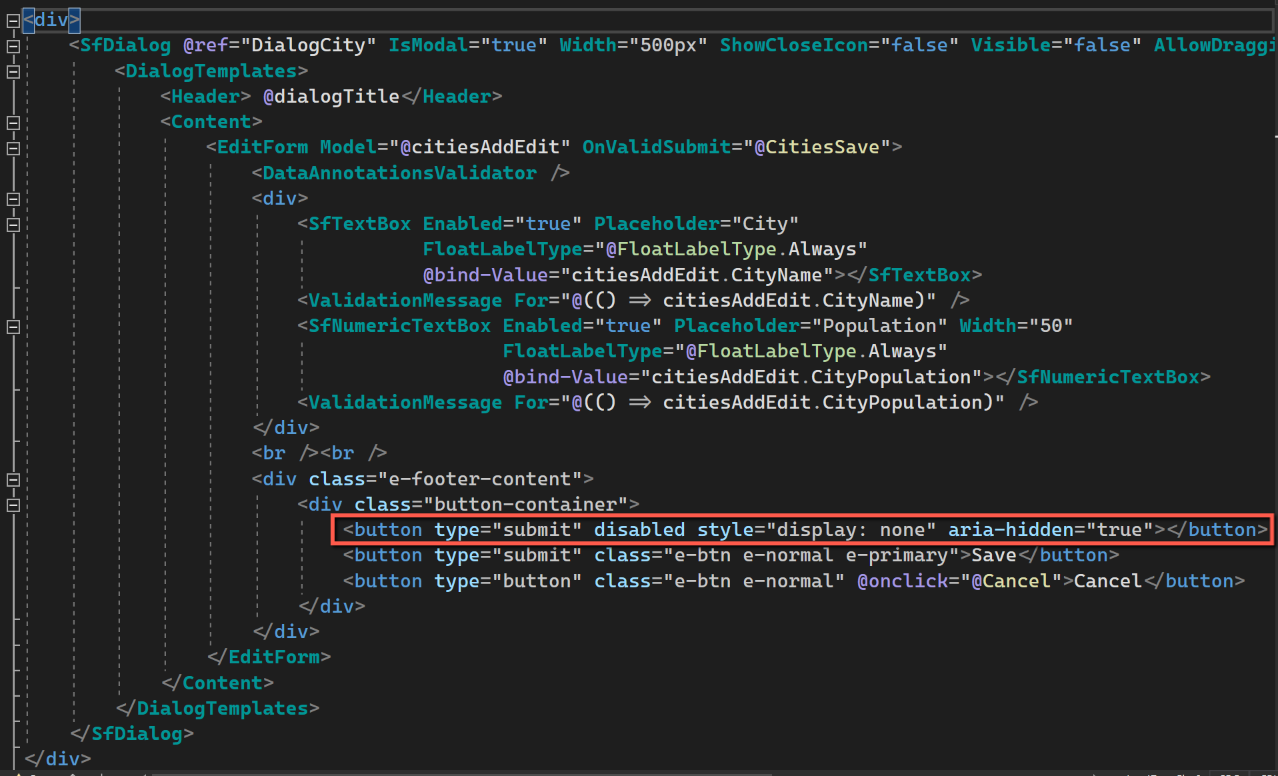
Code
Code changes for this post can be found here: Data Validation Code
References
- Redgate Hub: A Practical Guide to Dapper
- Code Magazine: The Rich Set of Data Annotation and Validation Attributes in .NET