List of Countries - Duplicates
Introduction
In many applications it doesn't make sense to allow certain records to be duplicated and in this small application we should prevent countries being duplicated to avoid confusing the user.
YouTube Video
Database Approach
A relatively simple way to prevent duplicate names is to modify the table definition for the Country table in the database. To do this, open DB Browser for SQLite:
- Open the 'CountriesAndCities' database
- Select the 'Country' table from the list
- Select 'Modify Table'
- Check the box in the 'U' (Unique) column for 'CountryName'
- Click 'OK' to save the changes
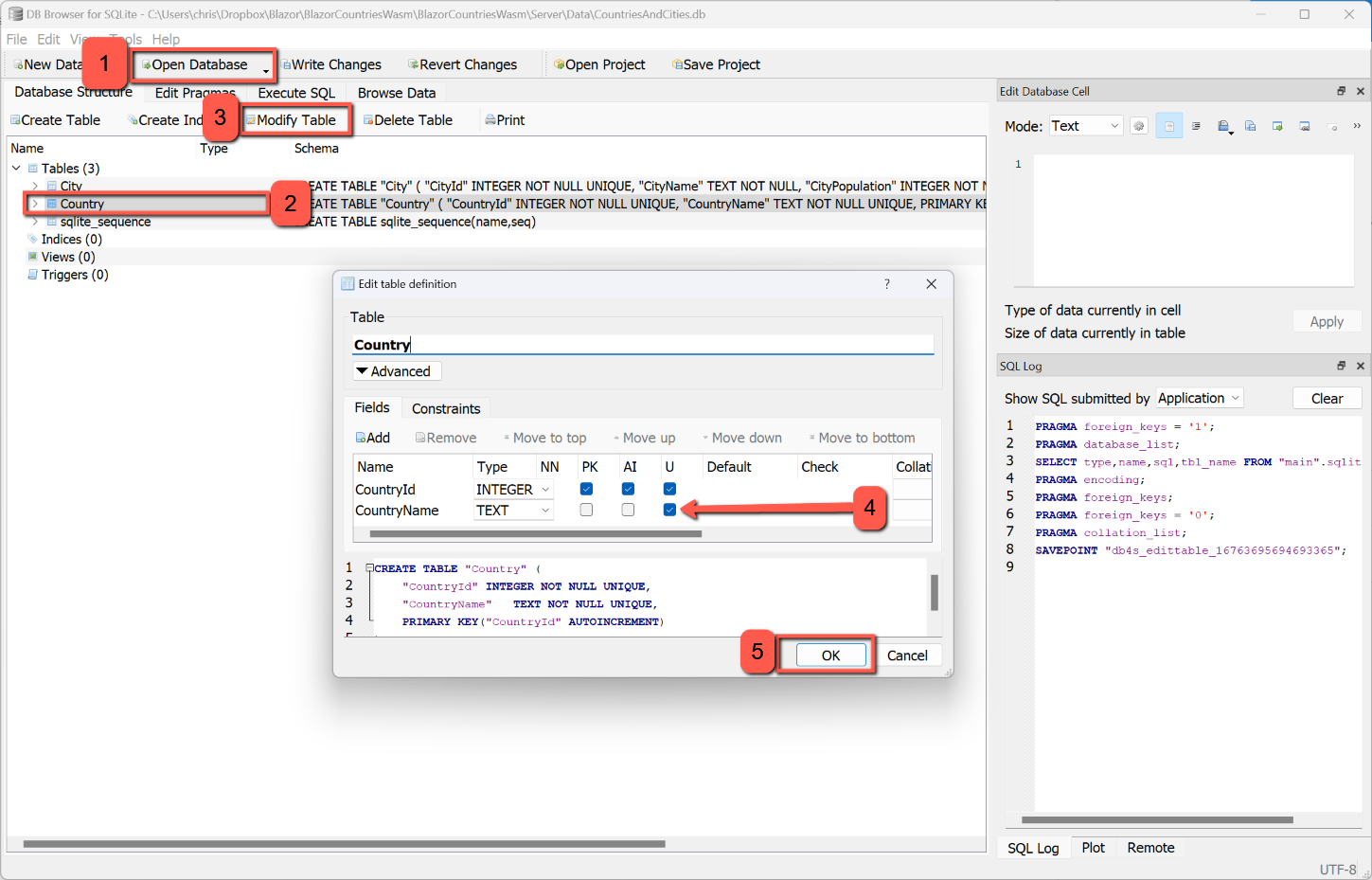
Running the application now will show that duplicates cannot be entered, but there is no feedback to the user to let them know what's happened.
To tackle this problem we will add a warning dialog so the user knows what has happened. We will, again, be using the Syncfusion predefined dialog.
Open CountryService.cs and replace the existing code for the CountryInsert method with the following:
public async Task<HttpResponseMessage> CountryInsert(Country country)
        {
            var result = await _http.PostAsJsonAsync("api/country/", country);
            return result;
        }
By inserting 'HttpResponseMessage' in the angle brackets we are indicating that the method will return a type of HttpResponseMessage, and then by adding 'return result' we will be returning the response from the http.Post...
To reflect this change we also need to modify ICountryService with this line to replace the existing 'CountryInsert'.
Task<HttpResponseMessage> CountryInsert(Country country);That sets up the behaviour to allow us to test the 'Response Message' in the CountryAddEdit page.
We start by adding the code to inject the Syncfusion predefined dialog at the top of the file.
@inject SfDialogService DialogServiceWe can then change the CountriesSave method as shown below:
// Executes OnValidSubmit of EditForm above.
    protected async Task CountriesSave()
    {
        if (CountryId == 0)
        {
            var result = await CountryService.CountryInsert(country);

            if (result.IsSuccessStatusCode)
            {
                NavigationManager.NavigateTo("/countrylist");
            }
            else
            {
                await DialogService.AlertAsync("An error has occurred and the country cannot be added.", "ERROR");
            }
        }
        else
        {
            await CountryService.CountryUpdate(CountryId, country);
            NavigationManager.NavigateTo("/countrylist");
        }
    }
This checks whether the returned value, result, from the controller 'IsSuccessStatusCode' and, if so, returns the focus back to the Country List page, otherwise is displays a warning message to the user. Although we are checking for duplicates we cannot be absolutely certain that a duplicate caused the problem, so the message needs to be a more generic message.
Code Approach
As we have seen, the database approach is not bullet proof in that the uniqueness of a country name, correctly, distinguishes between names spelt with different case letters. However, we can still keep the changes made to the database table definition and C# code and build on them.
The method we will use, in code, to prevent a duplicate country being added before inserting or updating a record, is to count the number of existing countries in the database with the (case-insensitive) name of the country being added or edited. When adding a new record we will reject the addition if there is a country already in the database with the same name. When editing, we will have to exclude the current record from the count.
CountriesAddEditPage
Warning the User
If adding or editing a country is going to result in a duplicate we want to warn the user before we reject the addition or amendment. We will use the 'Syncfusion Predefined Dialog' to achieve this.
Adding a Country
To avoid adding a country that already exists we will add a check at the point at which the record is about to be saved.
However, before changing the CountriesSave method, amend the declaration of the 'country' object to make it non-nullable. I.e. change the declaration to:
public Country country = new Country();The check will consist of a count of the records in the database where the name of the country is the same as the country that is about to be added. To do this edit the CountriesAddEditPage and replace the CountriesSave method with the following:
protected async Task CountriesSave()
{
    if (CountryId == 0)
    {
        //Check for duplicates
        int duplicates = await CountryService.CountCountriesByName(country.CountryName);

        if (duplicates == 0)
        {
            //Count is zero, so duplicate won't be created - proceed with insert
            var result = await CountryService.CountryInsert(country);

            //If insert is successful, navigate back to Country List
            if (result.IsSuccessStatusCode)
            {
                NavigationManager.NavigateTo("/countrylist");
            }
            //Otherwise warn the user the insert has failed with unknown error
            else
            {
                await DialogService.AlertAsync("Unknown Error!", "Can't insert country.");
            }
        }
        else
        {
            //Count is not zero, so Country Name already exists in the database.
            //Warn the user, but keep input dialog open
            string header = "Country Already Exists";
            string warningMessage = "Sorry, you can't add this country again, it already exists.";
            await DialogService.AlertAsync(warningMessage, header);
        }
    }
    else
    {
        await CountryService.CountryUpdate(CountryId, country);
        NavigationManager.NavigateTo("/countrylist");
    }
}

The check is simply a service that returns the number of countries with the name of the country being added. (This will be explained in more details later.) If the count is zero, then the country doesn't exist and can safely be added (but now we are also warning the user if the insert fails for some other reason). Alternatively if the count is not zero (hopefully not more that one), then the Syncfusion predefined dialog is displayed warning the user that the country cannot be added again.
CountryService
A new method (in CountryService) is used to return the count of records in the database with the name of the record being added I have called 'CountCountriesByName'. Add the new method at the end of the CountryService class; the code for this is shown below:
public async Task<int> CountCountriesByName(string countryName)
        {
            var result = await _http.GetFromJsonAsync<int>($"api/countryname/{countryName}");
            return result;
        }
There are a number of points to note about this:
- It is an async task that will return an integer (the <int> after Task)
- the country name to be checked is passed to the method as a string
- We need <int> as the type to be returned by 'GetFromJsonAsync'
- I have called the 'endpoint' matching the controller (see below) "api/countryname/{...}". I could have called this anything (e.g. "api/apples/{...}") apart from "api/country/{...}; the reason for this is that there should not be two endpoints in the application with the same url.
ICountryService
A new line needs to be inserted into ICountryService to match the new method:
Task<int> CountCountriesByName(string countryName);CountryController
Digression
The controller is where the work is really carried out, but I have made some changes to the previous code to make some aspects clearer (to me anyway).
Previously I had the following on the line before [ApiController]
[Route("api/[controller]")]This has the general effect that the path to the api endpoint substitutes the name of the controller for [controller] and removes the need for "api/controller" to be mentioned in every route. i.e. in our case the "api/Country/" is assumed as the base for every route.
The other coding option I decided not to use is the way that the route can be included in the [HTTP] statement, i.e. I'm going to avoid this:
[HTTP "{CountryId}"]
In favour of the longer version:
[HttpGet]
[Route("{CountryId}")]
By combining the removal of both conventions I need to write, for example:
[HttpGet]
[Route("api/country/{CountryId}")]
Why do this? Simply because I prefer the explicit definition of the route; I think the other camouflages what is required
Back to the code
Having changed the existing code to the 'new' convention, we need a method to check for duplicates. This is the code:
        [HttpGet]
        [Route("api/countryname/{CountryName}")]
        public async Task<ActionResult> CountCountriesByName(string CountryName)
        {
            var parameters = new DynamicParameters();
            parameters.Add("@CountryName", CountryName, DbType.String);

            sqlCommand = $"Select Count(*) From Country " +
                "Where Upper(CountryName) =  Upper(@CountryName)";

            using IDbConnection conn = new SQLiteConnection(_config.GetConnectionString(connectionId));
            {
                int duplicates = await conn.QueryFirstAsync<int>(sqlCommand, parameters);
                return Ok(duplicates);
            }
        }
There are several points to note with this:
- Notice that the route is "api/countryname/". The existing routes are "api/country". I had originally assumed that by changing "api/country/{CountryId}" (used to get countries by Id) to "api/country/{CountryName}" I would get countries by name. However, that is not the case and one gets an error along the lines of 'ambiguous route'.
- CountryName is being passed as a string to the method.
- '@CountryName' is defined as a parameter for the SQL statement.
- The SQL statement uses Count(*) to count the number of existing records that match the 'where' statement.
- Both the CountryName and the @CountryName are converted to uppercase to avoid omitting a match where one starts with (or includes) an uppercase letter and the other dosen't.
- an integer 'duplicates' is declared and assigned the value of 'QueryFirstAsync'. Notice also that the type <int> is part of the command.
- Lastly, 'duplicates' is returned. If no duplicates are found this will be 0.
Editing a Country
When editing a country we can use the same technique for checking for duplicates as for we use for adding a country, with the exception that we must exclude the record being edited from the duplicate check. With this in mind, the code we need is shown below:
CountriesAddEditPage
We will call a new service, called "CountCountriesByNameAndId" and will pass to it both the country name and id. If the returned value is 0 no duplicates have been found and the update can take place. If duplicates are found a Syncfusion Predefined Dialog is presented to the user warning them of the duplicate.

//Editing - Check for duplicates
            int duplicates = await CountryService.CountCountriesByNameAndId(country.CountryName, country.CountryId);

            if (duplicates == 0)
            {
                //Count is zero, so duplicate won't be created - proceed with update
                var result = await CountryService.CountryUpdate(CountryId, country);

                //If insert is successful, navigate back to Country List
                if (result.IsSuccessStatusCode)
                {
                    NavigationManager.NavigateTo("/countrylist");
                }
                //Otherwise warn the user the insert has failed with unknown error
                else
                {
                    await DialogService.AlertAsync("Unknown Error!", "Can't insert country.");
                }
            }
            else
            {
                //Count is not zero, so Country Name already exists in the database.
                //Warn the user, but keep input dialog open
                string header = "Country Already Exists";
                string warningMessage = "Sorry, you can't add this country again, it already exists.";
                await DialogService.AlertAsync(warningMessage, header);
            }
CountryService
The code for the service is shown below. The significant aspect of this is that both the country name and id are passed to the method and the construction of the endpoint (route) appends {countryName} and {id} to the base route separated by a '/'.

public async Task<int> CountCountriesByNameAndId(string countryName, int id)
        {
            var result = await _http.GetFromJsonAsync<int>($"api/countryname/{countryName}/{id}");
            return result;
        }
In addition we need to change the UpdateCountry method to return the HttpResponseMessage. Modify the existing method as shown below:
public async Task<HttpResponseMessage> CountryUpdate(int Countryid, Country country)
        {
            var result = await _http.PutAsJsonAsync($"api/country/{Countryid}", country);
            return result;
        }
ICountryService
CountryUpdate needs to be amended and the new service added to the interface as below:
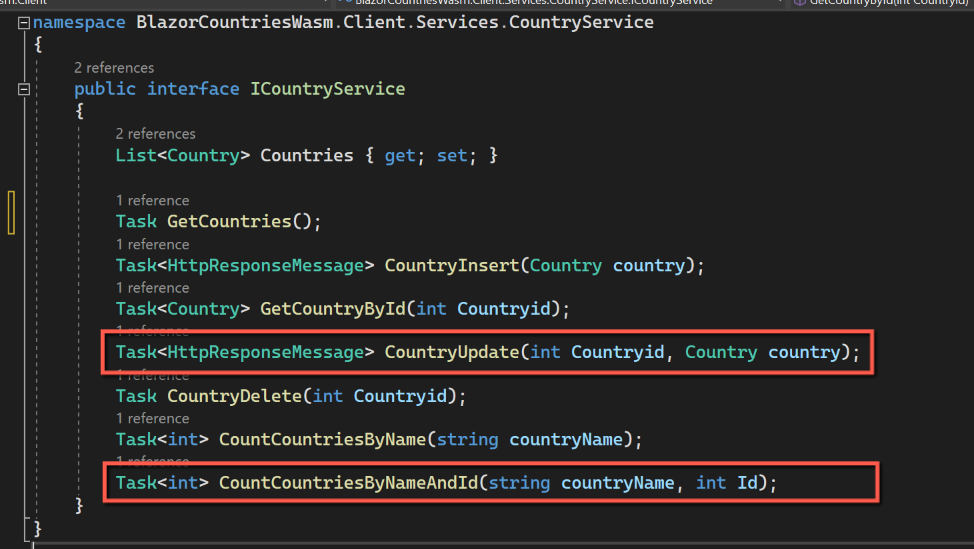
Task<HttpResponseMessage> CountryUpdate(int Countryid, Country country);

Task<int> CountCountriesByNameAndId(string countryName, int Id);
CountryController
As with the check for duplicates when adding, this is where the real work is done.
[HttpGet]
        [Route("api/countryname/{CountryName}/{CountryId}")]
        public async Task<ActionResult> CountCountriesByNameAndId(string CountryName, int CountryId)
        {
            var parameters = new DynamicParameters();
            parameters.Add("@CountryName", CountryName, DbType.String);
            parameters.Add("@CountryId", CountryId, DbType.Int32);

            sqlCommand = $"Select Count(*) From Country " +
                "Where Upper(CountryName) =  Upper(@CountryName)" +
                "And CountryId <> @CountryId";

            using IDbConnection conn = new SQLiteConnection(_config.GetConnectionString(connectionId));
            {
                int duplicates = await conn.QueryFirstAsync<int>(sqlCommand, parameters);
                return Ok(duplicates);
            }
        }
This follows the pattern when adding a new record, but has parameters passed for CountryName and CountryId, the really significant point being the separation of the two parameters in the endpoint by the slash between the two.
Code
Code changes for this post can be found here: Duplicate Checking Code