Automatic Reminders
Introduction
The aim of the project is to have email reminders sent automatically to remind people that birthdays of their friends and relatives are imminent. This post is where we bring together the various elements that will, hopefully, achieve this goal.
However, I will preface this post by saying that I am not entirely happy with how I have coded this - I am repeating code that I have elsewhere and know there is a better way of doing this. If anyone can point me in the right direction I would be very grateful.
YouTube Video
Summary of Tasks
- Create a new 'Reminder' service
- Modify Program.cs to activate Hangfire to send reminder emails
Reminder Service
I am going to make the Reminder Service self-contained. By self-contained I mean that it will contain the code to read the database to get the details of people whose birthdays are coming up and the code to send emails. This is the part that I don't like because I will be repeating code that I have already in the Person Service and Email Service, but as I can't find a way to call those classes and methods I am going to have to accept this annoyance.
In Visual Studio select the Data folder, right-click and add a new class, call it 'ReminderService.cs'.
We will need an interface; edit ReminderService.cs and replace the existing code after the namespace declaration with this:
{
    public interface IReminderService
    {
        public void SendReminders() { }
    }

    public class ReminderService : IReminderService
    {

    }
}
We will need to read data from appsettings.json, such as the connection string for connecting to the database, and email settings for smtp email user name and password. To allow us to read these configuration settings add the following at the top of the 'public class Reminder Service : IReminderService' method: (Note that the connection string we need from appsettings.json is called "Default", hence the declaration of the string 'connectionId'.
// Database connection
private readonly IConfiguration _configuration;
public ReminderService(IConfiguration configuration)
{
    _configuration = configuration;
}

private string connectionId = "Default";
We will add a method that will read the database and send an email as appropriate, if necessary. We already have most of this code in the 'EmailTestPage.razor'; we will copy it in it's entirety and then amend it to fit into the structure for this service. Open 'EmailTestPage.razor' and copy the whole of the method called 'public async Task SendEmail()' and paste into ReminderService, - re-naming it 'SendReminders()', placing it under the declaration of 'connectionId'. The whole file should now have the following code:
namespace BlazorBirthdaysTest.Data;

public interface IReminderService
{
    public void SendReminders() { }
}

public class ReminderService : IReminderService
{
    // Database connection
    private readonly IConfiguration _configuration;
    public ReminderService(IConfiguration configuration)
    {
        _configuration = configuration;
    }

    private string connectionId = "Default";

    public async Task SendReminders()
    {
        string? SendTo;
        string? EmailSubject;
        string? EmailBody;
        bool SomeoneWithBirthdayFound = false;

        for (int daysNotice = 7; daysNotice < 22; daysNotice = daysNotice + 7)
        {
            people = await PersonService.Person_GetByDaysToNextBirthday(daysNotice);

            birthdaypeople = people.ToList(); //Convert from IEnumerable to List

            foreach (var person in birthdaypeople)
            {
                SomeoneWithBirthdayFound = true;

                SendTo = person.PersonSendReminderTo;
                EmailSubject = "It's " + person.PersonFullName + "'s Birthday!";
                EmailBody = "<p>Hello</p>";
                if (daysNotice == 21)
                {
                    EmailBody = EmailBody + "<p>A bit of warning that it's ";
                }
                else if (daysNotice == 14)
                {
                    EmailBody = EmailBody + "<p>Don't forget, it's ";
                }
                else
                {
                    EmailBody = EmailBody + "<p>Better get cracking, it's only " + daysNotice + "days until ";
                }

                EmailBody = EmailBody + person.PersonFirstName + "'s birthday on " + person.NextBirthday.ToString("dd/MM/yyyy") + ".</p>";
                if (person.AgeNextBirthday < 21)
                {
                    EmailBody = EmailBody + "<p>" + person.PersonFirstName + " will be " + person.AgeNextBirthday + ".</p>";
                }
                EmailBody = EmailBody + "<p>Chris <br/>";
                EmailBody = EmailBody + "Chris's automated Birthday Reminder Service<p>";

                if (EmailService.Send(SendTo, EmailSubject, EmailBody))
                {
                    //do something
                    await this.ToastObj.Show(Toast[1]);
                }
                else
                {
                    //do something else
                    await this.ToastObj.Show(Toast[2]);
                };
            }
        }

        if (!SomeoneWithBirthdayFound)
        {
            await this.ToastObj.Show(Toast[3]);
        }
    }
}
We will start tidying up this code by deleting the blocks we don't need. Since this code will be run 'silently' with no user interaction we can delete those sections that give feedback to the user. I have also been unable to discover how to call the Email Service and will be re-coding this section. Delete the following blocks:
if (IEmailService.Send(SendTo, EmailSubject, EmailBody))
{
    //do something
    await this.ToastObj.Show(Toast[1]);
}
else
{
    //do something else
    await this.ToastObj.Show(Toast[2]);
};
if (!SomeoneWithBirthdayFound)
{
await this.ToastObj.Show(Toast[3]);
}We can also delete the declaration for 'SomeoneWithBirthdayFound and the line where it is set to true in the 'foreach' loop.
The problem we now face is that 'people' object is populated by the 'PersonService' call that I cannot get to work! My way round this is not to use the PersonService, but to reproduce (and modify) the code from Person Service. Open 'PersonService.cs' and scroll down to the 'Person_GetByDaysToNextBirthday' and copy the code from within the method, excluding the return statement i.e.
var parameters = new DynamicParameters();
parameters.Add("@DaysToNextBirthday", DaysToNextBirthday, DbType.Int32);
IEnumerable<Person> people;
using IDbConnection conn = new SqlConnection(_configuration.GetConnectionString(connectionId));
{
    people = await conn.QueryAsync<Person>("spPerson_GetByDaysToNextBirthday", parameters, commandType: CommandType.StoredProcedure);
}
Return to ReminderService and paste over and replace the line 'people = await PersonService...'. The top of the SendReminders() method should now look like this:

We are now using Dapper to access the SQL database, so we need to add the following 'using' statements at the top of the file:
using Dapper;
using Microsoft.Data.SqlClient;
using System.Data;
That will sort out some of the red squiggles. We have a mismatch between the name of a variable for the number of days to the next birthday, in the 'for' loop we are passing 'daysNotice' but in the parameters passed to the stored procedure we have called it 'DaysToNextBirthday'; we could change either, but we will change the parameter being passed to the stored procedure to 'daysNotice'. Lastly (for this part) we need to declare 'birthdayPeople' the list of people returned by the stored procedure. Declare this by entering the following under the declaration for 'connectionId' string.
private List<Person>? birthdaypeople;We should now be left with no errors, but we still need to add the ability to send emails.
We have most of what we need in the Send method in EmailService. Open EmailSender.cs and copy all the code within the Send method. Swap back to ReminderService and paste all the code at the end of (but within) the foreach loop. The code should look like this:
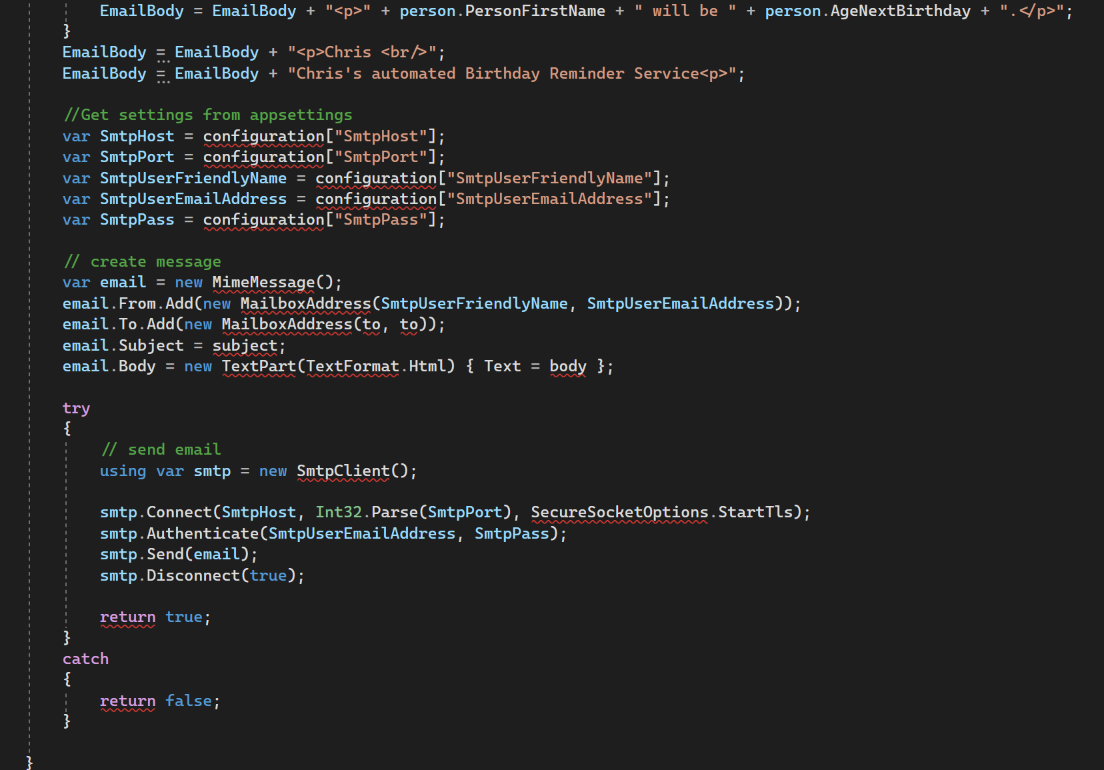
We have used slightly different conventions in the EmailService and this regarding the variable 'configuration'. Replace 'configuration' in the above with '_configuration'.
We are using MailKit for sending emails, and therefore we need the following 'using' statements at the top of the file.
using MimeKit;
using MimeKit.Text;
using MailKit.Net.Smtp;
using MailKit.Security;
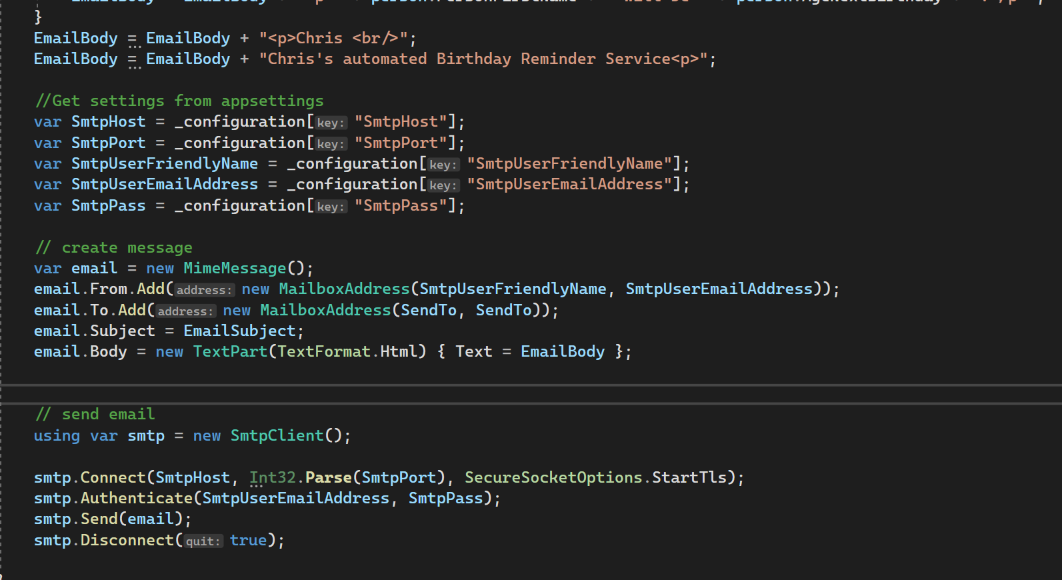
We now need to adjust the names of the variables used in the Email section. Adjust
- 'to' to 'SendTo'
- 'subject' to 'EmailSubject'
- 'body' to 'EmailBody'
In the EmailService we used a Try/Catch structure to report to the user whether the email had been sent successfully. We won't need this here, for this simple system - perhaps something more sophisticated would use a logging system - (Hangfire will keep a log for us). Delete the 'try catch' structure but leave the 'send email' code. The revised code should look like this:
Program.cs
With the above in place we can turn our attention to Program.cs. To register the SendReminderService insert the following line within the 'builder' section. (I suggest under the lines for PersonService and EmailService.
builder.Services.AddSingleton<IReminderService, ReminderService>();To call Hangfire to run the Reminders service insert the following before the app.run statement.
 IReminderService ReminderService = app.Services.GetRequiredService<IReminderService>();      //Needed for items below
RecurringJob.AddOrUpdate(
    "Daily Birthday Reminder", () => ReminderService.SendReminders(),
    "35 13 * * *");
This will cause the reminder service to run every day at 13:35pm. For testing purposes change the 'cron' statement to something like "*/5 * * * *) to run every 5 minutes.
Save and Test
Save the project and run. You will need to engineer some test data to ensure that you can be sure of getting email reminders...
References
- Code for this post: Automatic Reminders