Dapper - Code Generator
Introduction
Our approach to using Dapper in this project will be to use SQL stored procedures to provide the CRUD operations (Create, Read, Update and Delete). In addition to the SQL stored procedures we will also require model, service and interface classes in the C# code. We will need stored procedures and C# classes for every table - if we had multiple tables this would be a bore to write, but fortunately an application originally written by Alan Simpson and since modified by me takes care of most of the repetitive work. Luckily, for this project there is only one table.
YouTube Video
Summary of Tasks
- Run the application at https://blazordappercodegenerator.azurewebsites.net/
- Use generated code to create:
- SQL Stored Procedures
- Models
- Service
- Interface
- Update Program.cs
Blazor-Dapper-Code-Generator
To use the code generator open browser and go to https://blazordappercodegenerator.azurewebsites.net/
- Note: if we had more than one table we would need to run it separately for each table
- Enter the 'Namespace' - this is name of the project (BlazorBirthdayReminders)
- We need the basic 'Create Table' SQL for the table. The easiest way to get this is
- Open SQL Management Studio
- Select the Birthdays database
- Select Tables
- Select the required table (e.g. Person)
- Right-click and select 'Script Table as..' > Create to.. > New Query Editor Window
- Copy from 'Create Table..' to the last column defined. i.e. do not copy the line that starts 'Constraint..'
- Paste the 'Create Table' SQL (example shown below) into the large textbox and click the 'Go' button.
CREATE TABLE [dbo].[Person](
	[PersonID] [uniqueidentifier] NOT NULL,
	[PersonFirstName] [nvarchar](50) NOT NULL,
	[PersonLastName] [nvarchar](50) NOT NULL,
	[PersonDateOfBirth] [date] NOT NULL,
	[PersonSendReminderTo] [nvarchar](100) NOT NULL,
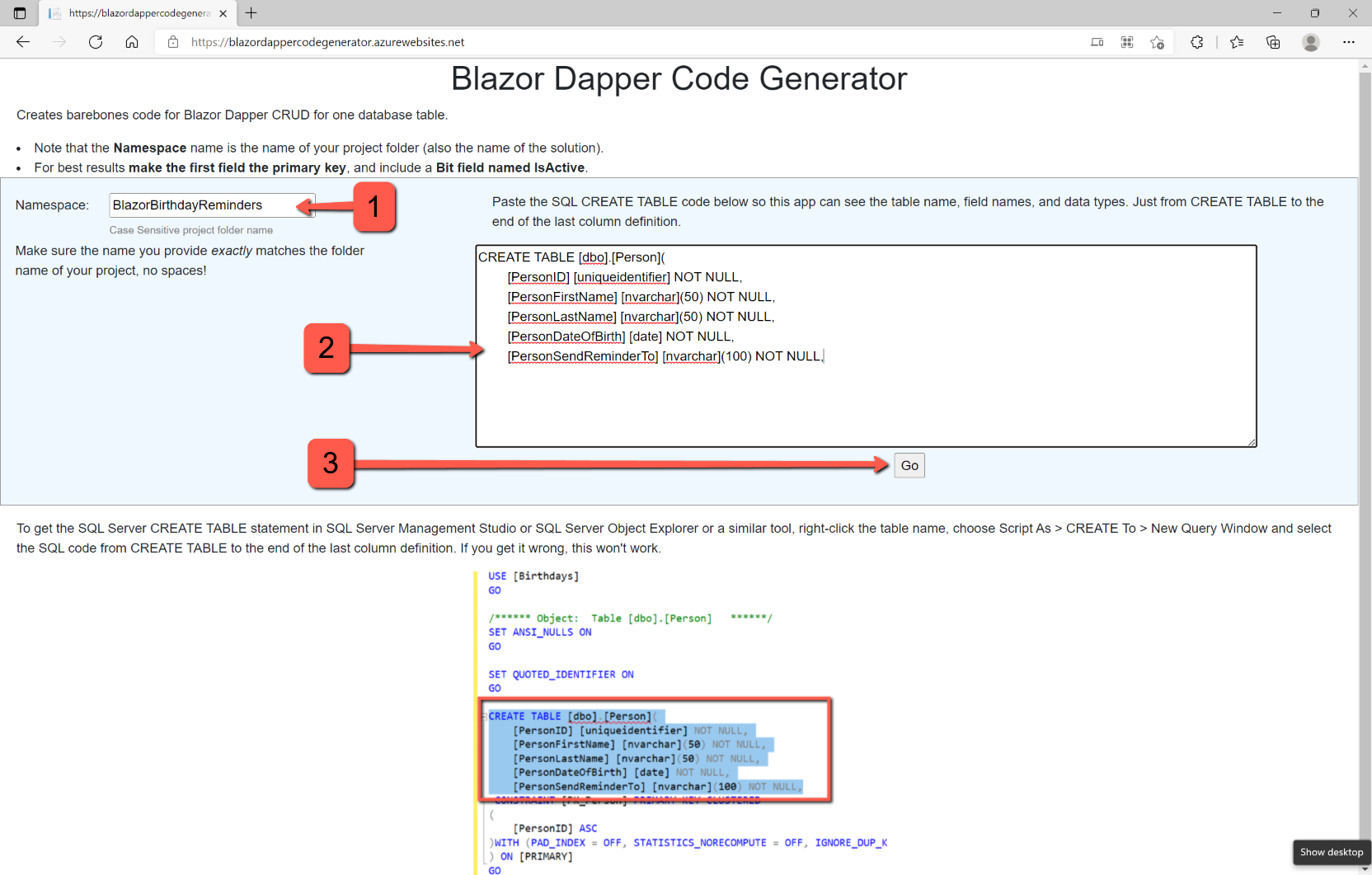

The easiest way to handle the result is to copy and paste all the output to Notepad or NotePad++, but could also just be copied from the web page.
Generated Code
The generated code will enable us to add the following:
- SQL stored procedures for the CRUD operations
- Model class for each table
- Service class for each table/CRUD operation
- Interface class for each service class
At the top of the file are instructions for 'Things to do in Visual Studio', followed by SQL scripts for the stored procedures and, lastly, the C# code.
SQL Stored Procedures
Open SQL Management Studio and select the Birthdays database by highlighting it.
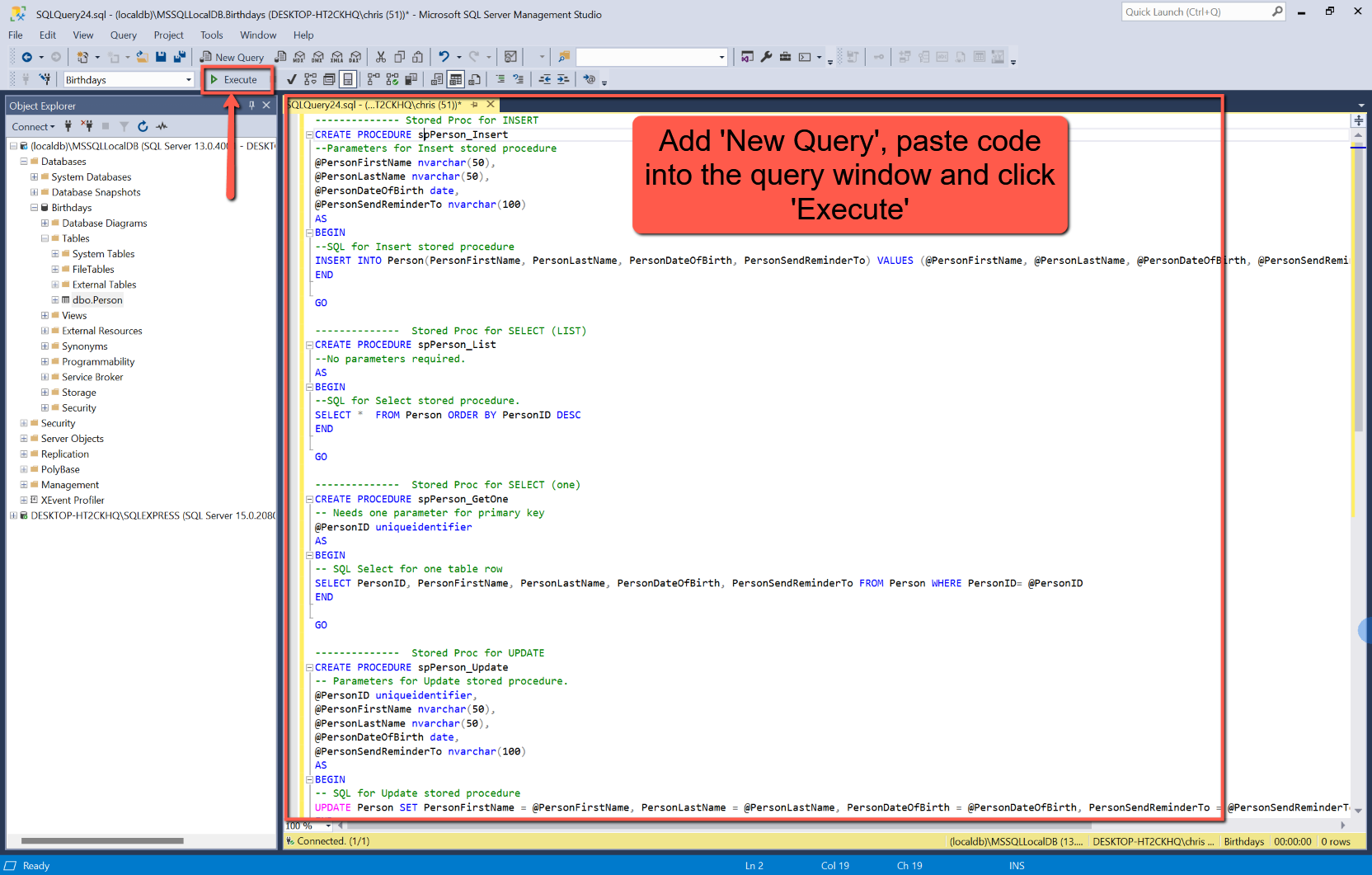
Copy from 'Stored Proc for Insert...' down to, and including, 'END' statement just before 'Back in Visual Studio', and paste into a New Query window in SQL Management Studio.
Execute the script. To confirm that the stored procedures have been created, select 'Programmability > Stored Procedures.
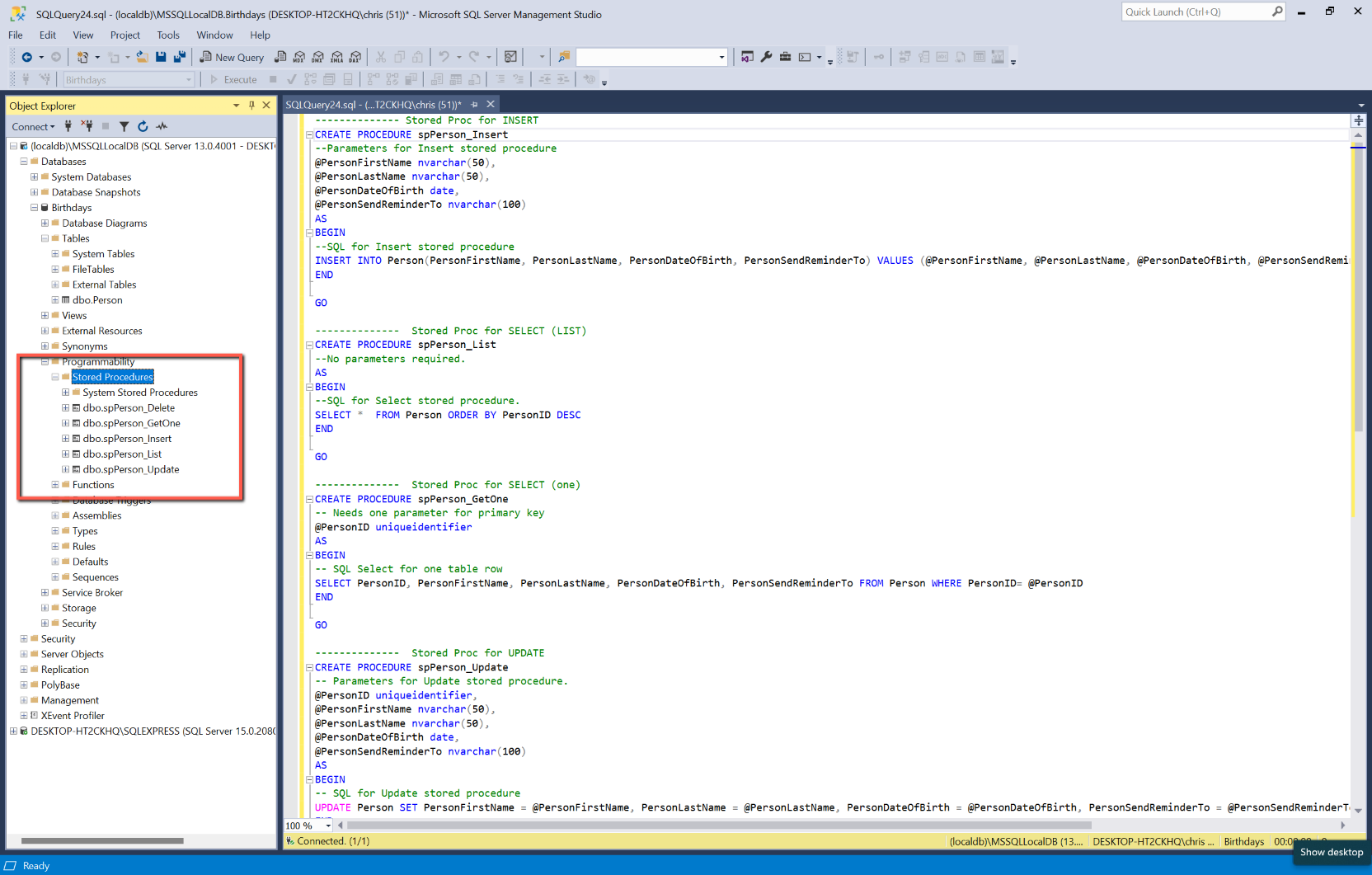
There's no need to save the SQL scripts.
Models
Open the BlazorBirthdayReminders project, if it isn't already.
In the Data folder add a class with the name of 'TableNameModel'.cs where TableName is the name of the table. i.e. PersonModel.cs
Paste the code for the model into the newly created class in Visual Studio, replacing the template code created when adding the class.
The code for Person.cs should be:
using System.ComponentModel.DataAnnotations;

namespace BlazorBirthdayReminders.Data
{
    public class Person
    {
	[Required]
public Guid PersonID { get; set; }
[Required]
[StringLength(50)]
public string PersonFirstName { get; set; } = String.Empty;
[Required]
[StringLength(50)]
public string PersonLastName { get; set; } = String.Empty;
[Required]
public DateTime PersonDateOfBirth { get; set; }
[Required]
[StringLength(100)]
public string PersonSendReminderTo { get; set; } = String.Empty;

    }
}
Service
In the Data folder add a class with the name of 'TableName'Service.cs where TableName is the name of the table. i.e. PersonService.cs
Copy the text for the service into the new class, replacing the template code created automatically when adding the class.
The code for PersonService.cs should be:
// This is the service for the Person class.
using Dapper;
using Microsoft.Data.SqlClient;
using System.Data;

namespace BlazorBirthdayReminders.Data
{
    public class PersonService : IPersonService
    {
        // Database connection
        private readonly IConfiguration _configuration;
        public PersonService(IConfiguration configuration)
        {
            _configuration = configuration;
        }

        public string connectionId = "Default";

        // Add (create) a Person table row (SQL Insert)
        public async Task<bool> PersonInsert(Person person)
        {
            using IDbConnection conn = new SqlConnection(_configuration.GetConnectionString(connectionId));
            {
                var parameters = new DynamicParameters();
			parameters.Add("PersonFirstName", person.PersonFirstName, DbType.String);
parameters.Add("PersonLastName", person.PersonLastName, DbType.String);
parameters.Add("PersonDateOfBirth", person.PersonDateOfBirth, DbType.Date);
parameters.Add("PersonSendReminderTo", person.PersonSendReminderTo, DbType.String);

                // Stored procedure method
                await conn.ExecuteAsync("spPerson_Insert", parameters, commandType: CommandType.StoredProcedure);
            }
            return true;
        }

        // Get a list of person rows (SQL Select)
        public async Task<IEnumerable<Person>> PersonList()
        {
            IEnumerable<Person> people;
            using IDbConnection conn = new SqlConnection(_configuration.GetConnectionString(connectionId));
            {
                people = await conn.QueryAsync<Person>("spPerson_List", commandType: CommandType.StoredProcedure);
            }
            return people;
        }

        // Get one person based on its PersonID (SQL Select)
        public async Task<Person> PersonGetOne(Guid @PersonID)
        {
            Person person = new Person();
            var parameters = new DynamicParameters();
            parameters.Add("@PersonID", PersonID, DbType.Guid);
            using IDbConnection conn = new SqlConnection(_configuration.GetConnectionString(connectionId));
            {
                person = await conn.QueryFirstOrDefaultAsync<Person>("spPerson_GetOne",parameters,commandType: CommandType.StoredProcedure);
            }
            return person;
        }

        // Update one Person row based on its PersonID (SQL Update)
        public async Task<bool> PersonUpdate(Person person)
        {
            using IDbConnection conn = new SqlConnection(_configuration.GetConnectionString(connectionId));
            {
                var parameters = new DynamicParameters();
                parameters.Add("PersonID", person.PersonID, DbType.Guid);

			    parameters.Add("PersonFirstName", person.PersonFirstName, DbType.String);
parameters.Add("PersonLastName", person.PersonLastName, DbType.String);
parameters.Add("PersonDateOfBirth", person.PersonDateOfBirth, DbType.Date);
parameters.Add("PersonSendReminderTo", person.PersonSendReminderTo, DbType.String);

                await conn.ExecuteAsync("spPerson_Update", parameters, commandType: CommandType.StoredProcedure);
            }
            return true;
        }

        // Physically delete one Person row based on its PersonID (SQL Delete)
        public async Task<bool> PersonDelete(Guid PersonID)
        {
            var parameters = new DynamicParameters();
            parameters.Add("@PersonID", PersonID, DbType.Guid);
            using IDbConnection conn = new SqlConnection(_configuration.GetConnectionString(connectionId));
            {
                await conn.ExecuteAsync("spPerson_Delete",parameters, commandType: CommandType.StoredProcedure);
            }
            return true;
        }
    }
}
Interface
In the Data folder add a class with the name of I'TableName'Service.cs where TableName is the name of the table. e.g. IPersonService.cs
Copy the text for the service into the new class, replacing the template code created automatically when adding the class.
The code for IPersonService.cs should be:
// This is the Person Interface
using System;
using System.Collections.Generic;
using System.Threading.Tasks;

namespace BlazorBirthdayReminders.Data
{
    // Each item below provides an interface to a method in PersonServices.cs
    public interface IPersonService
    {
        Task<bool> PersonInsert(Person person);
        Task<IEnumerable<Person>> PersonList();
        Task<Person> PersonGetOne(Guid PersonID);
        Task<bool> PersonUpdate(Person person);
        Task<bool> PersonDelete(Guid PersonID);
    }
}
Program.cs
In Program.cs add the following to the 'builder' section substituting the correct table name for 'TableName'.
builder.Services.AddScoped<IPersonService, PersonService>();Run the application
We won't be able to add any people yet, but the application should run