Friends & Family List
Introduction
We will use the main (index) page to list the people for whom reminders about birthdays should be sent and the user who recorded their birthday. In the first instance we will keep this very simple, just listing people. However, we will also use the list to allow a person to be selected for editing or deleting. A rough idea can be gained from this Excel mock-up.

YouTube Video
Summary of Tasks
- Modify Index.razor to add a Synfusion Grid to display a list of people.
- Add a toolbar above the grid for 'Add', 'Edit' and 'Delete'
- Add a modal pop-up dialog to add people.
Index.razor
We will start off simply and add functionality as we go. To start with, open Index.razor and replace all the existing code with the following:
@page "/"

<PageTitle>Birthday Reminders</PageTitle>

@using BlazorBirthdayReminders.Data
@inject IPersonService PersonService

<div>
    <h3>Birthday Reminders</h3>
    <br />
    <SfGrid DataSource="@people">
        <GridColumns>
            <GridColumn Field="@nameof(Person.PersonFirstName)"
                        HeaderText="First Name"
                        TextAlign="@TextAlign.Left"
                        Width="20">
            </GridColumn>
            <GridColumn Field="@nameof(Person.PersonLastName)"
                        HeaderText="Last Name"
                        TextAlign="@TextAlign.Left"
                        Width="20">
            </GridColumn>
            <GridColumn Field="@nameof(Person.PersonDateOfBirth)"
                        HeaderText="Date of Birth"
                        Format="d"
                        Type="ColumnType.Date"
                        TextAlign="@TextAlign.Center"
                        Width="20">
            </GridColumn>
            <GridColumn Field="@nameof(Person.PersonSendReminderTo)"
                        HeaderText="Send Reminder to:"
                        TextAlign="@TextAlign.Left"
                        Width="40">
            </GridColumn>
        </GridColumns>
    </SfGrid>
</div>

@code {

    // Create an empty list, named people, of empty Person objects.
    IEnumerable<Person>? people;

    protected override async Task OnInitializedAsync()
    {
        //Populate the list of Person objects from the Person table.
        people = await PersonService.PersonList();;
    }
}
We have a page directive of "\", pointing to the root razor page. The PageTitle will be displayed on the browser's tab. We inject the Person interface and service and the Blazor Navigation Manager. We then display a header within the page and a Syncfusion grid. The SfGrid has a datasource of '@people' (defined in the code section). At present we have four columns; note the Format and Type for the date column.
The code declares IEnumerable
Save the code and run the application. It should look similar to this; notice the page title on the browser tab:

Adding a Toolbar
The revised code, adding a toolbar above the grid is shown below:
@page "/"

<PageTitle>Birthday Reminders</PageTitle>

@using BlazorBirthdayReminders.Data
@inject IPersonService PersonService

<div class="col-sm-12">
    <h3>Birthday Reminders</h3>
    <br />
    <SfGrid DataSource="@people"
            Toolbar="Toolbaritems">
        <GridEvents OnToolbarClick="ToolbarClickHandler" TValue="Person"></GridEvents>
        <GridColumns>
            <GridColumn Field="@nameof(Person.PersonFirstName)"
                        HeaderText="First Name"
                        TextAlign="@TextAlign.Left"
                        Width="20">
            </GridColumn>
            <GridColumn Field="@nameof(Person.PersonLastName)"
                        HeaderText="Last Name"
                        TextAlign="@TextAlign.Left"
                        Width="20">
            </GridColumn>
            <GridColumn Field="@nameof(Person.PersonDateOfBirth)"
                        HeaderText="Date of Birth"
                        Format="d"
                        Type="ColumnType.Date"
                        TextAlign="@TextAlign.Center"
                        Width="20">
            </GridColumn>
            <GridColumn Field="@nameof(Person.PersonSendReminderTo)"
                        HeaderText="Send Reminder to:"
                        TextAlign="@TextAlign.Left"
                        Width="40">
            </GridColumn>
        </GridColumns>
    </SfGrid>

</div>

@code {

    // Create an empty list, named people, of empty Person objects.
    IEnumerable<Person>? people;

    private List<ItemModel> Toolbaritems = new List<ItemModel>();

    protected override async Task OnInitializedAsync()
    {
        //Populate the list of Person objects from the Person table.
        people = await PersonService.PersonList();

        Toolbaritems.Add(new ItemModel() { Text = "Add", TooltipText = "Add a new person", PrefixIcon = "e-add" });
        Toolbaritems.Add(new ItemModel() { Text = "Edit", TooltipText = "Edit selected person", PrefixIcon = "e-edit" });
        Toolbaritems.Add(new ItemModel() { Text = "Delete", TooltipText = "Delete selected person", PrefixIcon = "e-delete" });
    }

    public async Task ToolbarClickHandler(Syncfusion.Blazor.Navigations.ClickEventArgs args)
    {
        if (args.Item.Text == "Add")
        {
            //Code for adding goes here
        }

        if (args.Item.Text == "Edit")
        {
            //Code for editing
        }

        if (args.Item.Text == "Delete")
        {
            //Code for deleting
        }
    }

}
Notice the [Toolbar="Toolbaritems"] defined within the SfGrid tag and the GridEvents that points to a method called "ToolbarClickHandler" to handle the OnToolbarClick. (There's nothing special about the names 'Toolbaritems' and 'ToolbarClickHandler' - they could be anything.)
Further down the code a private List<ItemModel> is declared with a name (again) of 'Toolbaritems' (that refers back to the Toolbar) and that List is populated by the OnInitilalizedAsync method with items for 'Add', 'Edit' and 'Delete', each item having some 'TooltipText' and a 'PrefixIcon' defined. The PrefixIcons are Syncfusion icons, available especially for the Syncfusion toolbar.
The 'ToolbarClickHandler' has some scaffold code that we will fill out later.
Adding People
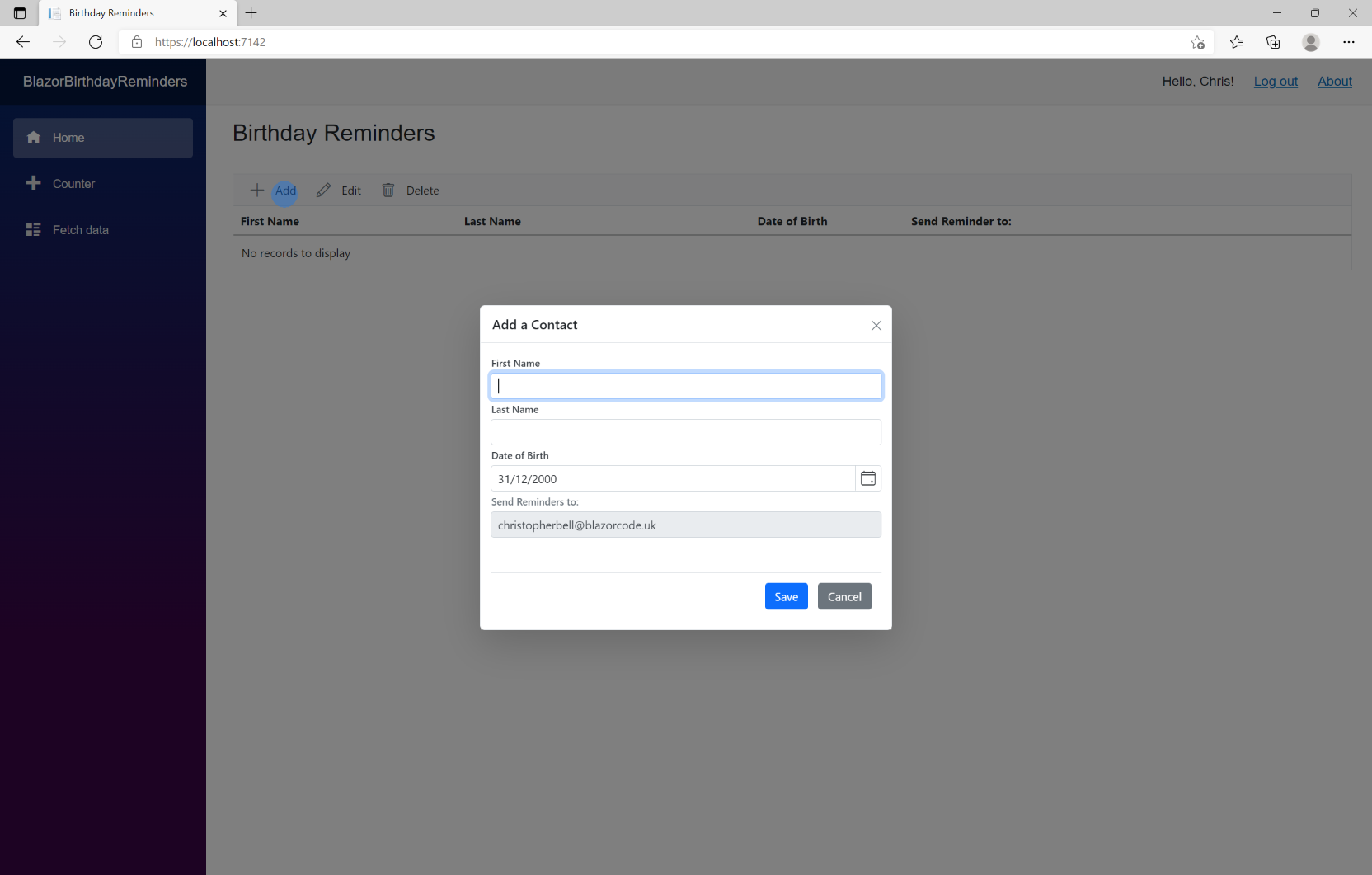
We will use a modal pop-up dialog form to allow the user to add a new contact (person). It will consist of text boxes for 'First Name' and 'Last Name'; 'Birthday' will be input through a Date-Picker, although in practice it might be simpler for the user to enter the date of birth directly as scrolling back a number of years will be a pain. The 'Person to Send Reminder to' will not be enabled, but we will it default to the currently logged in user in the next section. (Eventually only Contacts for the logged in user will be displayed in the Birthday Reminders list - but that is yet to come...)
To add the person dialog form:
- Add the HTML to add the Syncfusion dialog
<SfDialog @ref="DialogAddEditPerson" IsModal="true" Width="500px" ShowCloseIcon="true" Visible="false">
    <DialogTemplates>
        <Header> @HeaderText </Header>
    </DialogTemplates>
    <EditForm Model="@personaddedit" OnValidSubmit="@PersonSave">
        <div>
            <SfTextBox Enabled="true" Placeholder="First Name"
                       FloatLabelType="@FloatLabelType.Always"
                       @bind-Value="personaddedit.PersonFirstName">
            </SfTextBox>
            <SfTextBox Enabled="true" Placeholder="Last Name"
                       FloatLabelType="@FloatLabelType.Always"
                       @bind-Value="personaddedit.PersonLastName">
            </SfTextBox>
            <SfDatePicker TValue="DateTime"
                          Placeholder='Date of Birth'
                          FloatLabelType="@FloatLabelType.Auto"
                          @bind-Value="personaddedit.PersonDateOfBirth"></SfDatePicker>
            <SfTextBox Enabled="false" Placeholder="Send Reminders to:"
                       FloatLabelType="@FloatLabelType.Always"
                       @bind-Value="personaddedit.PersonSendReminderTo"></SfTextBox>
        </div>
        <br /><br />
        <div class="e-footer-content">
            <div class="button-container">
                <button type="submit" class="e-btn e-normal e-primary">Save</button>
                <button type="button" class="e-btn e-normal" @onclick="@CloseDialog">Cancel</button>
            </div>
        </div>
    </EditForm>
</SfDialog>
It should look like this:

The SfDialog if given a @ref called, arbitrarily, "DialogAddEditPerson", is set to IsModal="true", allows the Close Icon to be shown and is initially set to Visible="false" The <Header> will show the variable '@HeaderText' in the top bar of the modal form.
The <EditForm> section is linked to a model called "@personaddedit" (see below) and has an 'OnValidSubmit' event defined by the "@PersonSave" method.
There follows textboxes for first and last name, a date-picker for date of birth and lastly an other textbox for 'Send Reminders to' - but notice that this is set to enabled="false".
The following changes need to be made to the code section
- Insert the following declarations near the top of the code section
SfDialog DialogAddEditPerson;
Person personaddedit = new Person();
string HeaderText = "";- If the user clicks the 'Add' button we want the dialog to open. Modify the code for the ToolbarClickHandler as shown below. This creates a new 'personaddedit' object, provides the header text for the dialog and then opens the dialog.
        if (args.Item.Text == "Add")
        {
            //Code for adding goes here
            personaddedit = new Person();             // Ensures a blank form when adding
            HeaderText = "Add a Contact";
            await this.DialogAddEditPerson.Show();
        }
- Change the ToolbarClickHandler from 'public void' to 'public async Task'. (The Add option has 'await this.DialogAddEditPerson.Show' and this requires an async task.)
public async Task ToolbarClickHandler(Syncfusion.Blazor.Navigations.ClickEventArgs args)- There are two buttons in the dialog; add the basic code to handle these at the end of the code section. The 'PersonSave' checks the value of the PersonID to determine if a new record is going to be inserted into the database, or an existing record updated. (Neither do anything at the moment.)
- The 'CloseDialog' closes the dialog and refreshes the SfGrid on the Index page.
    protected async Task PersonSave()
    {
        if (personaddedit.PersonID == Guid.Empty)
        {
            // Insert if PersonID is empty guid.
        }
        else
        {
            // Item is being edited
        }
    }

    private async Task CloseDialog()
    {
        await this.DialogAddEditPerson.Hide();
        //Refresh datagrid
        people = await PersonService.PersonList();
        StateHasChanged();
    }
You should be able to run the application at this point and open the dialog by clicking the 'Add' button, but won't be able to save any data.
Default Date of Birth
If the application is run now it would show a default date of birth as 01/01/0001 - not very helpful. There is no really helpful default Date of Birth; today's date isn't particularly helpful either. I have therefore landed on 31/12/2000 as being as useful as any (as it makes clear which is the day and month). To make this the default Date of Birth when adding a new contact, add the following to the 'Add' part of the 'ToolbarClickHandler' method (after creating the 'personaddedit' object.)
personaddedit.PersonDateOfBirth = new DateTime(2000, 12, 31);
Send Reminder To
I want the 'Send Reminder to;' field to default to the currently logged in user, and for the user to be unable to change it. We will later restrict the list of people displayed on the Index page to only those associated with the logged in user, but whilst we develop the application we will omit this feature for the moment.
To default the currently logged in user we need to
- add the following to the top of the file.
@using Microsoft.AspNetCore.Components.Authorization
@using Microsoft.Identity.Client
@using System
@using System.Collections.Generic
@using System.Security.Claims
@inject AuthenticationStateProvider AuthenticationStateProvider
- declare the following variables near the top of the code section
private string? UserEmail;

[CascadingParameter]
private Task<AuthenticationState>? authState { get; set; }

private ClaimsPrincipal? principal;
- insert this code into the 'OnInitializedAsync' method. This gets the name of the current user if logged in.
//Get user if logged in and populate the 'Requested by' column
if (authState != null)
{
    principal = (await authState).User;
}

foreach (Claim claim in principal.Claims)
{
    //claimtype = claimtype + "Claim Type: " + claim.Type + "; CLAIM VALUE: " + claim.Value + "</br>";

    if(claim.Type == "emails")
    {
        UserEmail = claim.Value;
    }
}
Add the following to the Add section of the 'ToolbarClickHandler' (after the line for default Date of Birth would be a good place).
personaddedit.PersonSendReminderTo = UserEmail;Note that the SfTextbox for SendReminderTo is set to Enabled="false" to prevent the user changing the value.
Save the project and run it. The 'Add a Contact' page should look similar to this (but note that you will still not be able to save a record):