Postscript - Dependency Injection
Introduction
Whilst coding Blazor Birthday Reminders I was troubled that I was copying and pasting code between files, breaking the DRY rule - Don't Repeat Yourself. I knew there had to be a better way and suspected that Dependency Injection was the answer but just couldn't figure out how to use it. Spurred on by a comment on one of my YouTube videos by Mihai Dumitru, and following the hint that Mihai gave I think I have it cracked!
The Problem
In ReminderService.cs I am aware that I have two sections of code that I have copied, more or less verbatim, from PersonService and EmailService and that there should be no need for me to do this. Surely I can re-use code from one part of the project in another part?

The Answer
Mihai points out that I am, unwittingly, already using dependency injection in ReminderService and that I could follow my own example! My original code for ReminderService included the following:

In this code, the constructor, the method that starts with "public ReminderService(IConfiguration configuration)" is, in fact, dependency injection using a 'built-in' method to access configuration settings from appsettings.json (in my case).
After a little experimentation I discovered I could extend this as follows. I should also point out that as both EmailService and PersonService already read data from appsettings.json using the exact code shown above, I no longer needed IConfiguration.

Note that as many services as are needed can be inserted within the brackets, each pair separated by a comma, and that the convention seems to be that the service variable has an initial underscore. Note also the declaration of the service interface as 'private readonly'.
By using dependency injection the code for getting the list of people can be reduced from this:

To this:

And, more dramatically, for sending the email from this:
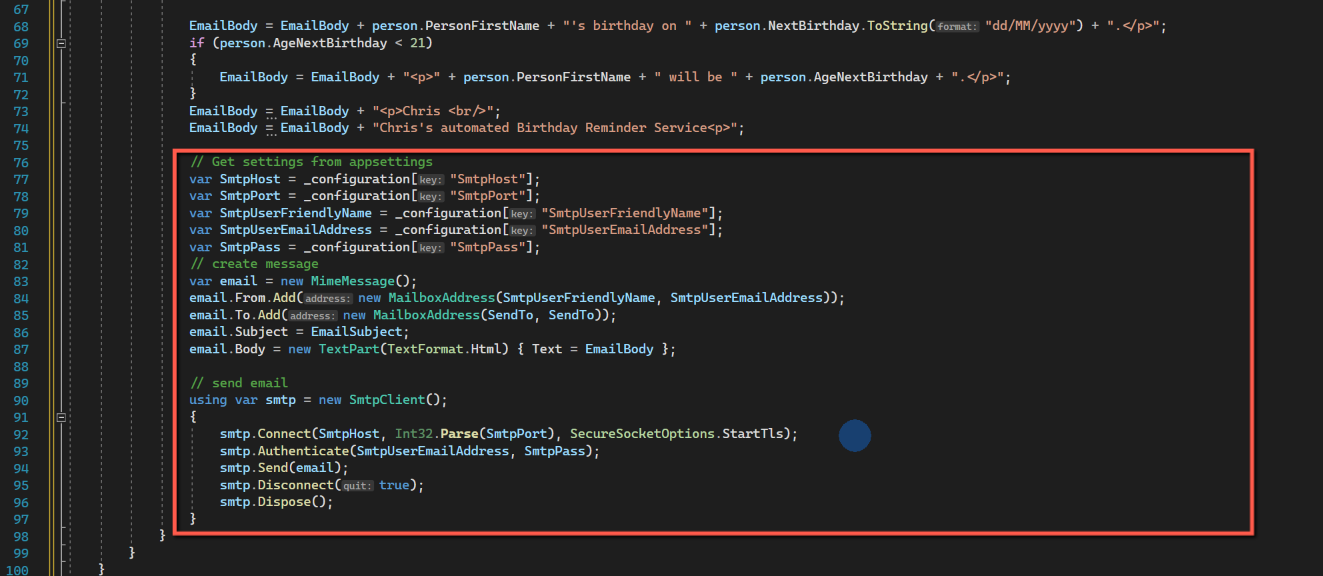
to this:

Email Body
It also occurs to me that we have the same code for building the body of the email in two places, in the EmailTestPage and ReminderService. Perhaps a service to create the body of the email could also be added.
If we look at the EmailTestPage we have the following code to generate the email body.
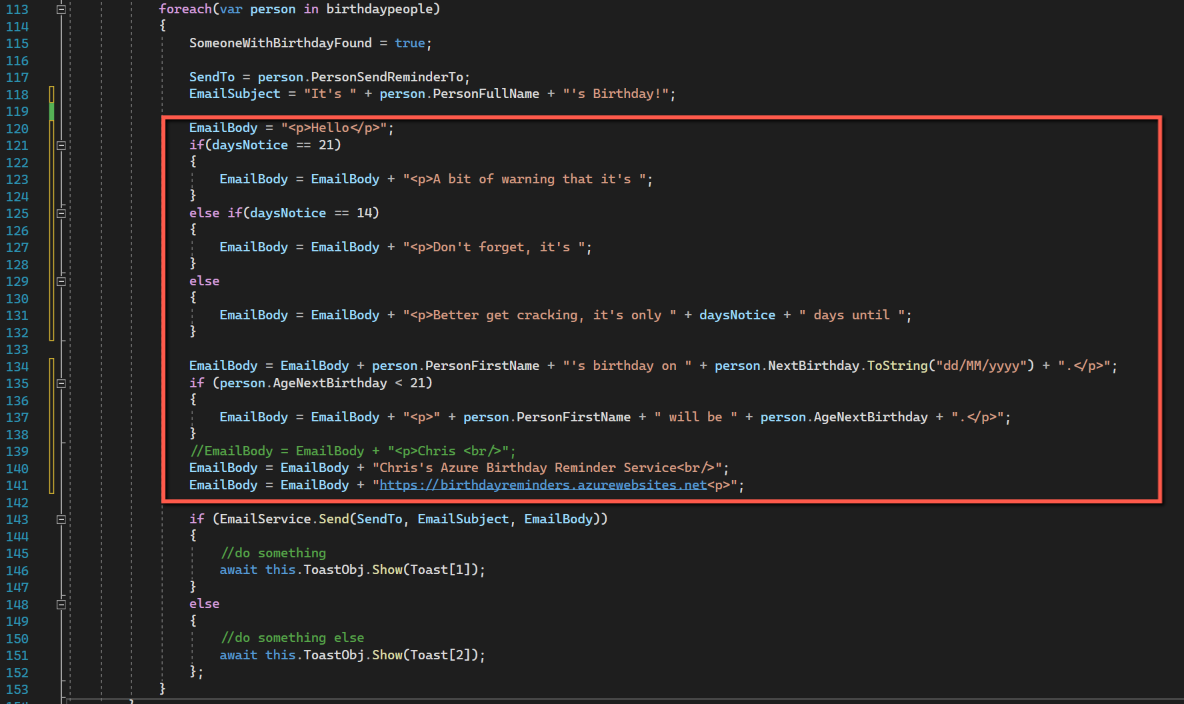
And we have exactly the same code in ReminderService. This code includes a number of variables that we will need to pass to any new service, i.e.
- daysNotice
- PersonFirstName
- NextBirthday
- AgeNextBirthday
We will want the email body returned as a string.
To create the new service, select the Data folder in the Solution Explorer, right-click and add a new class. Call it 'EmailBodyService' and the template code will be created:
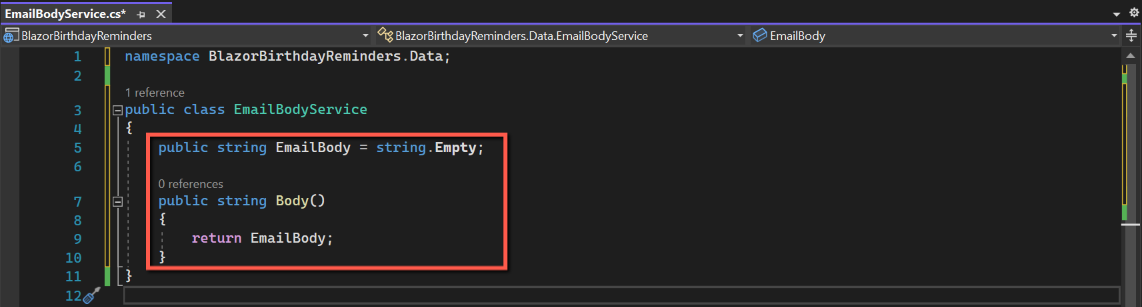
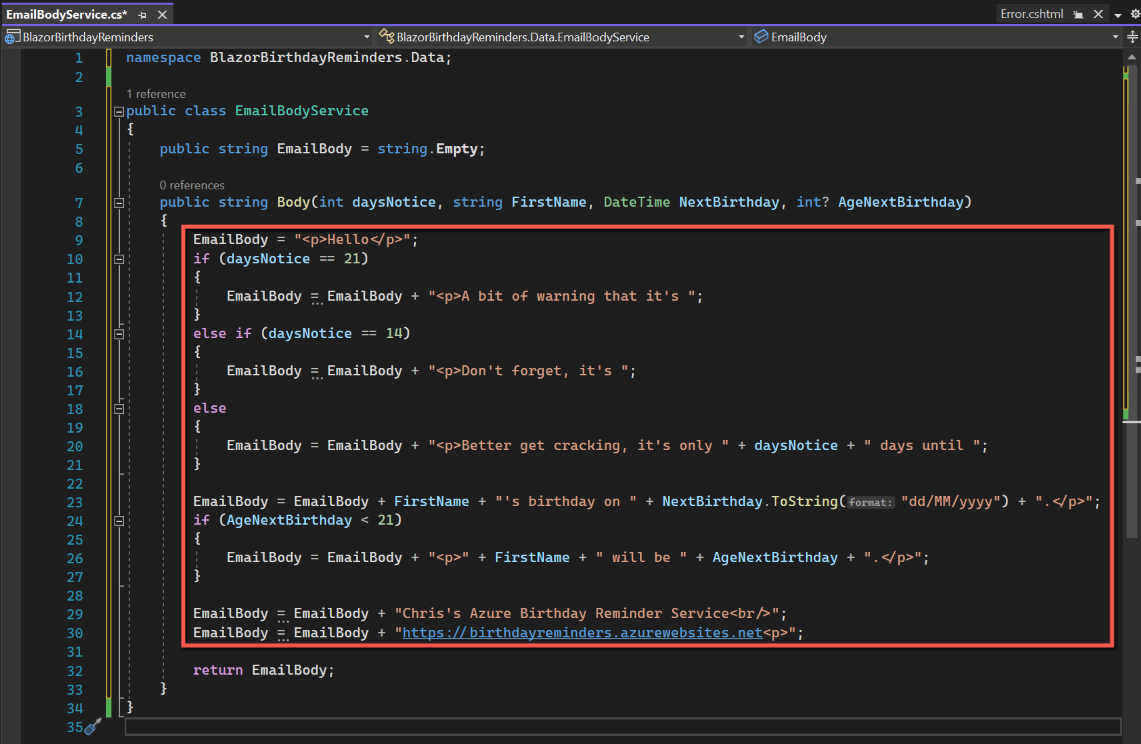
We will want to return a string that comprises the text we want as the body of the email. Within the EmailBodyService class declare a string called 'EmailBody' and set it to an empty string.
Also within the class declare a method of type string called 'Body' (for example, but do not call it EmailBody) and add the line that will return EmailBody to the calling method.
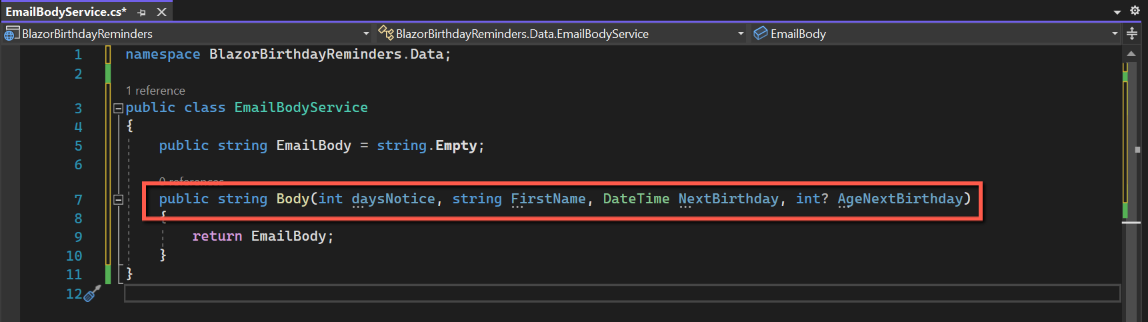
We now need to add the parameters being passed to the 'Body' method, by adding the parameter type and name within the brackets of the method. (i.e. int daysNotice, string FirstName, DateTime NextBirthday, int? AgeNextBirthday)
We can now copy and paste the code used to construct the email body from either ReminderService or EmailTestPage into the 'Body' method.
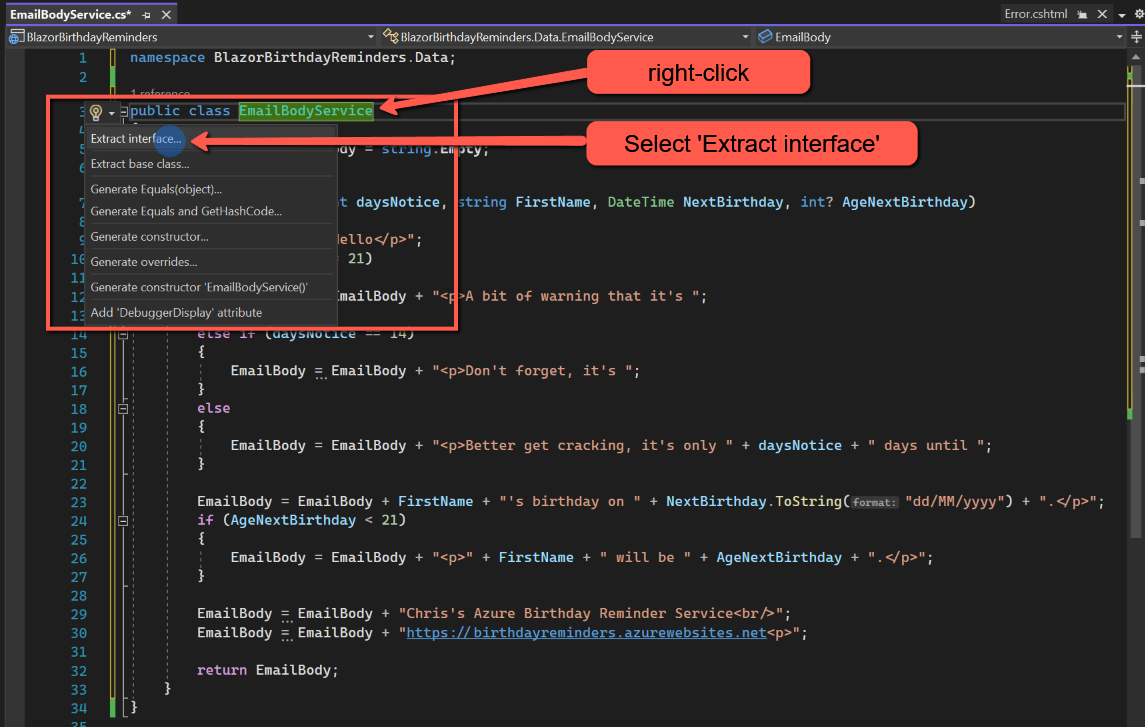
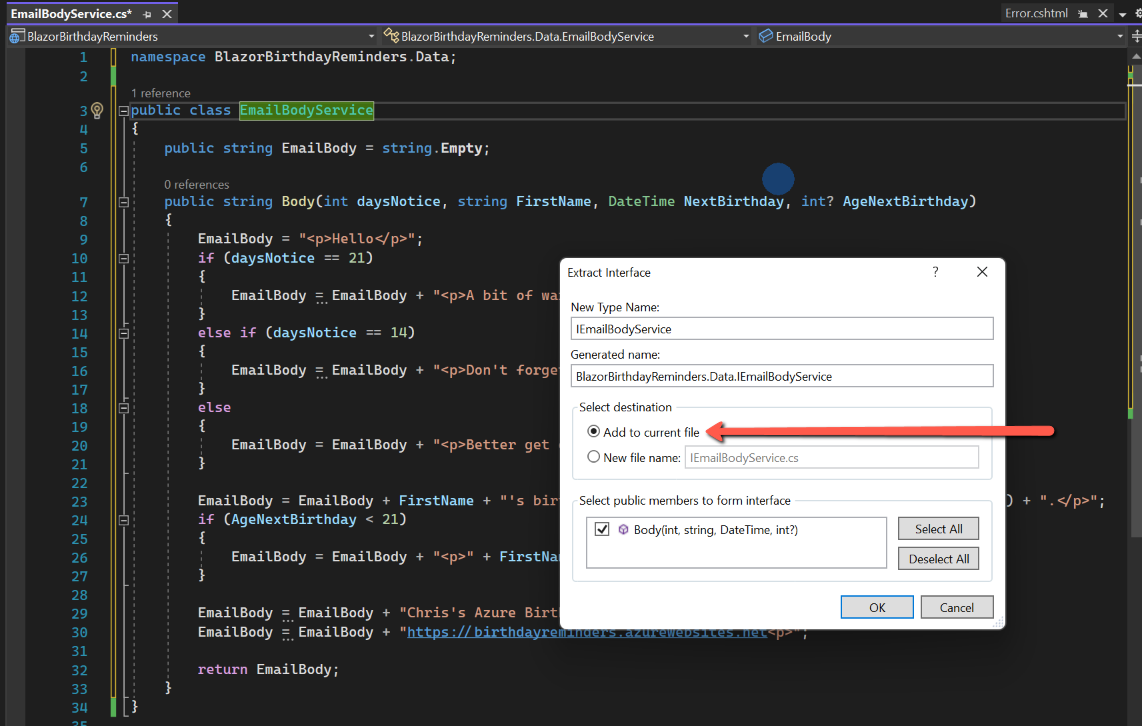
We need to add the 'Interface'. To do this right-click 'EmailBodyService' on the 'public class' line, select 'Quick Actions' followed by 'Extract interface'. In the pop-up box select the option to include in the same file (although it would be quite OK to extract into a separate file) and accept the other defaults.

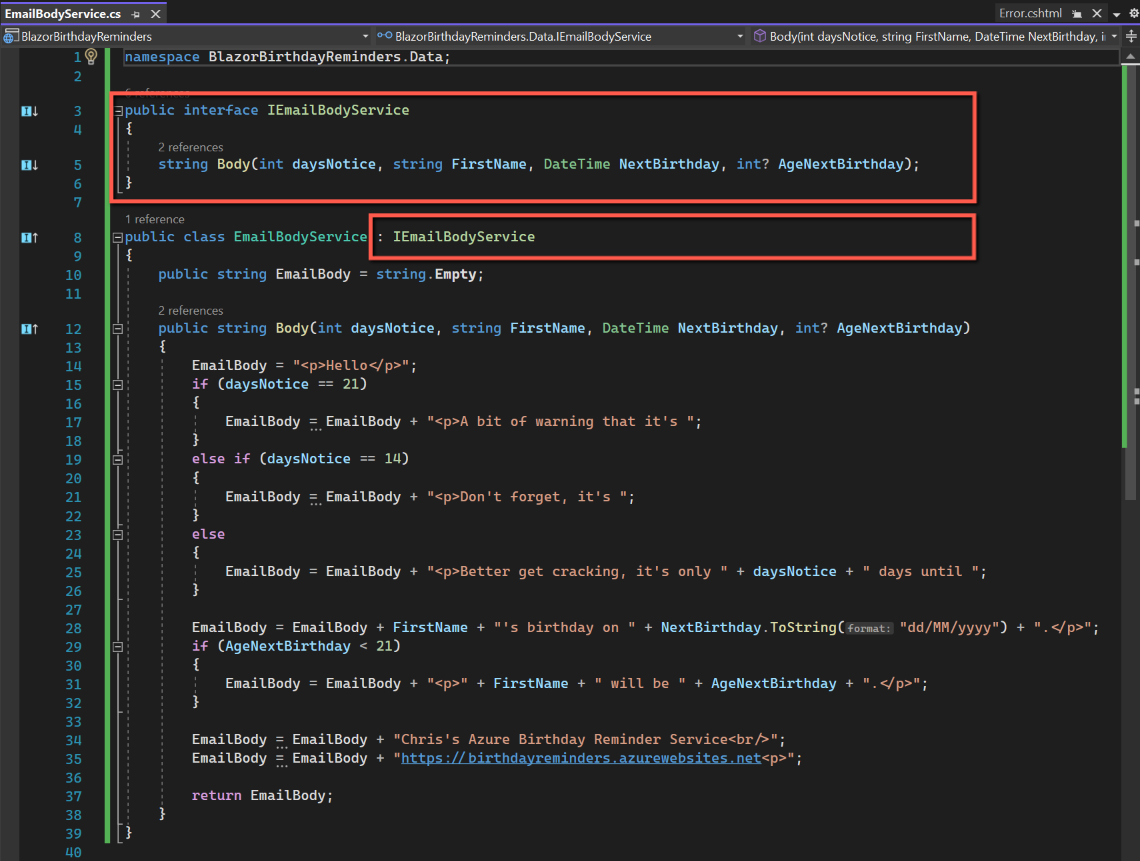
The code for the EmailBodyService is:
namespace BlazorBirthdayReminders.Data;

public interface IEmailBodyService
{
    string Body(int daysNotice, string FirstName, DateTime NextBirthday, int? AgeNextBirthday);
}

public class EmailBodyService : IEmailBodyService
{
    public string EmailBody = string.Empty;

    public string Body(int daysNotice, string FirstName, DateTime NextBirthday, int? AgeNextBirthday)
    {
        EmailBody = "<p>Hello</p>";
        if (daysNotice == 21)
        {
            EmailBody = EmailBody + "<p>A bit of warning that it's ";
        }
        else if (daysNotice == 14)
        {
            EmailBody = EmailBody + "<p>Don't forget, it's ";
        }
        else
        {
            EmailBody = EmailBody + "<p>Better get cracking, it's only " + daysNotice + " days until ";
        }

        EmailBody = EmailBody + FirstName + "'s birthday on " + NextBirthday.ToString("dd/MM/yyyy") + ".</p>";
        if (AgeNextBirthday < 21)
        {
            EmailBody = EmailBody + "<p>" + FirstName + " will be " + AgeNextBirthday + ".</p>";
        }

        EmailBody = EmailBody + "Chris's Azure Birthday Reminder Service<br/>";
        EmailBody = EmailBody + "https://birthdayreminders.azurewebsites.net<p>";

        return EmailBody;
    }
}
To make the service available to other classes and services we need to add the following line to program.cs in the 'builder' section:
builder.Services.AddTransient<IEmailBodyService, EmailBodyService>();Using EmailBodyService
ReminderService.cs
To use the new EmailBodyService within ReminderService to obtain the text for the body of the email:
- Insert "private readonly IEmailBodyService _emailBodyService;" at the top of the ReminderService class.
- Add " IEmailBodyService EmailBodyService" into the parameters for 'ReminderService'.
- Add " _emailBodyService = EmailBodyService;" into the 'ReminderService' class.
- Comment out the code in the 'foreach' loop used to construct 'EmailBody' and insert in its place: "EmailBody= _emailBodyService.Body(daysNotice, person.PersonFirstName, person.NextBirthday, person.AgeNextBirthday);"
The revised code for ReminderService is:
namespace BlazorBirthdayReminders.Data;

public interface IReminderService
{
    public void SendReminders() { }
}

public class ReminderService : IReminderService
{
    private readonly IEmailService _emailService;

    private readonly IPersonService _personService;

    private readonly IEmailBodyService _emailBodyService;

    public ReminderService(IEmailService EmailService, IPersonService PersonService, IEmailBodyService EmailBodyService)
    {
        _emailService = EmailService;
        _personService = PersonService;
        _emailBodyService = EmailBodyService;
    }

    private List<Person>? birthdaypeople;

    public async Task SendReminders()
    {
        string? SendTo;
        string? EmailSubject;
        string? EmailBody;

        for (int daysNotice = 7; daysNotice < 22; daysNotice = daysNotice + 7)
        {
            IEnumerable<Person> people;

            people = await _personService.PersonGetByDaysToNextBirthday(daysNotice);

            birthdaypeople = people.ToList(); //Convert from IEnumerable to List

            foreach (var person in birthdaypeople)
            {
                SendTo = person.PersonSendReminderTo;
                EmailSubject = "It's " + person.PersonFullName + "'s Birthday!";

                EmailBody= _emailBodyService.Body(daysNotice, person.PersonFirstName, person.NextBirthday, person.AgeNextBirthday);

                _emailService.Send(SendTo, EmailSubject, EmailBody);

            }
        }
    }
}
EmailTestPage.razor
To use dependency injection in a razor page is slightly different. The requirements for this are:
- At the top of the file insert: "@inject IEmailBodyService EmailBodyService"
- Comment out, or delete, the code used to construct the EmailBody and replace with "EmailBody= EmailBodyService.Body(daysNotice, person.PersonFirstName, person.NextBirthday, person.AgeNextBirthday);"
The complete, revised code for EmailTestPage.razor (with the old code for EmailBody deleted) is:
@page "/manualreminders/"

@using MailKit.Net.Smtp;
@using MailKit.Security;
@using MimeKit;
@using MimeKit.Text;

@inject IEmailService EmailService
@inject IPersonService PersonService
@inject IEmailBodyService EmailBodyService

<h3>Manual Birthday Reminder Emails</h3>
<hr />

<div>
    <p>By clicking the button the system will look for forthcoming
        birthdays and will send reminder emails.</p>
</div>
<div class="button-container">
    <button type="button" class="e-btn e-normal e-primary" @onclick="@SendEmail">Send Birthday Reminder Emails</button>
</div>

<div class="col-lg-12 control-section toast-default-section">
    <SfToast @ref="ToastObj" Timeout="4000">
        <ToastPosition X="Right" Y="Top"></ToastPosition>
    </SfToast>
</div>

<style>
    @@font-face {
        font-family: 'Toast_icons';
        src: url(data:application/x-font-ttf;charset=utf-8;base64,AAEAAAAKAIAAAwAgT1MvMj0gSRkAAAEoAAAAVmNtYXDnM+eRAAABsAAAAEpnbHlmzVnmlwAAAhgAAAZAaGVhZBEYIl8AAADQAAAANmhoZWEHlgN3AAAArAAAACRobXR4LvgAAAAAAYAAAAAwbG9jYQnUCGIAAAH8AAAAGm1heHABHQBcAAABCAAAACBuYW1lfUUTYwAACFgAAAKpcG9zdAxfTDgAAAsEAAAAggABAAADUv9qAFoEAAAAAAAD6AABAAAAAAAAAAAAAAAAAAAADAABAAAAAQAACcU5MF8PPPUACwPoAAAAANcI7skAAAAA1wjuyQAAAAAD6APoAAAACAACAAAAAAAAAAEAAAAMAFAABwAAAAAAAgAAAAoACgAAAP8AAAAAAAAAAQPqAZAABQAAAnoCvAAAAIwCegK8AAAB4AAxAQIAAAIABQMAAAAAAAAAAAAAAAAAAAAAAAAAAAAAUGZFZABA5wDnCgNS/2oAWgPoAJYAAAABAAAAAAAABAAAAAPoAAAD6AAAA+gAAAPoAAAD6AAAA+gAAAPoAAAD6AAAA+gAAAPoAAAD6AAAAAAAAgAAAAMAAAAUAAMAAQAAABQABAA2AAAABAAEAAEAAOcK//8AAOcA//8AAAABAAQAAAABAAIAAwAEAAUABgAHAAgACQAKAAsAAAAAAAAAQgB8AMIA4gEcAZQCBgJwAo4DAAMgAAAAAwAAAAADlAOUAAsAFwAjAAABFwcXNxc3JzcnBycFDgEHLgEnPgE3HgEFHgEXPgE3LgEnDgEBTXh4L3h4L3h4L3h4AbwDt4qKtwMDt4qKt/0eBeuxsesFBeuxsesCbHh4L3h4L3h4L3h4p4q3AwO3ioq3AwO3irHrBQXrsbHrBQXrAAAAAwAAAAADlAOUAAUAEQAdAAABJwcXAScXDgEHLgEnPgE3HgEFHgEXPgE3LgEnDgEBr2UylwEbMqADt4qKtwMDt4qKt/0eBeuxsesFBeuxsesBrGQylgEcMqKKtwMDt4qKtwMDt4qx6wUF67Gx6wUF6wAAAAAFAAAAAAOUA5cABQARAB0AIQAlAAABFzcnNSMFDgEHLgEnPgE3HgEFHgEXPgE3LgEnDgElFzcnBRc3JwHKxiCnPwFOA6V8fKUDA6V8fKX9aATToJ/UBATUn5/UAh7ANsD9fja/NQGedzNj29F8pAMDpHx8pQMDpXyf1AQE1J+g0wQE0/GhQKGhQKFAAAQAAAAAA74DfgADAAcACgANAAAlMzUjNTM1IwEhCQEhAQHLUlJSUgFj/YwBOv42A5T+NuZUUqf+igIc/ZADFgAEAAAAAAOUA5QAAwAHABMAHwAAATM1IzUzNSMFDgEHLgEnPgE3HgEFHgEXPgE3LgEnDgEBylRUVFQBbgO3ioq3AwO3ioq3/R4F67Gx6wUF67Gx6wEk+lNT0Iq3AwO3ioq3AwO3irHrBQXrsbHrBQXrAAAAAAcAAAAAA+gDMQALABUAJQAuADcAQQBLAAABFhcVITUmJz4BMxYFFhcVITU+ATcWJQYHFSE1LgEjIgYHLgEjIgEWFAYiJjQ2MgUWFAYiJjQ2MiUGFBYXPgE0JiIFBhQWFz4BNCYiA1xEBP6sAxUeRiRX/qxEBP45BIlXV/7xZQsD6AvKUypvMzNvKlMCKxozTTMzTP6CGTNMNDRMAQItWUREWlqI/jstWkREWVmIAWMbFjc3IBgKDwQcGxY3NxY3BAQjJUt7e0tKFxgYFwEMGU01NU0zGhlNNTVNMxYthloCAlqGWy4thloCAlqGWwAAAAQAAAAAA5wCxwAIABQANABFAAABFBYyNjQmIgYXDgEHLgEnPgE3HgEfAQcOAQ8BNz4BNS4BJw4BBxQWHwEnLgEvATc+ATc2FiUOAQ8BFx4BNz4BPwEnJiciAb8fLR4eLR+wAkU0NEUBAUU0NEX8BgEemG0FBB8kAlZBQFcBKyUCCkeVTAYBH76RVMP+3bDPBwcKZclcu/AGCwrM2AoBxxYfHy0eHhc0RQEBRTQ1RQEBRSgEARpWGAECFUIoQVcCAldBLEYUAQEIQkAGASJsBwFCoRbFFAoJW0sBCo8LCgztAQAAAAIAAAAAA4ADbAA4AEEAAAEEJCcmDgEWFx4BHwEVFAYHDgEnJg4BFhcWNjc2Fx4BBx4BFzc+ASc2JicmJzUzPgE3PgEnJicjIiUUFjI2NCYiBgNM/tz+pwwMGxEDDAaMfAcSETKEQw8WBg8Og80hNSg4JwICEw0FDhECAjFJEBICPYhKDQgGChQCB/5dMUgxMUgxAuB/ZRcIAxgbCQdHEQGTGi8TOVgKAw8dFwMNuDUFHTGDCA0QAQECFQ8Mnz8LCasJKiUHGg0SATMkMDBJMDAAAAAAAgAAAAAC/QMkAAMADQAAAQchJxMeATMhMjY3EyEC2x3+bB0kBCQZAQQZJARH/ewDBuDg/fcZICAZAicAAwAAAAACzwPoACwAQwBPAAABERQfARYfAzMVHgE7ATI2NRE0JisBNTEWOwEyNjQmJyMiJi8BLgErAQ4BAxUzNTQ2NzMeARcVMzUuAScjIgcjESM1HgEXPgE3LgEnDgEBVQEBAwQCCAjXARENOg0REQ2zDROVExoaE2UQGAQfAxAKYg0RPR8RDZcNEQEeASIalxANAR8CTTo6TQEBTTo6TQJ8/nYEBQIGBAIFArYNERENARENEUoNGicZARMPfQoNARH98Hl5DREBARENeXkaIgEIAe3FOk0CAk06Ok0BAU0AAAAAAgAAAAAC5gMyAAkAEQAAJRQWMyEyNjURITcjFSE1IycjASApHgEaHin+WFBuAeR+JLD8HigoHgGfeT09HgAAAAAAEgDeAAEAAAAAAAAAAQAAAAEAAAAAAAEAEgABAAEAAAAAAAIABwATAAEAAAAAAAMAEgAaAAEAAAAAAAQAEgAsAAEAAAAAAAUACwA+AAEAAAAAAAYAEgBJAAEAAAAAAAoALABbAAEAAAAAAAsAEgCHAAMAAQQJAAAAAgCZAAMAAQQJAAEAJACbAAMAAQQJAAIADgC/AAMAAQQJAAMAJADNAAMAAQQJAAQAJADxAAMAAQQJAAUAFgEVAAMAAQQJAAYAJAErAAMAAQQJAAoAWAFPAAMAAQQJAAsAJAGnIEZpbmFsIFRvYXN0IE1ldHJvcFJlZ3VsYXJGaW5hbCBUb2FzdCBNZXRyb3BGaW5hbCBUb2FzdCBNZXRyb3BWZXJzaW9uIDEuMEZpbmFsIFRvYXN0IE1ldHJvcEZvbnQgZ2VuZXJhdGVkIHVzaW5nIFN5bmNmdXNpb24gTWV0cm8gU3R1ZGlvd3d3LnN5bmNmdXNpb24uY29tACAARgBpAG4AYQBsACAAVABvAGEAcwB0ACAATQBlAHQAcgBvAHAAUgBlAGcAdQBsAGEAcgBGAGkAbgBhAGwAIABUAG8AYQBzAHQAIABNAGUAdAByAG8AcABGAGkAbgBhAGwAIABUAG8AYQBzAHQAIABNAGUAdAByAG8AcABWAGUAcgBzAGkAbwBuACAAMQAuADAARgBpAG4AYQBsACAAVABvAGEAcwB0ACAATQBlAHQAcgBvAHAARgBvAG4AdAAgAGcAZQBuAGUAcgBhAHQAZQBkACAAdQBzAGkAbgBnACAAUwB5AG4AYwBmAHUAcwBpAG8AbgAgAE0AZQB0AHIAbwAgAFMAdAB1AGQAaQBvAHcAdwB3AC4AcwB5AG4AYwBmAHUAcwBpAG8AbgAuAGMAbwBtAAAAAAIAAAAAAAAACgAAAAAAAAAAAAAAAAAAAAAAAAAAAAAADAECAQMBBAEFAQYBBwEIAQkBCgELAQwBDQAFRXJyb3IHU3VjY2VzcwVBbGFybQdXYXJuaW5nBEluZm8HTWVldGluZwVCbGluawdTdHJldGNoA1NpcANTaXQFVHJhc2gAAAAA) format('truetype');
        font-weight: normal;
        font-style: normal;
    }

    #toast_types button {
        margin: 5px;
        min-width: 160px;
        max-width: 160px;
    }

    .toast-icons {
        font-family: 'Toast_icons' !important;
        speak: none;
        font-size: 55px;
        font-style: normal;
        font-weight: normal;
        font-variant: normal;
        text-transform: none;
        line-height: 1;
        -webkit-font-smoothing: antialiased;
        -moz-osx-font-smoothing: grayscale;
    }

    #toast_type .e-toast-icon.e-icons {
        height: auto;
        font-size: 30px;
    }

    .toast-icons.e-success::before {
        content: "\e701";
    }

    .toast-icons.e-error::before {
        content: "\e700";
    }

    .toast-icons.e-info::before {
        content: "\e704";
    }

    .toast-icons.e-warning::before {
        content: "\e703";
    }

    #toast_types {
        text-align: center;
    }
</style>

@code {
    public MimeMessage email = new MimeMessage();

    private IEnumerable<Person>? people;
    private List<Person>? birthdaypeople;

    SfToast ToastObj;

    bool SomeoneWithBirthdayFound = false;

    private List<ToastModel> Toast = new List<ToastModel>
    {
        new ToastModel{ Title = "Warning!", Content="There was a problem with your network connection.", CssClass="e-toast-warning", Icon="e-warning toast-icons" },
        new ToastModel{ Title = "Success!", Content="Your message has been sent successfully.", CssClass="e-toast-success", Icon="e-success toast-icons" },
        new ToastModel{ Title = "Error!", Content="A problem has been occurred while submitting your email", CssClass="e-toast-danger", Icon="e-error toast-icons" },
        new ToastModel{ Title = "Information!", Content="No one with an upcoming birthday was found.", CssClass="e-toast-info", Icon="e-info toast-icons" }
    };


    public async Task SendEmail()
    {
        string? SendTo;
        string? EmailSubject;
        string? EmailBody;

        for(int daysNotice = 7; daysNotice < 22; daysNotice = daysNotice + 7)
        {
            people = await PersonService.PersonGetByDaysToNextBirthday(daysNotice);

            birthdaypeople = people.ToList(); //Convert from IEnumerable to List

            foreach(var person in birthdaypeople)
            {
                SomeoneWithBirthdayFound = true;

                SendTo = person.PersonSendReminderTo;
                EmailSubject = "It's " + person.PersonFullName + "'s Birthday!";

                EmailBody= EmailBodyService.Body(daysNotice, person.PersonFirstName, person.NextBirthday, person.AgeNextBirthday);

                if (EmailService.Send(SendTo, EmailSubject, EmailBody))
                {
                    //do something
                    await this.ToastObj.Show(Toast[1]);
                }
                else
                {
                    //do something else
                    await this.ToastObj.Show(Toast[2]);
                };
            }
        }
        if(!SomeoneWithBirthdayFound)
        {
            await this.ToastObj.Show(Toast[3]);
        }
    }
 }
Advantage of Dependency Injection
One great advantage of using code like this is that in future, should I want the text of the email body to be changed it, there is only one place it needs to be changed.
Constructors
This definition is taken from www.c-sharpcorner.com where it is explained in much more detail and with some examples.
A constructor in C# is a member of a class. It is a method in the class which gets executed when a class object is created. Usually we put the initialization code in the constructor. The name of the constructor is always is the same name as the class. A C# constructor can be public or private. A class can have multiple overloaded constructors.