Blazor Render Modes
Before we start programming our application we need to know something about the render modes now available in .NET 8. In .NET 7 there was basically a choice of either
- Server rendered or
- Client rendered (WebAssembly).
With .NET 8 all that changes! Now individual pages (or even sub-components) can be:
- Static Server-side Rendering (SSR)
- Server Interactive
- WebAssembly Interactive
- Interactive Auto Render Mode
YouTube Video
1. Static Server-Side Rendering
Although it shouldn't be completely disregarded, Static Server-side Rendering is exactly what it says - static. This means that there can be no interaction with the user. However, Static Server-side does not exclude getting data from a database or an API on initialisation. It just means it cannot be refreshed or updated by clicking a button on the page for example. If no interaction is needed it could be a good choice.
Stream Rendering
To confuse the situation a little Blazor now has a new option called 'Stream Rendering'. This is an enhancement for Static Server-Side Rendering that allows something to be displayed on the screen (e.g. a 'Loading...' message) whilst data is read from a database or API call, but it is not interactive.
2. Server Interactive
This is the equivalent of the previous Server mode and uses Signal R (websocket) to transfer data back and forth between the web browser and server.
3. WebAssembly Interactive
This is analogous to the old WebAssembly mode. The page is rendered on the client and data is transferred between the client and server via an API client service on the client and an API controller on the server. The 'work' is mainly done on the client.
4. Interactive Auto Render Mode
For WebAssembly Interactive mode there is yet another possibility: Interactive Auto Render Mode. In this mode Server rendering is used the first time the page or component is opened, while the WebAssembly runtime is being downloaded to the client in the background. Once downloaded the rendering will switch from Server to WebAssembly.
The Big Difference
The big difference is that now we can mix and match these approaches with individual pages or even sub-components using any of the above rendering modes.
But which render mode one to choose?
Let's look at the templates provided by Microsoft.
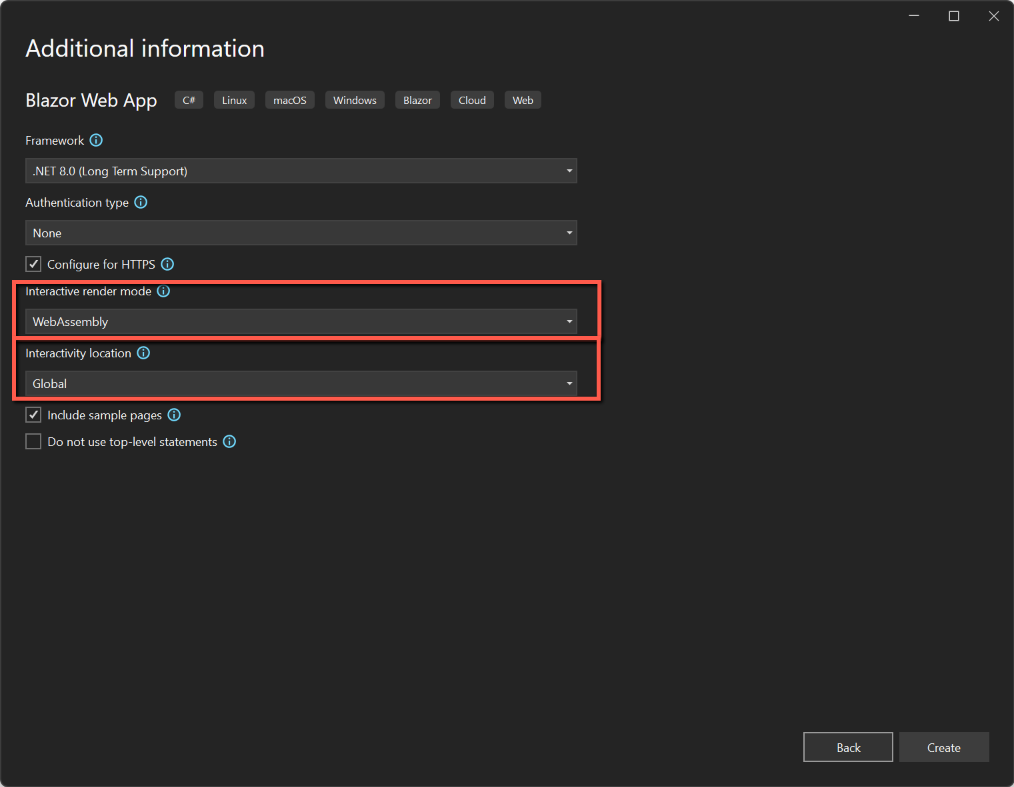
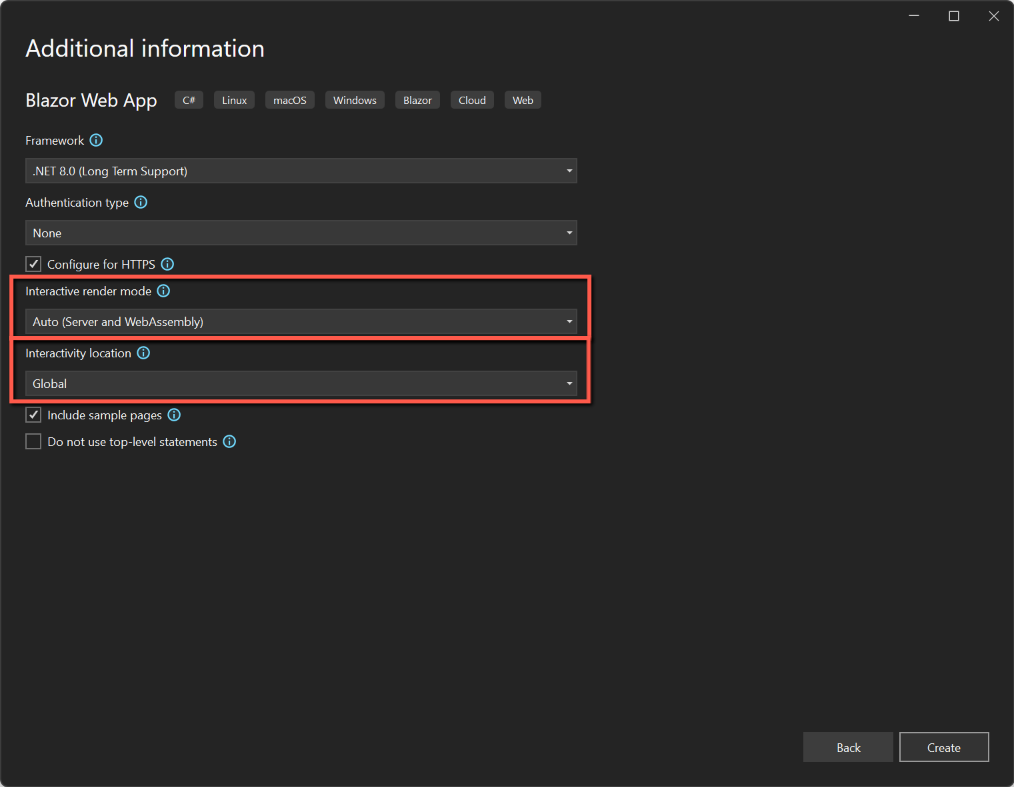
To compare these various modes I am going to create sample applications, using Visual Studio 2022, and selecting the Blazor Web App template and then choosing each render mode. There is one other choice to be made when creating a Blazor Web App and that is the 'Interactivity location'. For my initial investigation I will be only selecting 'Global' - but more of that later.
To start we will be creating four applications, one for each render mode. To create the applications:
- Open Visual Studio 2022
- Select Create New Project and choose 'Blazor Web App'
- Enter a name for the project and location
- On the Additional Information form, enter
- Framework: .NET 8
- Authentication type: None
- Configure for HTTPS: Yes
- Interactive server mode: in turn
- None
- Server
- WebAssembly
- Auto (Server and WebAssembly)
- Interactivity location: Global
- Include sample pages: Yes


Nomenclature
I'm going to use the phrases used in the template dialogs to save swapping between the different render mode names used by Microsoft and others, and hopefully to be consistent. This is the terminology I will use:
| Render Mode | Sometimes Called |
| Interactive None | Static Server |
| Interactive Server | Interactive Server Side Rendering (SSR) |
| Interactive WebAssembly | Client-side rendering (CSR) |
| Interactive Auto |
Solution Explorer
For each of the applications we will start by looking at Solution Explorer.
Interactive None
In the case of 'None' there is only one project (effectively the Server project) and that under the Components folder we have a Layout folder and Pages folder, the Pages folder containing all the razor pages for the application.
Those familiar with the .NET 7 templates will notice that the Counter page is missing. This is because there is no point in including it as it relies on the interaction of the user clicking the 'Click me' button.
Interactive Server
Note that there is only one project (effectively the Server project) and that under the Components folder we have a Layout folder and Pages folder, the Pages folder containing all the razor pages for the application. This is the same folder/file hierarchy as for Server Static, but now includes the Counter page.
Interactive WebAssembly
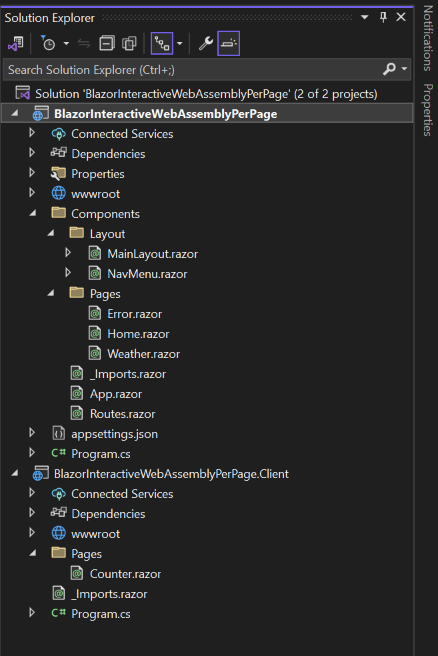
We now have 2 projects; as well as the main project (which I'm thinking of as the server project) we now have one with an extension of ".client". We also have 2 program.cs files, one in each of the projects.
In the main project we have a "Components" folder with a "Pages" sub-folder, but the only page this contains is "Error.razor". The "Components" folder also contains "App.razor". All the 'normal' pages are held in the .Client project.
Interactive Auto
The structure is exactly the same as WebAssembly Interactive (as far as I can see).


Program.cs
For each of the applications it is worthwhile comparing Program.cs
Interactive None
In the Interactive None application we see there is no mention of render modes (as one might expect)
Interactive Server
In the builder.Services section we now have .AddInteractiveServerComponents and .AddInteractiveServerRenderMode(); has been added to the app.MapRazorComponents
Interactive WebAssembly
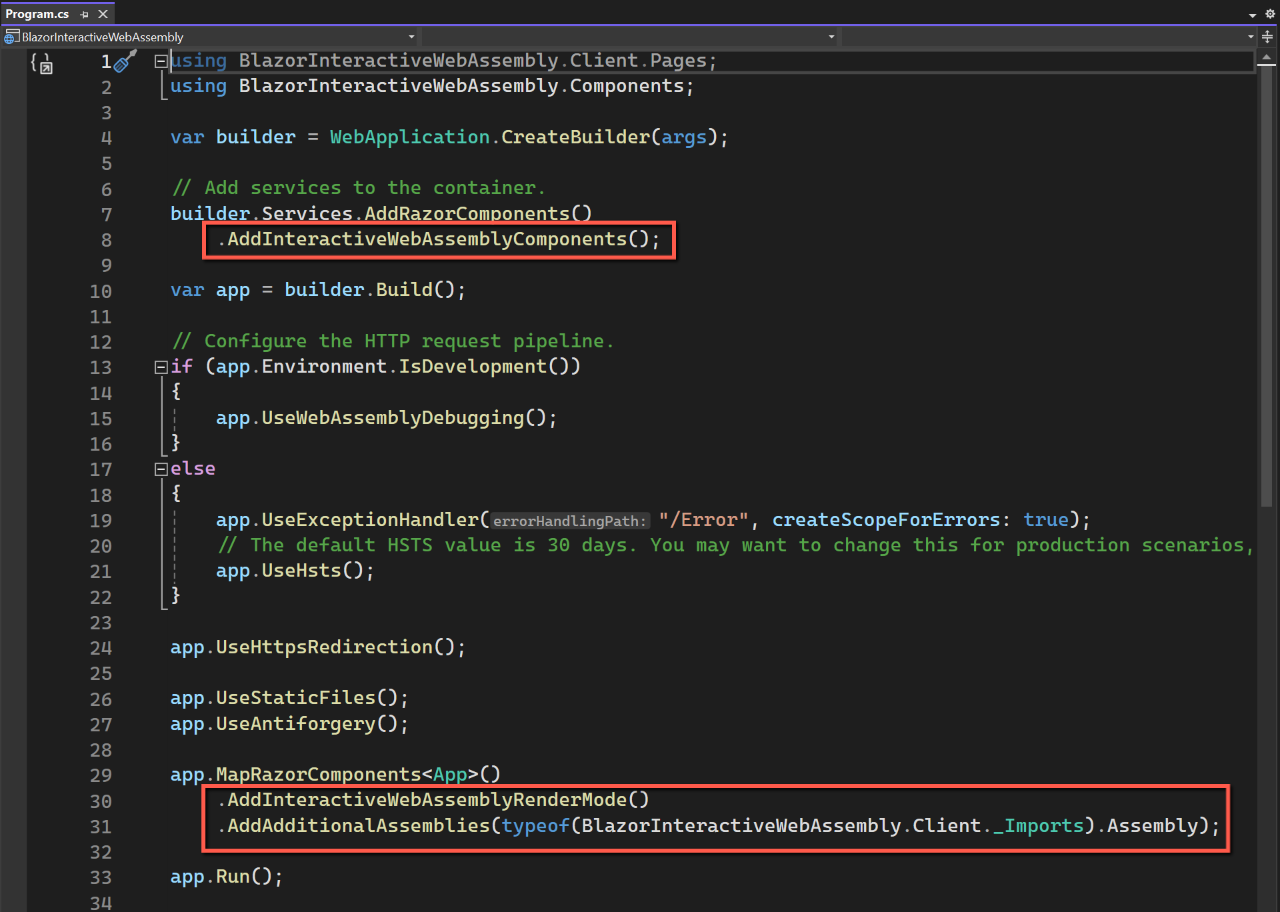
Open "Program.cs" in the main project. Notice that that .AddInteractiveWebAssemblyComponents has been included in the builder.Services section and .AddInteractiveWebAssemblyRenderMode();has been added to app.MapRazorComponents(). "Program.cs" in the .client project does not have anything specific about render modes.
Interactive Auto
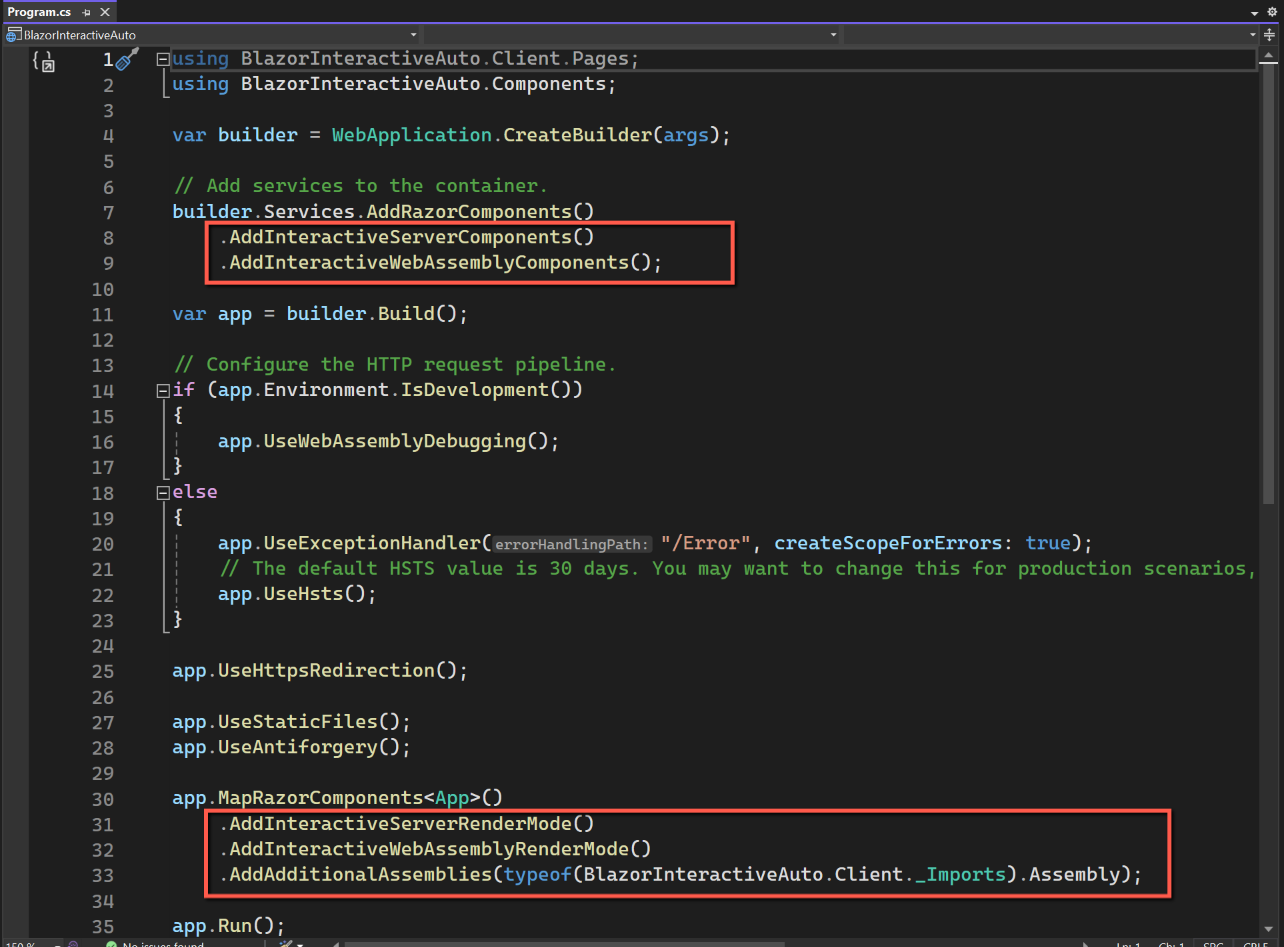
With Interactive Auto (Server and WebAssembly) Program.cs on the main project now has two lines added to builder.Services, one for .AddInteractiveServerComponents and one for .AddInteractiveWebAssemblyComponents. Similarly the app.MapRazorComponents() section has two lines, .AddInteractiveServerRenderMode(); and .AddInteractiveWebAssemblyRenderMode(); This seems to follow a logical pattern.


App.razor
The other file that varies according to render mode, other than the actual pages, is App.razor.
Interactive None
As with Program.cs, there is no mention of render mode in App.razor.
Interactive Server
The render mode is specified within both the <HeadOutlet> and <Routes> tags with @rendermode="InteractiveServer".
Interactive WebAssembly
As we might expect, the <HeadOutlet> and <Routes> tag have @rendermode="InteractiveWebAssembly. Compare this with Server Interactive where render mode was @rendermode="InteractiveServer".
Interactive Auto
Following the same pattern the render mode for the <HeadOutlet> and <Routes> tags is @rendermode="InteractiveAuto".


All the above seems to follow a logical pattern.
Razor Pages
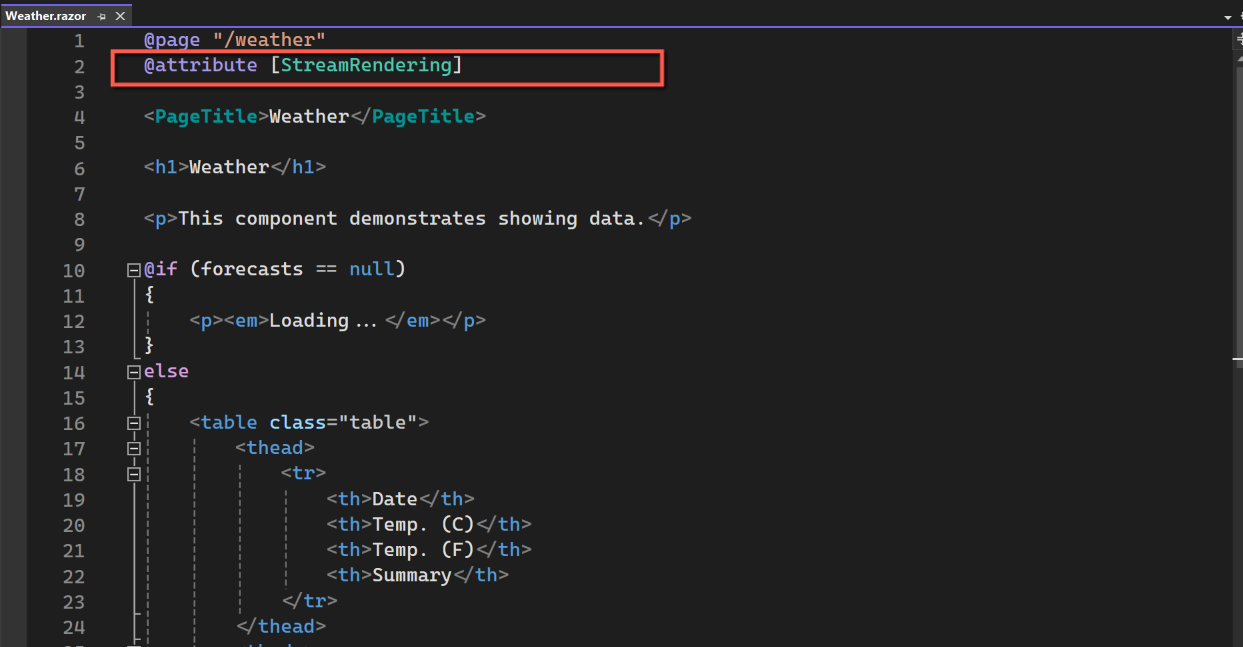
Generally, the pages of the applications do not reference the type of render mode to be used. The exception to this, in the templates at least, is on the Weather page of the Interactive None option. Here are screenshots of Weather.razor. Counter.razor also has no directive for render mode. (But note that all these samples were created with Location set to Global. The situation is different if set to Per Page/Component.)


But wait... Is there a problem?
However, the Weather page does exhibit one anomaly in the following render modes:
- Interactive Server
- Interactive WebAssembly
- Interactive Auto
The initial load shows the "Loading..." message, as one would expect, but if the page is refreshed using the normal page refresh button (ctrl-r in Edge), the page refreshes immediately with new data, but then after, I guess, 500 milliseconds we get the "Loading..." message again followed by some yet new data. This seems odd to me. What is going on?
By placing a break point on OnInitialzedAsync I found that this method is visited twice on page refresh. After a bit of investigation I found an issue logged in Github/aspnetcore, #52208. It appears that this is 'by design' (because pre-rendering is turned on by default). To get round this problem it is necessary to turn pre-rendering off. I found some resources that indicated that to do this I ought to enter a directive at the top of the page with @rendermode @(new InteractiveServerRenderMode(prerender: false)). However after making this change I still got the problem.
I took me quite a time, but I eventually realised that as I had created my applications with "Interactivity location" set to "Global" making the above directive on an individual page was ineffective, and that had I selected "Interactivity location" set to "Per page/Component" it would have worked. (More on that a little later...)
When setting "Interactivity location" to "Global" there are two lines in App.razor that effectively (I think) override any page directions. There are the two lines in the <HeadOutlet> and <Routes> tags. This is where prerendering can be set to false by making the following substitutions, depending on the Interactive mode.
<HeadOutlet @rendermode="new InteractiveServerRenderMode(prerender: false)" />

<Routes @rendermode="new InteractiveServerRenderMode(prerender: false)" />
<HeadOutlet @rendermode="new InteractiveWebAssemblyRenderMode(prerender: false)" /> />

<Routes @rendermode="new InteractiveWebAssemblyRenderMode(prerender: false)" />
<HeadOutlet @rendermode="new InteractiveAutoRenderMode(prerender: false)" / /> />
<Routes @rendermode="new InteractiveAutoRenderMode(prerender: false)" / />These will, of course, affect the whole project.
What about setting "Interactivity location" to "Per page/component"?
What would the projects have looked like if I selected "Interactivity location" to "Per page/component" from the templates? And what would have been the effect? I therefore created 3 more projects choosing this option. (I have ignored Interactive None.)
Solution Explorer
There didn't appear to be any difference between selecting "Global" and "Per page/component" for "Interactive location". For completeness I show the screenshots of Solution Explorer for "Per page/component" below:


Program.cs
These were as one might expect.


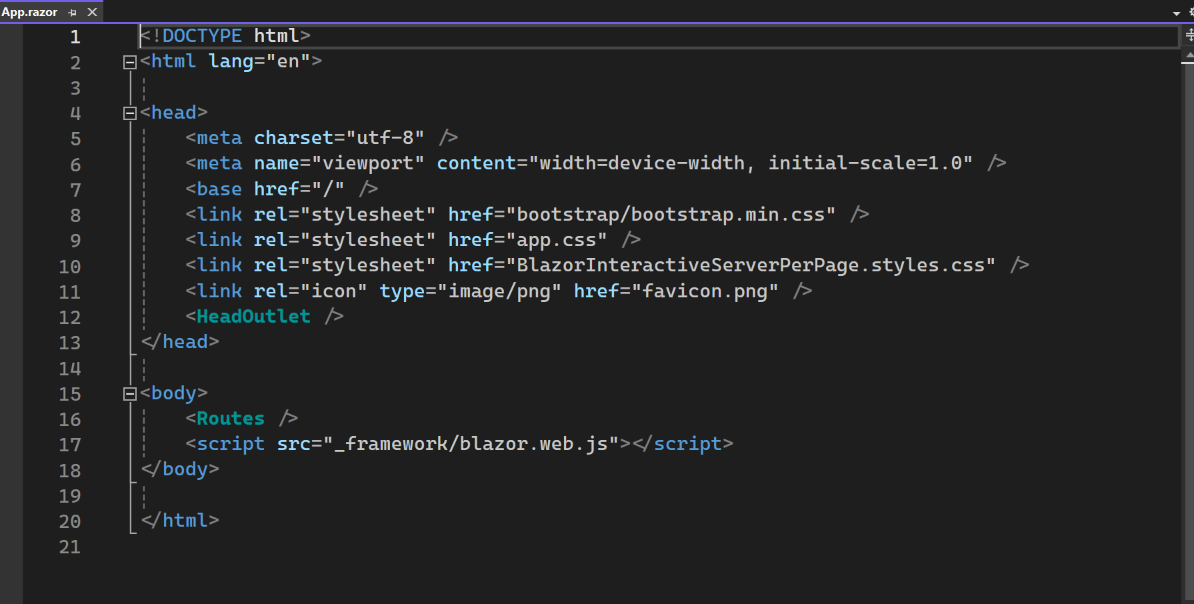
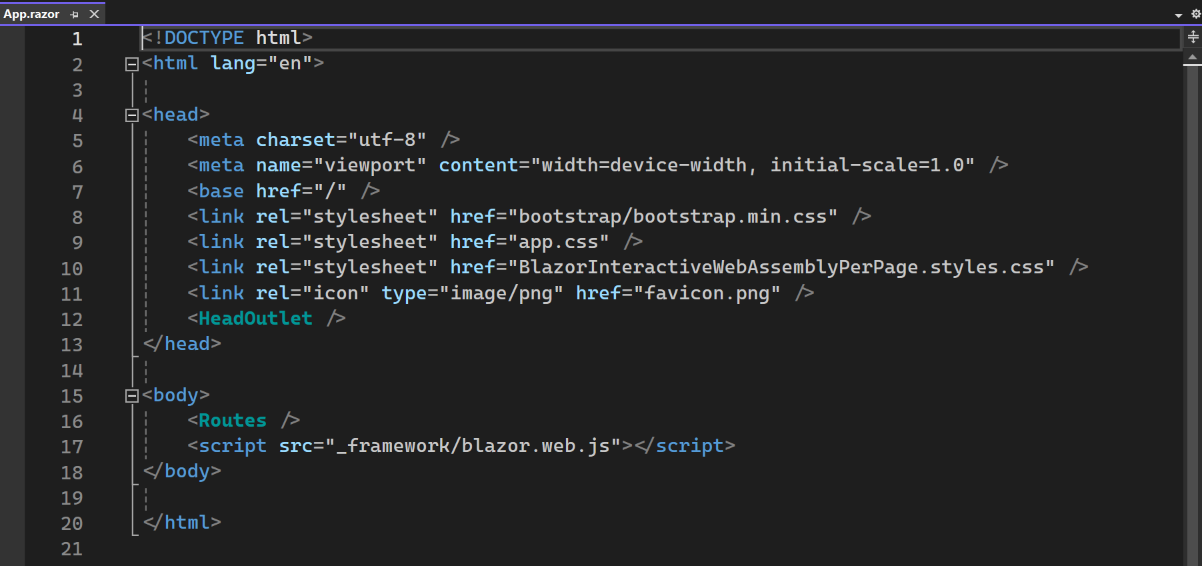
App.razor
But, in all three cases there were no render mode settings in App.razor. Compare this with "Global" location where <HeadOutlet> and <Routes> tags had 'Rendermode' defined.

Weather.razor
In all three versions, Weather.razor was in the main project (server) and had @attribute [StreamRendering] at the top of the file. Compare this with "Interactivity location" set to "Global" where only "Interactive None" had this directive and all other three options were left blank (to inherit the Global setting I presume.)
Counter.razor
The Counter page is located in the .Client project for WebAssembly and Auto, but in the main project for Interactive Server. The directive at the top of the file reflects this and is as one might expect.

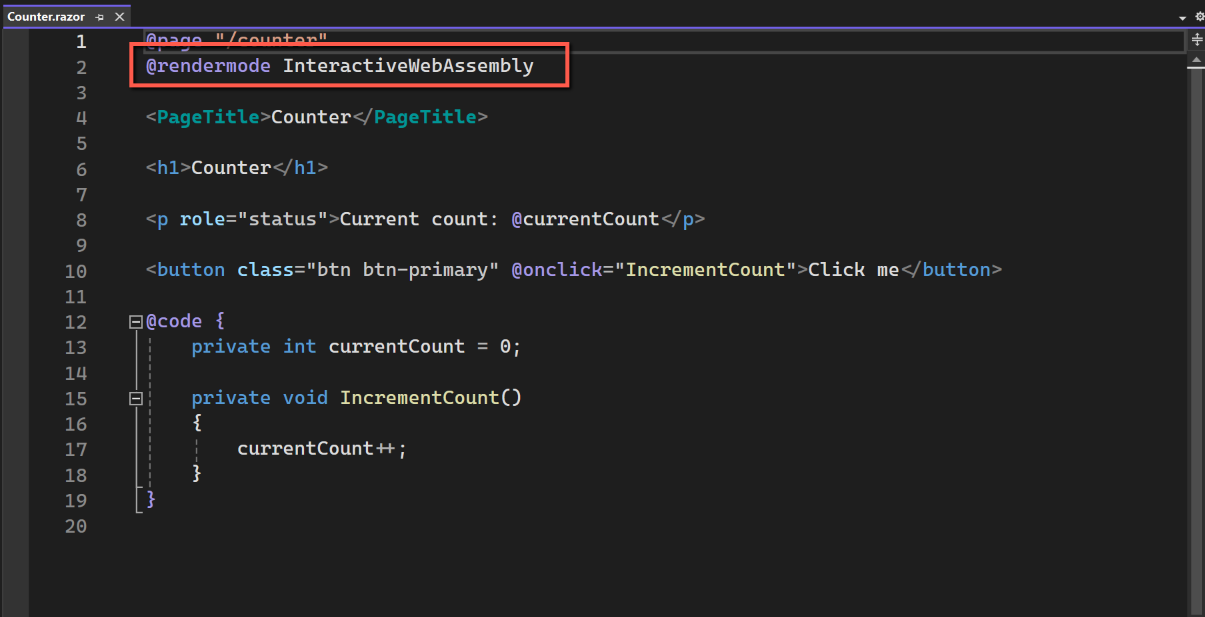

What have I learnt
In simple terms, when using the templates
- Setting "Interactive location" to "Global" sets the Interactivity for the application in App.razor and, it seems, cannot be overridden at the page/component level.
- Setting "Interactive location" to "Per page/component" does what it says and allows interactivity to be set to Server, WebAssembly or Auto on individual pages (but requires the page to be located in the Main project for Server or .Client project for WebAssembly or Auto.
Experiment
The template for Interactive WebAssembly (with "Interactive location" set to "Per Page/Component") creates the Weather page in the main (server) folder and has @attribute [StreamRendering]. What would happen if I created a similar Weather page in the .Client project and set it's @rendermode InteractiveWebAssembly. Would it display the double visit to OnInitializedAsync? And could I prevent this by the @rendermode @(new InteractiveWebAssemblyRenderMode(prerender: false)) directive.
The answer to this is that
- by setting
@rendermode InteractiveWebAssemblywe get the double visit to OnInitializedAsync. - By setting @rendermode
@(new InteractiveWebAssemblyRenderMode(prerender: false))on the new Weather page it does prevent the double visit to OnInitializedAsync
Going one step further could I change the rendermode to Auto and what would then happen?
We started this application by selecting "Interactive location" as "WebAssembly". To use the Auto render mode we must first make changes to Program.cs to include the server components:
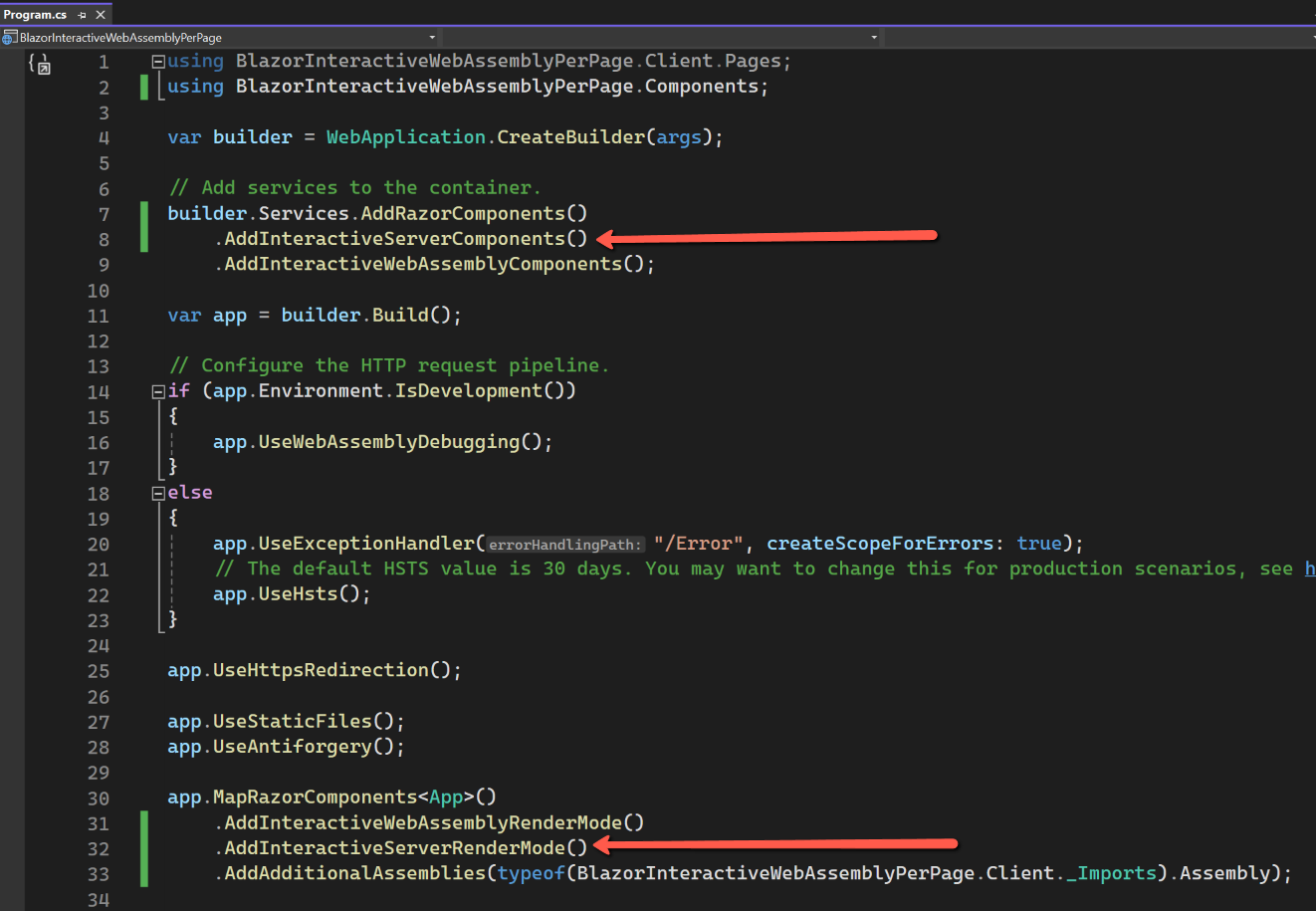
Now we can change our WeatherOnClient page as follows:

Run the application. It works as expected, we can refresh the page without OnInitializedAsync firing twice. (But it doesn't seem very fast!)
One last change to satisfy my curiosity. Can we change this to server interactive, despite the fact that the page is in the .Client folder?

Run the applicatio. It works and we can refresh the page without OnInitializedAsync firing twice, but I'm not sure what this proves or why one would do this.
Before we leave - one more problem
Whilst researching these various render modes I did come across one very concerning problem highlighted by Carl Franklin. Basically, when navigating between pages Auto mode does not switch from Interactive Server to Interactive WASM. It also appears that 'state' is lost and with it cascading parameters can get set to null. This is a YouTube video where Carl Franklin and Rocky Lhotka discuss the problem and a complicated workaround. It has also been reported on Github/aspnetcore as issue #53799. The response from Microsoft appears to say that nothing is likely to be done about this in the short term (.NET 10 backlog!)
Conclusions
My first conclusion is that by carrying out this investigation I have learnt a lot about Blazor Render Modes, and in particular how the templates set up the various scenarios. I have also learnt that Blazor Render Modes aren't as scary as I first thought.
“Global” means global. If you select “Global” for “Interactivity location” the application render mode is effectively set in App.razor. Conversely, if you want the flexibility to set the render mode at the page/component level, interactivity must be set at that level.
Which approach will I use?
All options have their pros and cons, but for maximum flexibility I am tempted to use the Interactive Auto option with "Interactivity location" set to "Per page/component“, even though I doubt I will actually use ‘Auto’ on individual pages.
For simple applications I could also be very tempted to use Interactive Server and Global. I'm not sure how much of a problem in real life the duplicate visit to 'OnInitializedAsync really is, particularly on a Server Interactive application, so that could well be my fall-back option.
However, one should bear in mind that whichever template is chosen, one isn't burning one's boats and that render mode strategies can always be changed in development.
Bottom line: Just for experience for my next application I'm going to try "Interactive Auto", set to "Per page/component", but will avoid 'Auto Rendering' at all costs, even though with my simple applications I would be unlikely to experience the problem highlighted by Carl Franklin.
Resources
Microsoft Learn: ASP.NET Core Blazor render modes
Coding with Tom - A really good explanation of the new render modes at the beginning of the video. Skip to about 20:00 to see how render modes are used.
dotnet Blazor Component Render Modes Dan Roth, Microsoft Principle Product Manager for Blazor explains the render modes.
Github/aspnetcore - OnInitialized and OnInitializedAsync are called twice with @rendermode InteractiveServer #52208
Shaun Curtis - Github blog post - Going for Broke
Github/aspnetcore - Blazor Web App render mode interactive auto does not switch from interactive server to interactive wasm when navigating between pages #53799
Carl Franklin - Per Page/Component Rendering Issues : Carl Franklin's Blazor Train Ep 102