Posting an order as a single transaction
Background
In a previous post, Orders - Part 4 - Saving, I pointed out that the method I used to save the order was not best practice. The reason for this is that the order header and order lines were saved in separate procedures and should the insert of order lines fail in any way we would have incomplete data; perhaps an order header with no lines, or with only some of the lines. At the time I excused this shortcoming on the grounds that doing it properly looked complicated and for expediency I chose to ignore the problem.
Introduction
In hindsight, ignoring the problem was definitely the right thing to do! Solving this problem has been a voyage of discovery and I'm still not convinced I have found the right answer. But I have enjoyed the challenge - and it has been challenging!!
YouTube Video
A reminder
Before we start tearing our current code apart, it's worth reminding ourselves how we are currently saving a new purchase order. The code for saving a new purchase order is shown below; as can be seen the posting takes place as two distinct operations, firstly for the header and then for the lines. But to make things more prone to error, the posting routine for the lines is called separately for each individual order line. This means, for example, that for a 5 line order, insert statements are called 6 times in total, any one of which could potentially fail.
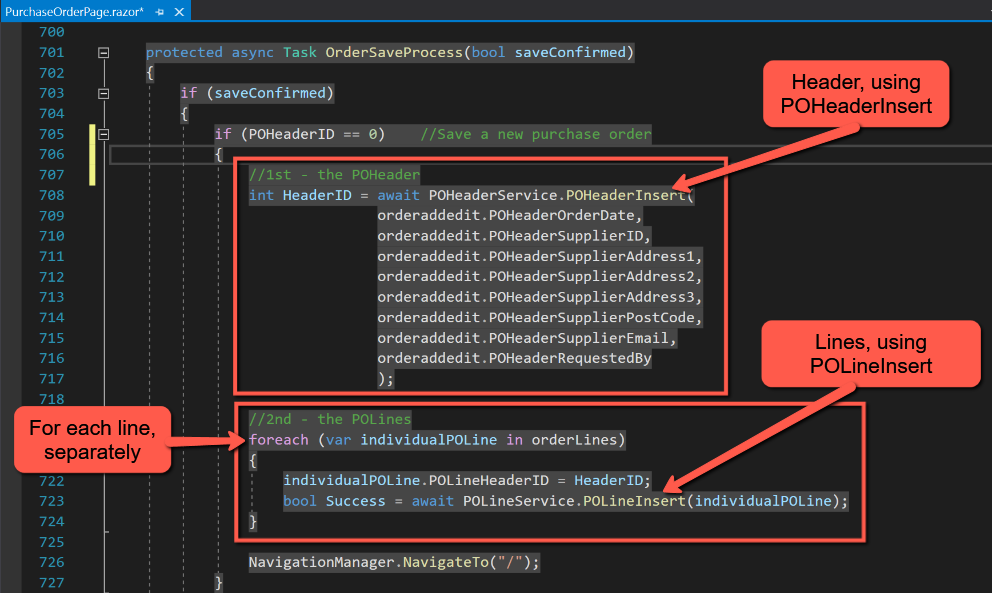
The challenge is to wrap all 'inserts' into a single transaction that either inserts all records, or fails completely if any one insert fails.
Data Tables
The first problem is that if we want to pass all the order lines as a single set of data to a posting procedure we won't be able to loop through the records in that 'foreach' statement. This is where 'DataTable' comes to the rescue. A DataTable can be thought of as an in-memory table similar to a SQL table. The Microsoft documentation can be found here, and happens to use order header and order detail as the example, and is very comprehensive. We will be taking a more simple approach.
In essence the steps needed to create and populate a DataTable are:
- Add an "@using System.Data" statement at the top of the page
- Create the DataTable
- Add the column definitions for the DataTable
- Loop through each order line, creating a new row, assigning values from the order line for each column and adding the row to the DataTable.
In our case, in PurchaseOrderPage.razor, the code is:
- Somewhere near the top of the page:
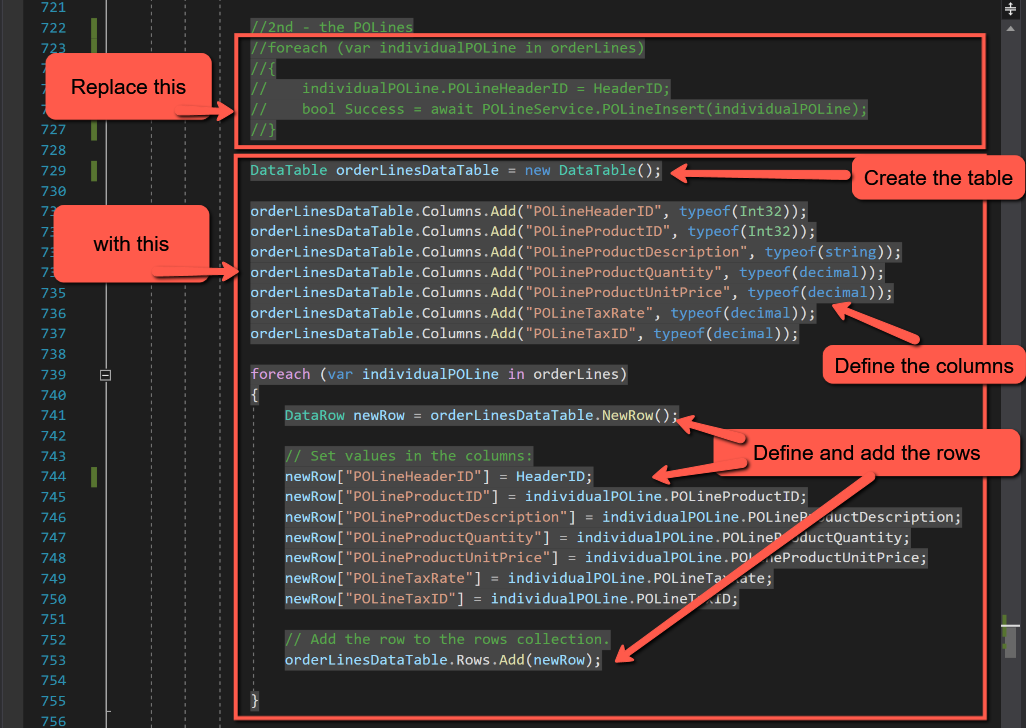
@using System.DataIn the 'OrderSaveProcess' method, replace the existing code for inserting POLines with the following:
DataTable orderLinesDataTable = new DataTable();

orderLinesDataTable.Columns.Add("POLineHeaderID", typeof(Int32));
orderLinesDataTable.Columns.Add("POLineProductID", typeof(Int32));
orderLinesDataTable.Columns.Add("POLineProductDescription", typeof(string));
orderLinesDataTable.Columns.Add("POLineProductQuantity", typeof(decimal));
orderLinesDataTable.Columns.Add("POLineProductUnitPrice", typeof(decimal));
orderLinesDataTable.Columns.Add("POLineTaxRate", typeof(decimal));
orderLinesDataTable.Columns.Add("POLineTaxID", typeof(decimal));

foreach (var individualPOLine in orderLines)
{
    DataRow newRow = orderLinesDataTable.NewRow();

    // Set values in the columns:
    newRow["POLineHeaderID"] = HeaderID;
    newRow["POLineProductID"] = individualPOLine.POLineProductID;
    newRow["POLineProductDescription"] = individualPOLine.POLineProductDescription;
    newRow["POLineProductQuantity"] = individualPOLine.POLineProductQuantity;
    newRow["POLineProductUnitPrice"] = individualPOLine.POLineProductUnitPrice;
    newRow["POLineTaxRate"] = individualPOLine.POLineTaxRate;
    newRow["POLineTaxID"] = individualPOLine.POLineTaxID;

    // Add the row to the rows collection.
    orderLinesDataTable.Rows.Add(newRow);
}- In the above, line 1 creates the DataTable, called orderLinesDataTable'.
- Lines 3 to 9 define the columns, which mirror the definition of the POHeader SQL table.
- Line 11 starts looping through orderLines
- Line 13 creates a new row
- Lines16 to 22 assigns the values to the row's columns.
- Line 25 adds the row to the DataTable
With the DataTable populated, we can now just pass the DataTable object to the 'posting routine'. To illustrate this we will create a new posting service and for the time being keep the existing POHeaderService to insert the header record.
In the Data folder, create a new class and call it 'PurchaseOrderService'. We will start by adding a method to post the order lines:
using Dapper;
using Microsoft.Data.SqlClient;
using System.Data;
using System.Threading.Tasks;

namespace BlazorPurchaseOrders.Data
{
    public class PurchaseOrderService : IPurchaseOrderService
    {
        // Database connection
        private readonly SqlConnectionConfiguration _configuration;

        public PurchaseOrderService(SqlConnectionConfiguration configuration)
        {
            _configuration = configuration;
        }

        public async Task<bool> POInsert(DataTable orderLinesDataTable)
        {
            using (var conn = new SqlConnection(_configuration.Value))
            {
                //Insert POLines
                foreach (DataRow row in orderLinesDataTable.Rows)
                {
                    var parameters = new DynamicParameters();
                    parameters.Add("POLineHeaderID", row["POLineHeaderID"], DbType.Int32);
                    parameters.Add("POLineProductID", row["POLineProductID"], DbType.Int32);
                    parameters.Add("POLineProductDescription", row["POLineProductDescription"], DbType.String);
                    parameters.Add("POLineProductQuantity", row["POLineProductQuantity"], DbType.Decimal);
                    parameters.Add("POLineProductUnitPrice", row["POLineProductUnitPrice"], DbType.Decimal);
                    parameters.Add("POLineTaxRate", row["POLineTaxRate"], DbType.Decimal);
                    parameters.Add("POLineTaxID", row["POLineTaxID"], DbType.Decimal);

                    await conn.ExecuteAsync("spPOLine_Insert", parameters, commandType: CommandType.StoredProcedure);
                }
                return true;
            }
        }
    }
}
The code looks like this:
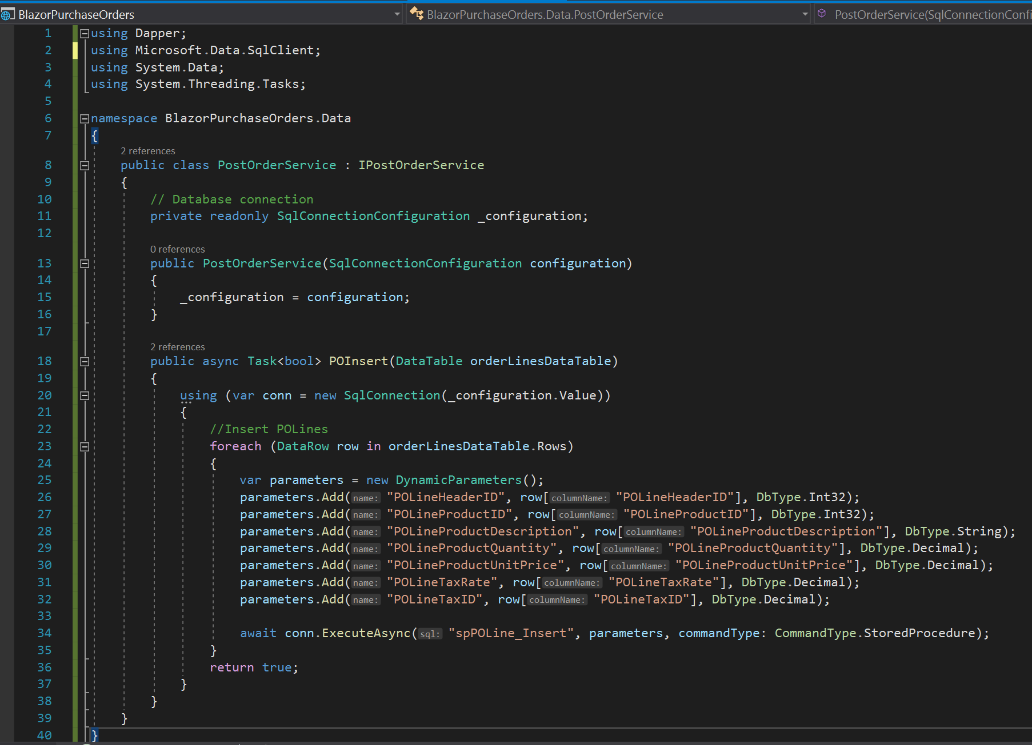
I have called the method 'POInsert' and am passing the orderLinesDataTable as a single object as the parameter.
Between lines 23 and 35 I am mimicking the code used in POLineService for inserting a POLine, but notice the method used to cycle through the DataTable to extract the data to add to the parameters being passed to the SQL stored procedure.
Notice too that the stored procedure is still called separately for each purchase order line.
To make this work, we also need to:
- Add an interface file ()
- Register the service in Startup.cs
- Inject the service into the PurchaseOrderPage
- Insert a line in PurchaseOrderPage to call the POInsert
The code for these is shown below:
Add a new class in the Data folder, called IPurchaseOrderService.cs and paste in the following code
using System;
using System.Collections.Generic;
using System.Data;
using System.Threading.Tasks;

namespace BlazorPurchaseOrders.Data
{
    // Each item below provides an interface to a method in ProductServices.cs
    public interface IPurchaseOrderService
    {
        Task<bool> POInsert(DataTable orderLinesDataTable);
    }
}
In Startup.cs add the following in the 'ConfigureServices' block.
services.AddScoped<IPurchaseOrderService, PurchaseOrderService>();In PurchaseOrderPage insert the following at the top of the page:
@inject IPurchaseOrderService PurchaseOrderServiceAlso, in PurchaseOrderPage, add the following after the closing bracket for the 'foreach' loop to create the DataTable
bool Success = await PurchaseOrderService.POInsert(orderLinesDataTable);Save and test the code so far.
By making these changes, it means that when adding an order the post method for the header is called once per order, but more importantly the post method for the lines is also only called once regardless of the number of lines.
Combining Order Header and Lines into a single method
The revelation to me at this stage was that it is possible to pass multiple parameters to a service relating to different objects. In other words it is possible to pass header and line information to the same service at the same time.
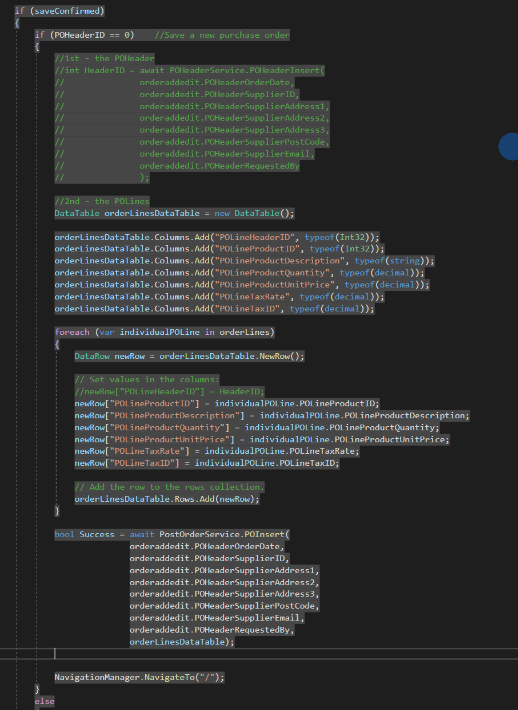
In PurchaseOrderPage, copy the fields from the 'POHeaderInsert' and paste them into the 'POInsert' parameters (for tidiness I placed them at the beginning, but I don't think the position is significant). Now comment out the whole of the POHeader section. The code should look like this:
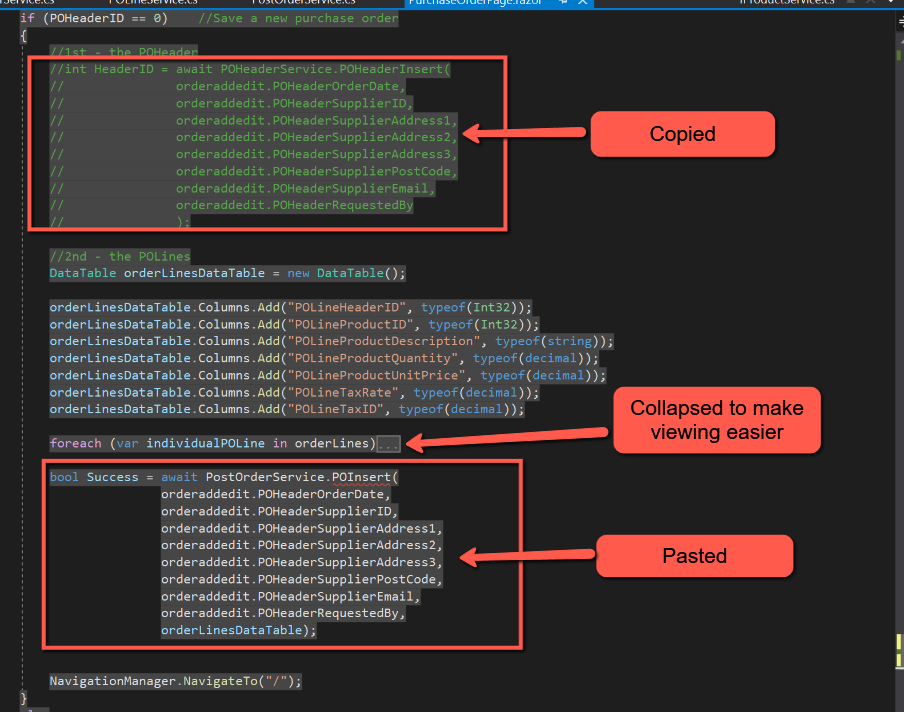
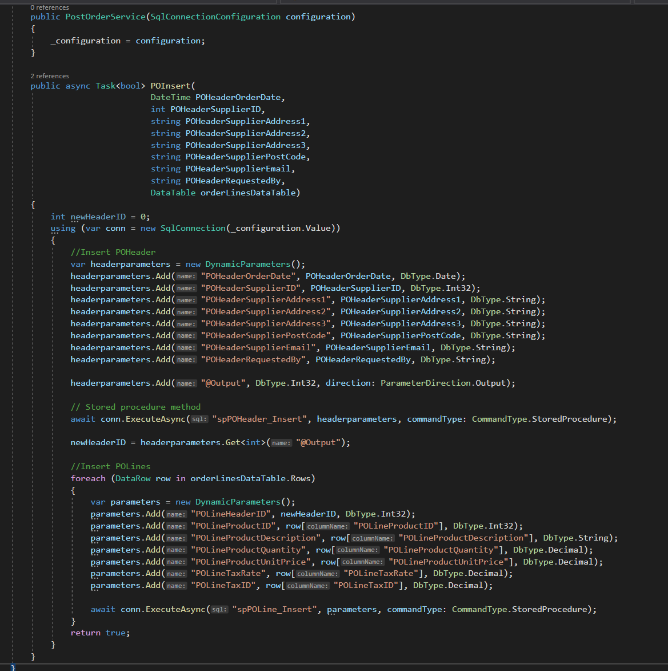
We can now modify PurchaseOrderService to handle inserting the header information. In PurchaseOrderService we will need to:
- Modify the POInsert line to include the additional parameters being passed, i.e.
public async Task<bool> POInsert(
                        DateTime POHeaderOrderDate,
                        int POHeaderSupplierID,
                        string POHeaderSupplierAddress1,
                        string POHeaderSupplierAddress2,
                        string POHeaderSupplierAddress3,
                        string POHeaderSupplierPostCode,
                        string POHeaderSupplierEmail,
                        string POHeaderRequestedBy,
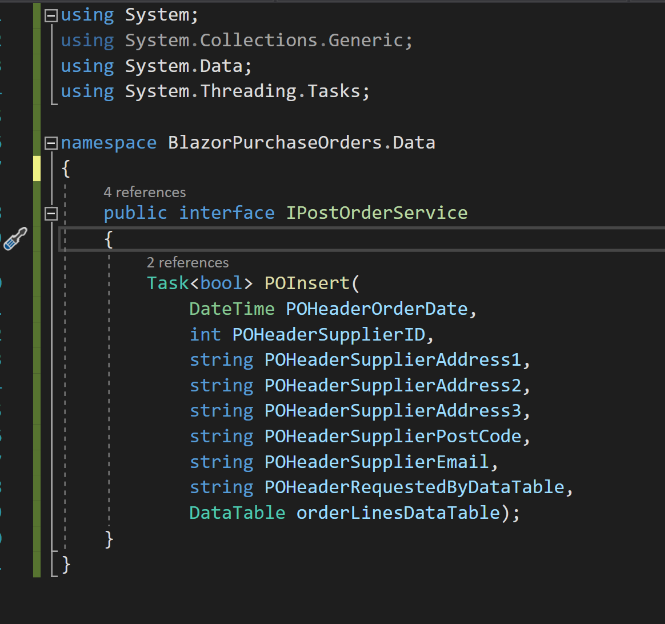
DataTable orderLinesDataTable)- On the same lines we need to modify IPostOrderService (note that we need to add the type 'DataTable' before 'orderLinesDataTable':
public interface IPurchaseOrderService
{
    Task<bool> POInsert(
        DateTime POHeaderOrderDate,
        int POHeaderSupplierID,
        string POHeaderSupplierAddress1,
        string POHeaderSupplierAddress2,
        string POHeaderSupplierAddress3,
        string POHeaderSupplierPostCode,
        string POHeaderSupplierEmail,
        string POHeaderRequestedByDataTable,
        DataTable orderLinesDataTable);
Back in PurchaseOrderService, we need to add the code to insert the POHeader and get the POHeaderID. To do that add code to declare the variable newHeaderID before the 'using' section:
int newHeaderID = 0;Add this code at the beginning of the 'using' section. (Basically this can be copied from the existing POHeaderService, but as we have already got a variable called 'parameters' I have renamed it 'headerParameters
var headerParameters= new DynamicParameters();
headerParameters.Add("POHeaderOrderDate", POHeaderOrderDate, DbType.Date);
headerParameters.Add("POHeaderSupplierID", POHeaderSupplierID, DbType.Int32);
headerParameters.Add("POHeaderSupplierAddress1", POHeaderSupplierAddress1, DbType.String);
headerParameters.Add("POHeaderSupplierAddress2", POHeaderSupplierAddress2, DbType.String);
headerParameters.Add("POHeaderSupplierAddress3", POHeaderSupplierAddress3, DbType.String);
headerParameters.Add("POHeaderSupplierPostCode", POHeaderSupplierPostCode, DbType.String);
headerParameters.Add("POHeaderSupplierEmail", POHeaderSupplierEmail, DbType.String);
headerParameters.Add("POHeaderRequestedBy", POHeaderRequestedBy, DbType.String);

headerParameters.Add("@Output", DbType.Int32, direction: ParameterDirection.Output);

// Stored procedure method
await conn.ExecuteAsync("spPOHeader_Insert", headerParameters, commandType: CommandType.StoredProcedure);

newHeaderID = headerParameters.Get<int>("@Output");
Finally, we can now substitute 'newHeaderID' in place of the parameter previously being passed by PurchaseOrderPage and comment out the line in PurchaseOrderPage that set the value of POLineHeaderID.
parameters.Add("POLineHeaderID", newHeaderID, DbType.Int32);// Set values in the columns:
//newRow["POLineHeaderID"] = HeaderID;
newRow["POLineProductID"] = individualPOLine.POLineProductID;
The code should look like this
Save and run the application.
Posting as a single Transaction with Commit and Rollback
The problem remains, however, that separate inserts for the header and lines are still being carried out, although they are being done within a single method and 'using' statement. Now is the time to wrap all these inserts into a single transaction. The general format for this is shown below:
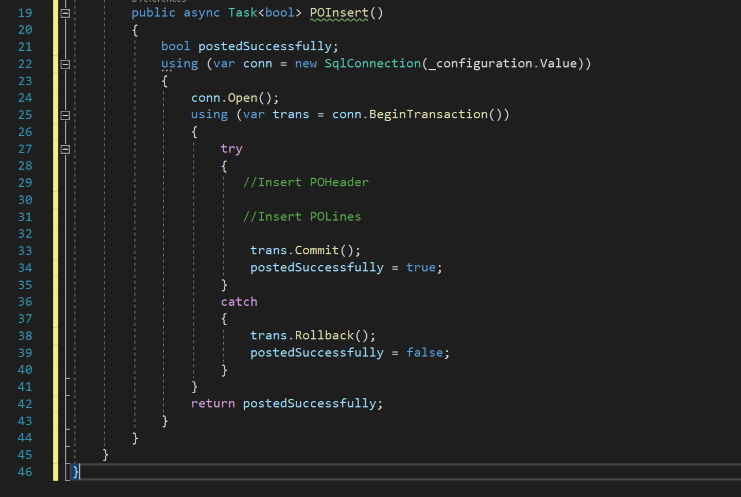
In this case we declare a boolean variable called 'postedSuccessfully'. This will be passed back to the PurchaseOrderPage where a message can be displayed if required.
On Line 24 the connection to the database id opened. On line 25 a 'using' statement is used to begin a transaction. A try-catch statement is used where the 'try' block has the code for inserting the POHeader and POLines. If no error is encountered the transaction is committed (line 33), and the postedSuccessfully boolean set to true. However if an error is encountered in either the POHeader or POLine inserts the 'catch' block is triggered and the transaction rolled back (line 38) and postedSuccessfully set to false. Outside the try-catch statement postedSuccessfully is returned to the calling method.
Our code for POInsert needs to be amended to the following, but note the addition of ", transaction: trans" to the end of both "conn.ExecuteAsync" parameters - this is crucial:
public async Task<bool> POInsert(
                        DateTime POHeaderOrderDate,
                        int POHeaderSupplierID,
                        string POHeaderSupplierAddress1,
                        string POHeaderSupplierAddress2,
                        string POHeaderSupplierAddress3,
                        string POHeaderSupplierPostCode,
                        string POHeaderSupplierEmail,
                        string POHeaderRequestedBy,
                        DataTable orderLinesDataTable)
{
    int newHeaderID = 0;
    bool postedSuccessfully;
    using (var conn = new SqlConnection(_configuration.Value))
    {
        conn.Open();
        using (var trans = conn.BeginTransaction())
        {
            try
            {
                //Insert POHeader
                var headerParameters = new DynamicParameters();
                headerParameters .Add("POHeaderOrderDate", POHeaderOrderDate, DbType.Date);
                headerParameters .Add("POHeaderSupplierID", POHeaderSupplierID, DbType.Int32);
                headerParameters .Add("POHeaderSupplierAddress1", POHeaderSupplierAddress1, DbType.String);
                headerParameters .Add("POHeaderSupplierAddress2", POHeaderSupplierAddress2, DbType.String);
                headerParameters .Add("POHeaderSupplierAddress3", POHeaderSupplierAddress3, DbType.String);
                headerParameters .Add("POHeaderSupplierPostCode", POHeaderSupplierPostCode, DbType.String);
                headerParameters .Add("POHeaderSupplierEmail", POHeaderSupplierEmail, DbType.String);
                headerParameters .Add("POHeaderRequestedBy", POHeaderRequestedBy, DbType.String);

                headerParameters .Add("@Output", DbType.Int32, direction: ParameterDirection.Output);

                // Stored procedure method
                await conn.ExecuteAsync("spPOHeader_Insert", headerParameters , commandType: CommandType.StoredProcedure, transaction: trans);

                newHeaderID = headParameters.Get<int>("@Output");

                //Insert POLines
                foreach (DataRow row in orderLinesDataTable.Rows)
                {
                    var lineParameters = new DynamicParameters();
                    lineParameters.Add("POLineHeaderID", newHeaderID, DbType.Int32);
                    lineParameters.Add("POLineProductID", row["POLineProductID"], DbType.Int32);
                    lineParameters.Add("POLineProductDescription", row["POLineProductDescription"], DbType.String);
                    lineParameters.Add("POLineProductQuantity", row["POLineProductQuantity"], DbType.Decimal);
                    lineParameters.Add("POLineProductUnitPrice", row["POLineProductUnitPrice"], DbType.Decimal);
                    lineParameters.Add("POLineTaxRate", row["POLineTaxRate"], DbType.Decimal);
                    lineParameters.Add("POLineTaxID", row["POLineTaxID"], DbType.Decimal);

                    await conn.ExecuteAsync("spPOLine_Insert", lineParameters, commandType: CommandType.StoredProcedure, transaction: trans);
                }

                trans.Commit();
                postedSuccessfully = true;
            }
            catch
            {
                trans.Rollback();
                postedSuccessfully = false;
            }
            return postedSuccessfully;
        }
    }
}
The effect of the above is that the boolean 'postedSuccessfully' will be passed back to PurchaseOrderPage as either true if all the inserts succeeded, or false if any insert failed. The other very important point is that if any insert failed the SQL database will be rolled back to the position before any insert was attempted.
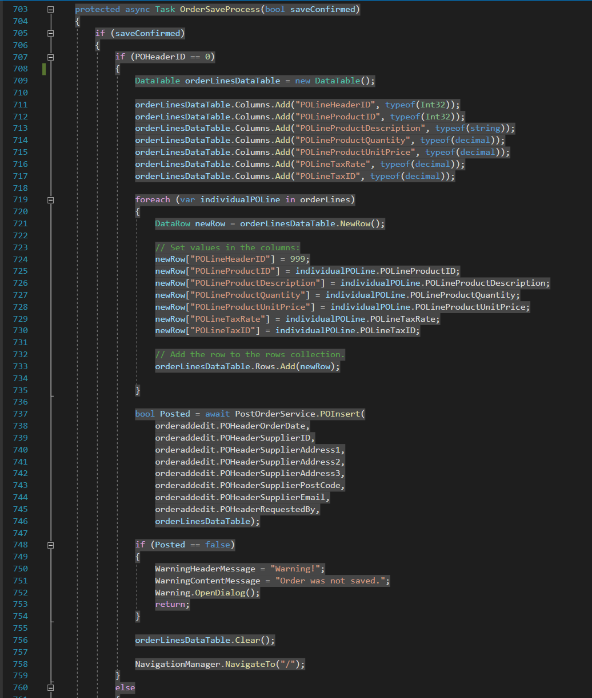
All that remains (for now) is to alert the user that the saving of the purchase order failed if an error occurred. Luckily we already have a 'Warning' component in place and can simply call that with appropriate wording. This is done in the PurchaseOrderPage code by placing the following code after the 'bool Success = await PostOrderService.POInsert' statement. (Note that it doesn't matter that the boolean being passed back is not the same as the boolean for the calling statement.) The 'orderLinesDataTable.Clear()' is used to ensure that all rows in the DataTable are removed. (I'm not sure if this is necessary, but there is probably no harm in carrying it out.)
if (Success == false)
{
    WarningHeaderMessage = "Warning!";
    WarningContentMessage = "Order was not saved.";
    Warning.OpenDialog();
    return;
}

orderLinesDataTable.Clear();
Save and test the application.
Obviously it should work! But to force an error to demonstrate what could happen, change, for example, the last line of 'lineParameters' replacing "POLineTaxID" with "POLineTaxIX". Save and run; you should get a warning message saying that the order hasn't been saved.
Data Sets
The above does what we set out to achieve. Either the whole order is saved or the whole order is rejected; we won't get the situation where the order part-saved, e.g. the header is saved, but not all the order lines.
However, whilst researching this I discovered that as well as being able to pass the order lines as a single object to the POInsert service, it is also possible to pass a data set to SQL as a single object. And this seemed too good an opportunity to let pass without covering that.
To do this, we need to follow these steps:
- In SQL create a 'Type' that matches exactly the structure of the table that we want to insert multiple rows to. This is also known as a 'User Defined Type' or UDT
- In SQL create a stored procedure for the insert that reads from the UDT created at step 1.
- In C# modify the code that calls the stored procedure (created at 2), passing to it an anonymous object created from the DataTable.
In our situation these are those steps
1. In SQL create a Type called OrderLinesUDT (this matches the POLine table).
Create Type OrderLinesUDT as table
(
    [POLineHeaderID] [int],
	[POLineProductID] [int],
	[POLineProductDescription] [nvarchar](50),
	[POLineProductQuantity] [decimal](9, 3),
	[POLineProductUnitPrice] [money],
	[POLineTaxRate] [decimal](6, 4),
	[POLineTaxID] [int]
)
2. Create the stored procedure. @OrderLines is the name of the parameter that will be passed to the stored procedure from C# and 'OrderLinesUDT' is the type created in step 1.
CREATE PROCEDURE [dbo].[spPOLine_InsertSet]
	@OrderLines OrderLinesUDT readonly
as
Begin
INSERT INTO POLine(POLineHeaderID, POLineProductID, POLineProductDescription, POLineProductQuantity, POLineProductUnitPrice, POLineTaxRate, POLineTaxID)
SELECT [POLineHeaderID], [POLineProductID], [POLineProductDescription], [POLineProductQuantity], [POLineProductUnitPrice], [POLineTaxRate], [POLineTaxID]
FROM @OrderLines;
End
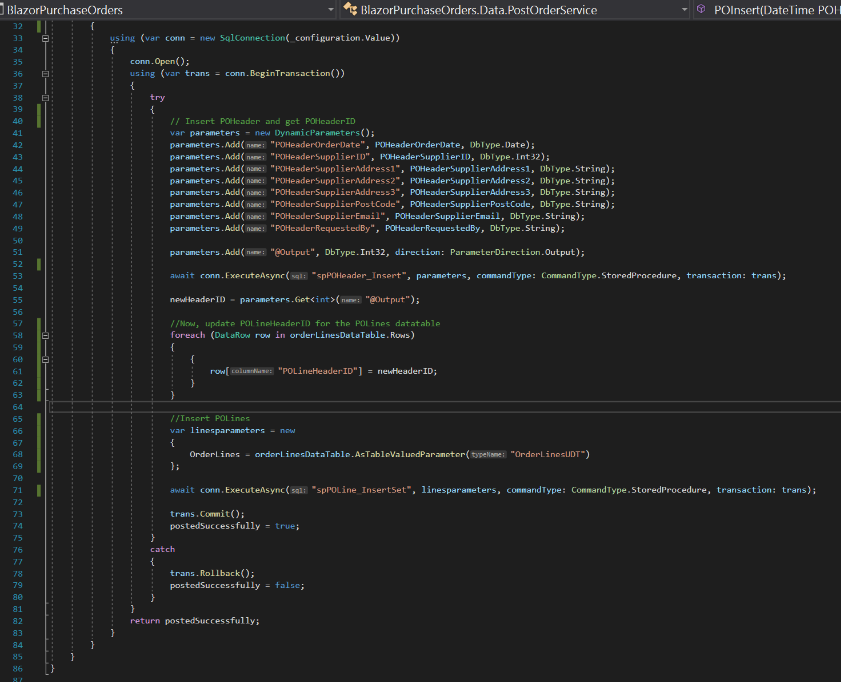
3. For inserting POLines, we have in intermediate step in C# to update the orderLinesDataTable with the newHeaderID obtained after the insert of POHeader. This is shown below and should be inserted immediately after deriving newHeaderID.
//Now, update POLineHeaderID for the POLines datatable
foreach (DataRow row in orderLinesDataTable.Rows)
{
    {
        row["POLineHeaderID"] = newHeaderID;
    }
}
4. Create the anonymous object called 'lineParameters' as shown below and call the stored procedure. Note that 'OrderLines' matches the @OrderLines in the stored procedure and that "OrderLinesUDT" in the definition of 'OrderLines' matches the user defined type in SQL.
//Insert POLines
var lineParameters = new
{
    OrderLines = orderLinesDataTable.AsTableValuedParameter("OrderLinesUDT")
};

await conn.ExecuteAsync("spPOLine_InsertSet", lineParameters, commandType: CommandType.StoredProcedure, transaction: trans);
The completed code should now look like this:
Conclusion
Once completed it looks fairly straightforward, but getting all the pieces of the jigsaw to fit together was quite a struggle at times. Ultimately, though, it's hugely rewarding to have it working!
Code
Complete code for all files changed in this post can be found here
References
- Microsoft DataTables: documentation
- I am Tim Corey: Advanced Dapper in C# (really helpful)