Index Page - Deductions
Introduction
At this stage we have a functioning 'Wall Area Calculator' but it doesn't take into account the area we don't need to tile because of doors and windows, for example. I'm calling these areas 'Deductions'.
We will add a grid for deductions. Each item, such as a door or window, will be a distinct deduction. To make life a little easier for me I will assume that each deduction is rectangular. The deductions grid will have a toolbar allowing for the addition, edit and deletion of individual deductions. The toolbar buttons for adding and editing a deduction will open a dialog inviting the user to enter a description for the deduction together with the height and width.
The crucial aspect of adding, editing or deleting a deduction is that the area of the wall associated with the deduction will need to be recalculated.
Deductions Grid
We'll start by adding the grid for deductions. This follows the pattern used for rooms and walls. Insert the following code under the Wall grid section.
<h6><b>Deductions</b></h6>

<SfGrid ID="DeductionGrid"
        DataSource="@deductions"
        AllowSorting="true"
        AllowResizing="true"
        Height="125"
        Toolbar="@DeductionToolbaritems">
    <GridColumns>
        <GridColumn Field="@nameof(Deduction.DeductionName)"
                    HeaderText="Description"
                    TextAlign="@TextAlign.Left"
                    Width="50">
        </GridColumn>
        <GridColumn Field="@nameof(Deduction.SqM)"
                    HeaderText="Area SqM"
                    TextAlign="@TextAlign.Right"
                    Format="n3"
                    Width="20">
            <Template>
                @{
                    var value = (context as Deduction);

                    decDeductionWidth = Convert.ToDecimal(value.DeductionWidth);
                    decDeductionHeight = Convert.ToDecimal(value.DeductionHeight);
                    decimal SqM = decimal.Round(((decDeductionWidth * decDeductionHeight) / 1000000), 3, MidpointRounding.AwayFromZero);
                    string SqMString = SqM.ToString("F3");
                    <div>@SqMString</div>
                }
            </Template>
        </GridColumn>
    </GridColumns>

    <GridEvents OnToolbarClick="DeductionToolbarClickHandler"
                TValue="Deduction" RowSelected="DeductionRowSelectHandler">
    </GridEvents>
</SfGrid>
This has introduced a number of variables and methods that need to be defined.
In the declarations section add the declaration for 'deductions' IEnumerable.
public IEnumerable<Deduction>? deductions;Now we need to add the 'DeductionsToolbar' items. First, in the declarations section declare the list for the Deduction toolbar items:
private List<ItemModel> DeductionToolbaritems = new List<ItemModel>();And, in the OnInitializedAsync() method insert the following after the other toolbar items:
DeductionToolbaritems.Add(new ItemModel() { Text = "Add", TooltipText = "Add a deduction", PrefixIcon = "e-add" });
DeductionToolbaritems.Add(new ItemModel() { Text = "Edit", TooltipText = "Edit selected deduction", PrefixIcon = "e-edit" });
DeductionToolbaritems.Add(new ItemModel() { Text = "Delete", TooltipText = "Delete selected deduction", PrefixIcon = "e-delete" });
As with the other grids we will need a 'toolbar click handler' and 'row select handler'. Add the following two methods before "#region Area Calculation". Note that I am enclosing the Deduction methods in #region tags as well to make code display easier. (And whilst doing this we should enclose the 'Rooms' section in #region tags if they're not already.)
#region Deduction
public async Task DeductionToolbarClickHandler(ClickEventArgs args)
{
    //Check that a Wall has been selected
    if (args.Item.Text == "Add")
    {
        if (SelectedWallID == 0)
        {
            await DialogService.AlertAsync("Please select a wall.", "No Wall Selected");
            return;
        }
        else
        {
            //Code for adding goes here
            dialogTitle = "Add a Deduction";
            deductionAddEdit = new();
            deductionAddEdit.WallID = SelectedWallID;
            await DialogDeduction.ShowAsync(false);
        }
    }
    if (args.Item.Text == "Edit")
    {
        //Code for editing
        dialogTitle = "Edit a Deduction";

        //Check that a wall has been selected
        if (SelectedDeductionID == 0)
        {
            await DialogService.AlertAsync("Please select a deduction.", "No Deduction Selected");
            return;
        }
        else
        {
            //populate deductionAddEdit (temporary data set used for the editing process)
            deductionAddEdit = new();
            deductionAddEdit.DeductionID = SelectedDeductionID;
            deductionAddEdit.WallID = SelectedWallID;
            deductionAddEdit.DeductionName = SelectedDeductionName;
            deductionAddEdit.DeductionWidth = SelectedDeductionWidth;
            deductionAddEdit.DeductionHeight = SelectedDeductionHeight;
            await DialogDeduction.ShowAsync(false);
            StateHasChanged();
        }
    }
    if (args.Item.Text == "Delete")
    {
        //Code for deleting
        if (SelectedDeductionID == 0)
        {
            await DialogService.AlertAsync("Please select a deduction.", "No Deduction Selected");
            return;
        }
        else
        {
            bool isConfirm = await DialogService.ConfirmAsync(
                "Are you sure you want to delete " + SelectedDeductionName + "?",
                "Delete " + SelectedDeductionName);
            if (isConfirm == true)
            {
                await DeductionService.DeductionDelete(SelectedDeductionID);
                //Refresh datagrid
                deductions = await DeductionService.DeductionsReadByWall(SelectedWallID);
                StateHasChanged();
                SelectedWallID = 0;
            }
        }
    }
}

public void DeductionRowSelectHandler(RowSelectEventArgs<Deduction> args)
    {
        //{args.Data} returns the current selected record.
        SelectedDeductionID = args.Data.DeductionID;
        SelectedDeductionName = args.Data.DeductionName;
        SelectedDeductionWidth = args.Data.DeductionWidth;
        SelectedDeductionHeight = args.Data.DeductionHeight;
        StateHasChanged();
    }
#endregion
The above introduces a few more missing elements! Firstly, we need to inject the Deduction service. Insert the following at the top of the code:
@inject IDeductionService DeductionServiceWe will be using a dialog to enter details of deductions and an object of type 'Deduction' to hold data when adding or editing a deduction. We need to add declarations for the dialog and deductions object. Add the following into the declarations section:
SfDialog? DialogDeduction;
Deduction deductionAddEdit = new Deduction();
Again, when selecting a row from the deductions grid we will need to hold the ID of the selected row. We need to add this to the declarations:
public int SelectedDeductionID { get; set; } = 0;
public string SelectedDeductionName { get; set; } = string.Empty;
public int SelectedDeductionWidth { get; set; } = 0;
public int SelectedDeductionHeight { get; set; } = 0;
In the dialog (yet to be added) the user will be entering the height and width of the deduction in mm and stored as integers, whereas the area will be calculated in SqM in decimal type. We therefore need to convert the height and width from integers to decimals. To do this we also need to declare new variables of decimal type to hold the height and width of deductions. Insert the following into the declarations section:
public decimal decDeductionWidth = decimal.Zero;
public decimal decDeductionHeight = decimal.Zero;
Displaying SqM in the Deductions grid
The dialog will record the height and width of the deduction, but we want the grid to display the area in SqM. The database will not record the area, but instead we will calculate the SqM from the height and width whenever it is needed. Looking at the code for the SqM column we have:

Notice that we convert the data from the IEnumable for height and width to decimals before then doing the calculation, rounding the result to 3 decimal places. Note too that the calculation is within <Template> tags. I initially ran into trouble displaying the SqM to three decimal places, in particular it was stripping trailing zeros. The solution was to convert the SqM to a string and then format the string. This solution was provided very speedily by Syncfusion support - so 'thank you' to them.
Populating the Deductions grid
Whenever we need to populate the Deductions grid we only need those deductions associated with the wall selected at that point in time. We therefore need to add a new method to the DeductionService that I have called 'DeductionsReadByWall'. Open DeductionService.cs and paste in the following code, (I suggest under the 'DeductionReadAll' method - which is probably redundant anyway!):
public async Task<IEnumerable<Deduction>> DeductionsReadByWall(int WallID)
{
    IEnumerable<Deduction> deductions;
    var parameters = new DynamicParameters();
    parameters.Add("WallID", WallID, DbType.Int32);

    sqlCommand = "Select * from Deduction ";
    sqlCommand += "WHERE WallID  = @WallID";

    using IDbConnection conn = new SQLiteConnection(_configuration.GetConnectionString(connectionId));
    {
        deductions = await conn.QueryAsync<Deduction>(sqlCommand, parameters);
    }
    return deductions;
}
We now need to update IDeductionService by inserting the following line:
Task<IEnumerable<Deduction>> DeductionsReadByWall(int WallID);We should now have no errors, so although the grid won't work yet it might be worth saving all the file and running the application. (Don't try to enter any Deductions data!)
Deductions Dialog
We haven't added the dialog that will allow the user to add and edit deductions. Insert the following code after the WallDialog.
<SfDialog @ref="DialogDeduction" IsModal="true" Width="420px" ShowCloseIcon="false" Visible="false" AllowDragging="true">
    <DialogTemplates>
        <Header> @dialogTitle</Header>
        <Content>
            <EditForm Model="@deductionAddEdit" OnValidSubmit="@DeductionSave">
                <div>
                    <SfTextBox Enabled="true" Placeholder="Description"
                               FloatLabelType="@FloatLabelType.Always"
                               @bind-Value="deductionAddEdit.DeductionName">
                    </SfTextBox>

                    <div class="grid-container">
                        <div class="grid-child left-column">
                            <SfNumericTextBox Enabled="true"
                                              Placeholder="Width (mm)"
                                              Format="n0"
                                              FloatLabelType="@FloatLabelType.Always"
                                              @bind-Value="deductionAddEdit.DeductionWidth"
                                                ShowSpinButton=false
                                              CssClass="e-style">
                            </SfNumericTextBox>
                        </div>
                        <div class="grid-child right-column">
                            <SfNumericTextBox Enabled="true"
                                              Placeholder="Height (mm)"
                                              Format="n0"
                                              FloatLabelType="@FloatLabelType.Always"
                                              @bind-Value="deductionAddEdit.DeductionHeight"
                                              ShowSpinButton=false
                                              CssClass="e-style">
                            </SfNumericTextBox>
                        </div>
                    </div>
                </div>
                <br /><br />
                <div class="e-footer-content">
                    <div class="button-container">
                        <button type="submit" class="e-btn e-normal e-primary">Save</button>
                        <button type="button" class="e-btn e-normal" @onclick="@CancelDeduction">Cancel</button>
                    </div>
                </div>
            </EditForm>
        </Content>
    </DialogTemplates>
</SfDialog>
The above simply follows the pattern we have used before, with three text boxes, the DeductionName, DeductionWidth and DeductionHeight.
It uses two new methods, one for saving a record and one for cancelling the add/edit. Paste the following at the end of the Deductions code region.
protected async Task DeductionSave()
{
    if (deductionAddEdit.DeductionID == 0)    //It's an insert
    {
        await DeductionService.DeductionCreate(deductionAddEdit);
    }
    else
    {
        await DeductionService.DeductionUpdate(deductionAddEdit);
    }

    deductions = await DeductionService.DeductionsReadByWall(SelectedWallID);
    walls = await WallService.WallsReadByRoom(SelectedRoomID);
    await DialogDeduction.HideAsync();

    StateHasChanged();
}

void CancelDeduction()
{
    DialogDeduction.HideAsync();
}
Updating Deductions Grid
The above allows us to add, edit and delete deductions, but when initially selecting a wall the deductions for that wall are not displayed, and similarly, after adding a deduction and re-selecting another wall (or indeed room or project) the deductions grid is not refreshed to reflect the newly selected wall, room or project.
To correct this anomaly we need to:
- Refresh the 'deductions' object whenever a Wall is selected.
- Set the 'deductions' object to an empty object whenever a Project or Room is selected.
To refresh the deductions grid whenever a Wall is selected, add the following at the end of the WallRowSelectHandler (the StateHasChanged forces a refresh of the form):
deductions = await DeductionService.DeductionsReadByWall(SelectedWallID);
StateHasChanged();
And to set the deductions to an empty object add the following to the OnChangeProject and RoomRowSelectHandler methods:
deductions = Enumerable.Empty<Deduction>();In fact it would be worth reviewing what should be updated when Projects, Rooms and Walls are selected, added, updated or deleted.
- OnChangeProject
- Rooms grid refreshed to show rooms for selected project
- Walls grid cleared
- Deductions grid cleared
- RoomRowSelectHandler
- Walls grid refreshed to show walls for selected room
- Deductions grid cleared
- RoomToolbarClickHandler
- Room Added
- Rooms grid refreshed
- Walls grid cleared
- Deductions grid cleared
- Room Edited
- Rooms grid refreshed
- Room Deleted
- Rooms grid refreshed
- Walls grid cleared
- Deductions grid cleared
- WallRowSelectHandler
- Deductions grid refreshed to show deductions for selected wall
- WallToolbarClickHandler
- Wall Added
- Walls grid refreshed
- Deductions grid cleared
- Wall edited
- Walls grid refreshed
- Wall Deleted
- Walls grid refreshed
- Deductions grid cleared
- DeductionsToolBarClickHandler
- Deduction Added
- Deductions grid refreshed
- Wall grid refreshed
- Deduction edited
- Deductions grid refreshed
- Wall grid refreshed
- Deduction Deleted
- Deductions grid refreshed
- Wall grid refreshed
Well, that turned out to be more extensive than I first thought! (Although we have already covered some of the above.)
Note that whenever Deductions are added, edited or deleted we need to refresh the Wall grid. This is because the wall area needs to be recalculated whenever there are changes to deductions. - We'll come to that shortly...
The statements we need for refreshing a grid are in the general format
Xs = await XService.XsReadByZ(SelectedZID);Where X is the grid being refreshed and Z is the next higher level object in the hierarchy: Project > Room > Wall > Deduction. e.g. for the walls grid
walls = await WallService.WallsReadByRoom(SelectedRoomID);To clear a grid the general format of the command is:
Xs = Enumerable.Empty<X>();Where X is the grid being cleared, e.g. for the walls grid
walls = Enumerable.Empty<Wall>();For the ToolbarClickHandlers, the code for refreshing and clearing is put in the 'objectSave' method for Add and Edit, but directly in the Delete option for Delete in the ToolbarClickHandler.


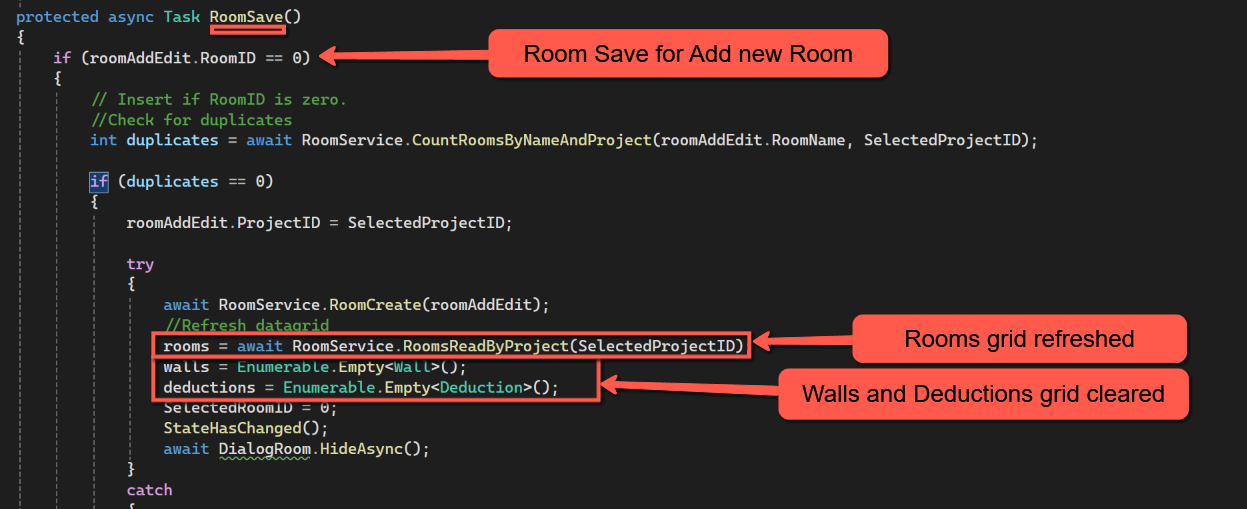


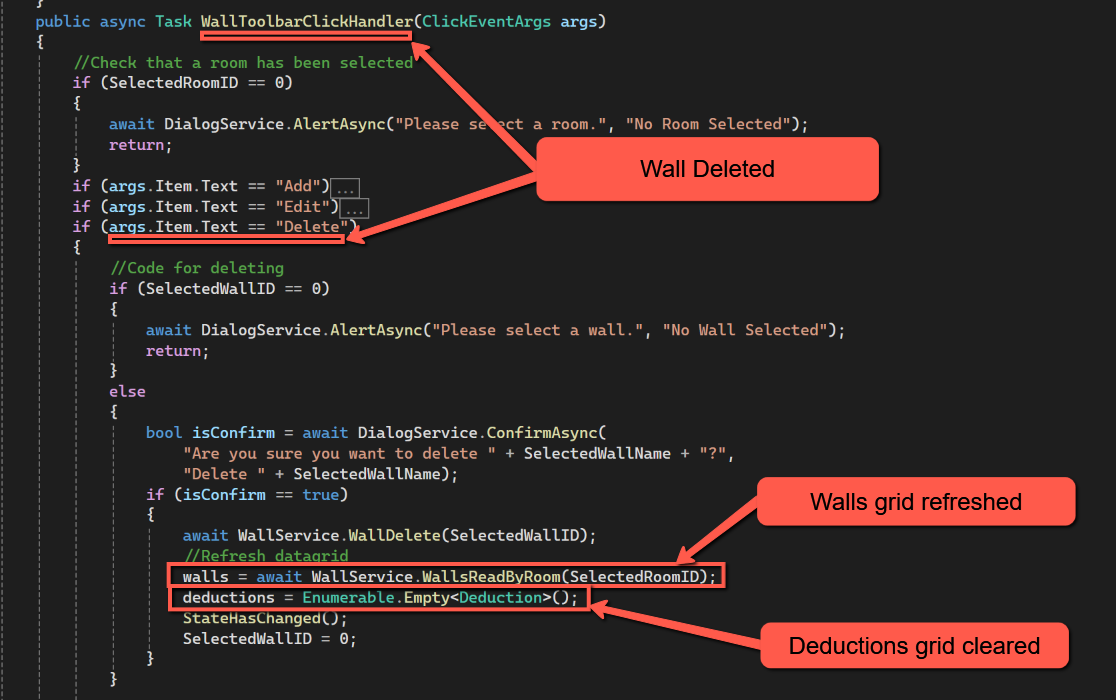


Save all the files and check the system still operates and that the behaviour is as expected.
Amending Wall Area Calculation to include Deductions
Whenever a deduction is added, amended or deleted the net area of the associated wall will need to be re-calculated, taking into account the area of all deductions for that wall.
There is also the other situation where the area of a wall will need to be re-calculated taking into account deductions, and that is if an existing wall is edited. (When adding a wall there will obviously be no deductions at the point it is saved, and if deleting a wall all associated deductions will be deleted thanks to the cascading delete on the database.)
We could have separate methods for calculating the net wall area depending on the action being performed (e.g. wall edit or deduction add/edit/delete), but it would be neater if we had just one overall method that could be called in all situations. (Although in hindsight this may have been the wrong decision!)
We'll start by looking at the existing AreaCalculation method. This is currently called by the WallSave method and passes the Wall object (wallAddEdit) to the method, calculating the area of the wall, passing back the wallAddEdit object, updated with the WallSqm, to the WallSave method, allowing the wall to be saved (both for insert and edit) with the area.
Unfortunately this will not work, as it is, for adding, editing and deleting Deductions because the wallAddEdit object is not available to the DeductionsSave method or the Delete option on the DeductionsToobarClickHandler. Instead, for these actions, we have the 'SelectedWallID' available and can use that to get the data for the wall we need.
The strategy we will use for calculating/re-calculating the area of a wall in all cases is:
- Calculate the gross area of the wall
- Get a collection of all deductions for the specific wall and cycle through these calculating the area of each deduction and adding it to a cumulative deduction total for the wall.
- We will then calculate the net area of the wall by calculating the wall area and deducting the total deductions area.
For a new wall there is a slight wrinkle that we can exploit; the WallID is 0 for a new wall until it has been saved, and because it is a new wall there cannot be any deductions, so we can omit that part of the procedure.
Where CalculateArea is called from WallSave the wallAddEdit object is effectively passed back to WallSave with WallSqM updated, ready for the wall to be saved as normal.
Where CalculateArea is called from one of the Deduction events we will need a new service to update the relevant wall record with the updated WallSqM figure. We will call this:
- WallService.WallUpdateArea
Insert the following into the WallService
//WallUpdateArea
public async Task<bool> WallUpdateArea(int WallID, decimal WallSqM)
{
    var parameters = new DynamicParameters();

    parameters.Add("@WallID", WallID, DbType.Int32);
    parameters.Add("@WallSqM", WallSqM, DbType.Decimal);

    sqlCommand = "Update Wall ";
    sqlCommand += "SET WallSqM = @WallSqM ";
    sqlCommand += "WHERE WallID  = @WallID";

    using IDbConnection conn = new SQLiteConnection(_configuration.GetConnectionString(connectionId));
    {
        await conn.ExecuteAsync(sqlCommand, parameters);
    }
    return true;
}
And insert the following line into IWallService
Task<bool> WallUpdateArea(int WallID, decimal WallSqM);Back in Index.razor we need to consider three topics
- Wall Save
- Insert Wall
- Edit Wall
- Deductions Save
- Insert Deduction
- Edit Deduction
- Deduction Delete
- Calculation Area Method
These are all inter-linked and there is no simple starting point, but I have decided to start with CalculateArea.
CalculateArea
The first change to AreaCalculation is to change the parameters being passed to it. For WallSave we have wallAddEdit available, but for Deductions we only have SelectedWallID, so the first change is to change the method name to:
public async Task CalculateArea(Wall wallAddEdit, int SelectedWallID)It will be helpful to distinguish whether the method has been called by WallSave or Deduction Save/Delete. The way I have chosen to accomplish this is to set the SelectedWallID parameter to 0 if the method is called by WallSave. Conversely if the method is called by DeductionSave or Deduction Delete the wallAddEdit object will be empty, but SelectedWallID will ne non-zero.
We'll start by checking to see if the method has been called by DeductionSave; if it has been we need to populate wallAddEdit with the data for the associated wall.
Att the top of the CalculateArea insert the following code:
//If coming from WallSave, wallAddEdit will be populated.
//If coming from Deductions wallAddEdit will be empty (but SelectedWallID will be non-zero),
//so we need to populate wallAddEdit using SelectedWallID

if (SelectedWallID != 0)
{
    wallAddEdit = await WallService.WallReadOne(SelectedWallID);
}
If SelectedWallID is not zero we call a new service called 'WallReadOne' that will get data for the selected wall. Insert the following into WallService:
public async Task<Wall> WallReadOne(Int32 @WallID)
{
    var parameters = new DynamicParameters();
    parameters.Add("@WallID", WallID, DbType.Int32);

    sqlCommand = "Select * from Wall ";
    sqlCommand += "WHERE WallID  = @WallID";

    using IDbConnection conn = new SQLiteConnection(_configuration.GetConnectionString(connectionId));
    {
        wall = await conn.QueryFirstOrDefaultAsync<Wall>(sqlCommand, parameters);
    }
    return wall;
}
This follows the familiar pattern for a service. Add the interface to IWallService by inserting the following (it doesn't matter where).
Task<Wall> WallReadOne(Int32 @WallID);With wallAddEdit populated the can use the existing code to calculate the gross area.
Once we have the gross area we can calculate the total deductions for the wall. Insert the following at the end of the method:
//Calculate Deductions

//Always set Deductions total to 0
decimal wallDeductionTotal = decimal.Zero;

// If a new wall is being inserted wallAddEdit.WallID will be 0 and we can skip deductions
if (wallAddEdit.WallID != 0)
{
    //Get deductions for this Wall
    deductions = await DeductionService.DeductionsReadByWall(wallAddEdit.WallID);

    foreach (var deductionItem in deductions)
    {
        decDeductionWidth = Convert.ToDecimal(deductionItem.DeductionWidth);
        decDeductionHeight = Convert.ToDecimal(deductionItem.DeductionHeight);
        decimal areaDeduction = decimal.Round((decDeductionWidth * decDeductionHeight), 3, MidpointRounding.AwayFromZero) / 1000000;

        wallDeductionTotal = wallDeductionTotal + areaDeduction;
    }

}

wallAddEdit.WallSqM = wallAddEdit.WallSqM - wallDeductionTotal;
In the above we start by initialising a variable called wallDeductionTotal. If a new wall is being added by the WallSave method WallID will be zero and we can skip the deductions calculation, however, in all other cases we get a collection of all deductions for the wall and cycle through them incrementing wallDeductionTotal, finally updating wallAddEdit.WallSqM.
If CalculateArea has been called by WallSave the updated wallAddEdit object will be handed back to the calling method, but if CalculateArea has been called by one of the Deduction events we need to update the Wall record directly at this point. Add the following: (This uses the newly added WallUpdateArea.)
if (SelectedWallID != 0)  //SelectedWall is set to 0 for WallSave
{
    // Otherwise, update wall record with revised calculation
    await WallService.WallUpdateArea(wallAddEdit.WallID, wallAddEdit.WallSqM);
}
The complete code for CalculateArea should be as follows:


WallSave
As we have changed CalculateArea we need to change WallSave to accommodate these changes. In fact it is simply a matter of adding the additional parameter for 'SelectedWallID' which we are setting to 0. Amend the code to call CalculateArea at the top of the method to:
//Run CalculateArea
await CalculateArea(wallAddEdit, 0);
DeductionSave
Unlike with WallSave we cannot place the call to calculate wall area at the top of the DeductionSave, rather we have to wait until the Deduction has been saved. Add this to the DeductionSave method immediately after creating or updating the deduction:
//Always do area calculation
await CalculateArea(wallAddEdit, SelectedWallID);
Once entered the DeductionSave method should look like this:

Delete Deduction
Deductions are deleted using the 'DeductionToolbarClickHandler'; we therefore need to amend the code for 'Delete' to add the following after the 'DeductionDelete':
//Always do area calculation
await CalculateArea(wallAddEdit, SelectedWallID);
Again, the Delete option for Deductions should look like this:

Finally
Save and test!
Resources
Code for this post